


How to use our e-service Excise duty - return
This is a user guide on how to use our e-service Excise duty - return.
Log in to the e-service
Use our e-service Excise duty - return (in Swedish: Punktskatt - deklaration).
How to log in to the e-service
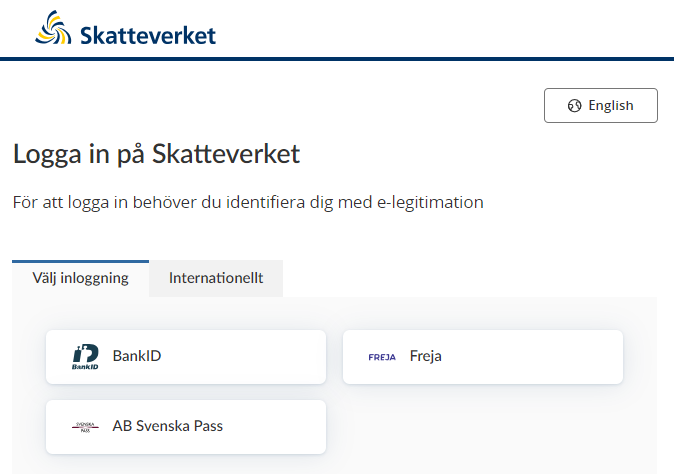
When you have selected the e-service you want to log in to, a login page will open. In the upper part of the view you can change the language to English by clicking the button ”English”. By choosing ”International” you get more alternatives for eIDs you can use to log in to the e-service. Select the login mode that suits you best by clicking it, and then proceed to identify yourself.
Once you have logged in, you select whether you are representing yourself or another party that you are authorised to represent. Only companies that you are authorised to represent will be shown in the list, but please note that authorisation requirements differ between e-services.
Start the e-service
The first view when you enter the e-service displays several parts.

Heading "Punktskatt - Deklaration" (Excise duty – Return)
Here you will see upcoming excise duty returns to file. You can also view and make changes to previously filed returns.
Drop-down menu "Om att deklarera punktskatter" (About filing excise duty returns)
Here you can see current returns that are due to be filed.
You can also opt to move ahead and view receipts for previously filed returns, or make changes to previously filed returns.
How to file a return:
- Fill in the excise duty return form. If you don’t have any excise duty to report, choose that option. You still have to review and submit the return.
- Review and submit the return. If you see something that is incorrect, you can go back and change it. When you are finished, select “Sign and submit”. You have to use your eID to sign your return.
- A receipt for the submitted information will be shown. You can print the receipt or save it.
If you file your return or pay your excise duty after the deadline, you may be liable for a penalty charge and interest.
If you want to add an explanation or additional documentation to the information in the return, please send us an email.
The list "Att göra" (To Do)
The returns you are due to file will be shown in this list. The names and dates shown are specified in the section “Våra skatteslag och aktörer”. If it says “Försenad”, the normal deadline has passed. If you have many returns to file, there may be several pages to click between. Use the buttons below the list to show additional returns.
Button "Skapa en särskild skattedeklaration" (Create a special excise duty return)
On this page you can create a special excise duty return, if you need to submit one. Find out more in the section below with the same name.
Button "Se och ändra tidigare perioder" (View and make changes to previous periods)
View and make changes to previous periods
When you click this button, you will be taken to a new page showing returns you have already submitted to the Swedish Tax Agency. Only returns submitted after this e-service was introduced are shown. Information about the excise duty determined for a specific period is also available.
Managing login errors
Error: Du behöver ändra vem du företräder (You need to specify a different party to represent).
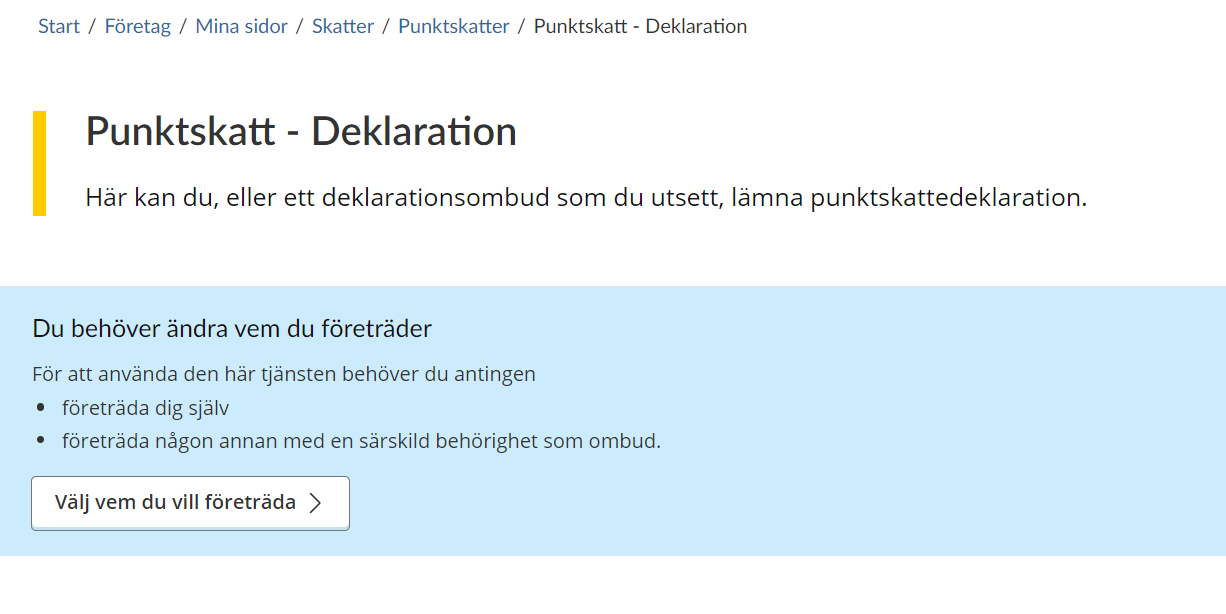
This error occurs when you try to represent a party that you do not have the correct authorisation to represent.
Check that you have selected the right person or business to represent.
Other error messages
If you need help, call our tax information service on 0771 567 567.
Excise duty categories and operators
Spelskatt (Gambling tax)
The view under Gambling tax displays several parts.

Heading "Spelskatt för {{period}}" (Gambling tax for {{period}})
The date in the heading is the period that the return refers to. This can be either one month or one year, depending on the reporting period that applies to you or the party you represent.
Dropdown menu "Om att deklarera spelskatt" (About filing Gambling tax returns)
You report gambling tax here if you have a licence for games requiring a licence. You don’t have to pay gambling tax if you only have a licence for games for public benefit purposes.
You pay gambling tax on the profits from each taxation period, and must include only stakes and payouts relating to Swedish participation in gambling. “Swedish participation” means all gambling occurring in a physical location within Swedish territory. Such locations might typically be casinos, arcades with token gaming machines, and gambling venues on board Swedish and foreign vessels in international traffic but travelling within Sweden’s exclusive economic zone. In other words, as long as gambling is taking place in a physical space within the country’s borders, it does not matter whether the gambler lives in Sweden or is here temporarily.
For taxation of online gambling, the gambler or gamer must live in Sweden or stay here permanently, regardless of where they are when gambling. A permanent stay means an uninterrupted stay of at least six months.
A stake is the total value that the gambler or someone else pays in order for the gambler to be able to participate in a game requiring a licence. It does not matter what this payment is called – it might, for example, include other fees charged for participation in a game. The same applies if a player receives a discount and therefore does not have to pay the entire stake.
A payout is the amount that a gambling business or its representative pays to gamblers by making a deposit in their gambling accounts or similar – either in cash or in other assets. Payouts also include repayments of bets in the event of cancelled games, and bonus payments into gambling accounts. They do not include payments made to other parties than the gambler, such as commissions to rights holders and partners.
More information about gambling tax is available here:
If you have no excise duty to report, you can select that option. You still have to review and submit the return.
Once you are finished, select “Next” to review and submit the return.
If you want to add an explanation or additional documentation to the information in the return, please send us an email.
Options under "Har du skatt att redovisa?" (Do you have excise duty to report?)
Ja (yes) – Select this option to report information for the period.
Nej (No) – Select this option if you have no information to report for the period.
Text field "Periodens sammanlagda insatser" (Total stakes for the period)
Here you state the sum of all taxable stakes placed during the period. The amount must be rounded to whole Swedish kronor.
Text field "Periodens sammanlagda utbetalningar" (Total payouts for the period)
Here you state the sum of all payouts made during the period. The amount must be rounded to whole Swedish kronor.
Calculation "Periodens behållning i kronor" (Profit for the period in SEK)
The service will calculate the difference between the two text fields above. The amount is shown in whole Swedish kronor.
Calculation "Skatt att betala" (Excise duty to pay)
The service will calculate the excise duty you have to pay, based on the current excise duty rate and the amount in the field Periodens behållning i kronor. The amount is shown in whole Swedish kronor.
Button "Nästa" (Next)
Once you have filled in all the information, you click this button in order to proceed to the next step, where you review the information you want to submit.
Button "Rensa formulär" (Clear form)
If you want to delete all the information you have filled in, click this button. You will then be asked to confirm whether you really want to delete all the information.
Button "Avbryt och släng" (Cancel and delete)
Click this button if you want to cancel the submission. If you have filled in any information, you will be asked to confirm whether you really want to start again.
Skatt på kemikalier i viss elektronik (Excise duty on chemicals in certain electronic goods)
The view under Excise duty on chemicals in certain electronic goods displays several parts.
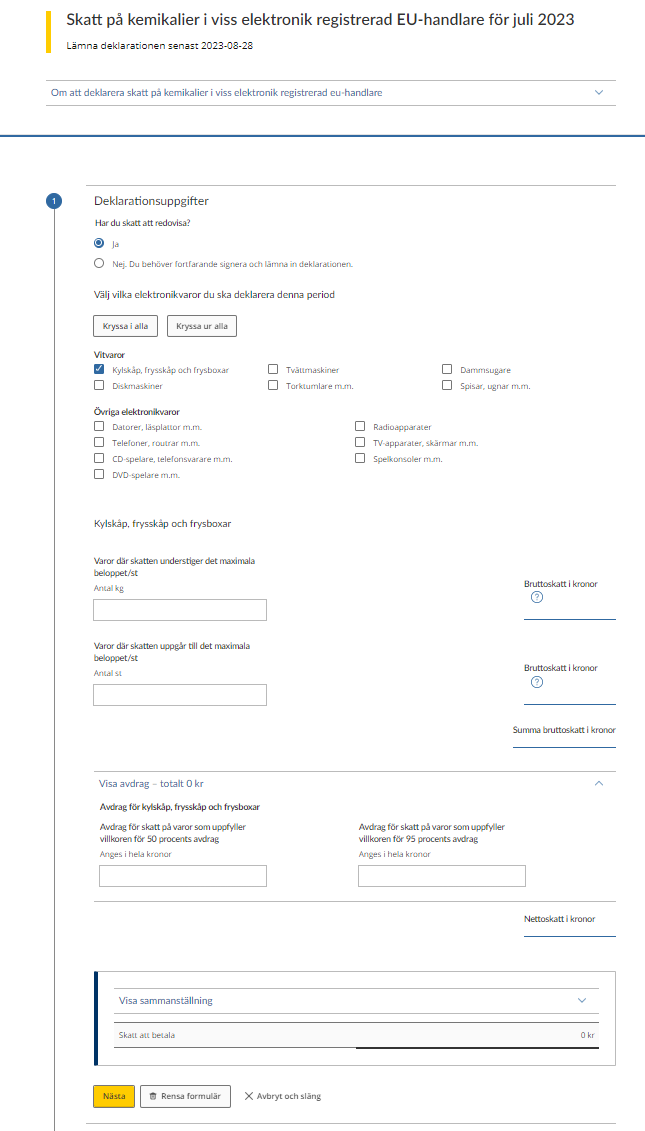
Heading "Skatt på kemikalier i viss elektronik {{aktör}} för {{period}}" (Excise duty on chemicals in certain electronic goods {{operator}} for {{period}})
The “operator” in the heading is the type of operator the return is for, and which you or the party you represent are registered as.
The date in the heading is the period that the return refers to. This can be either one month or one year, depending on the applicable reporting period for you or the party you represent.
Dropdown menu "Om att deklarera Skatt på kemikalier i viss elektronik {{aktör}}" (About Excise duty on chemicals in certain electronic goods)
Here you report the goods for which excise duty liability has come into effect during the period.
More information about excise duty on chemicals in certain electronic goods is available on the webbpage about excise duty on chemicals in certain electronic goods. There you can find information about goods subject to excise duty, how excise duty is calculated, current rates and maximum amounts per good and about deductions.
Note that net weight is specified without packaging, in kilogrammes (kg) to three decimal places and that deductions are reported rounded to the nearest whole Swedish krona.
If you have no excise duty to report, you can select that option. You still have to review and submit the return.
Once you are finished, select “Next” to review and submit the return.
If you want to add an explanation or additional documentation to the information in the return, do so in an email to the Swedish Tax Agency.
Option "Har du skatt att redovisa?" (Do you have excise duty to report?)
Ja (yes) – Select this option to report information for the period.
Nej (No) – Select this option when you have no information to report for the period.
Option "Välj vilka elektronikvaror du ska deklarera för denna period" (Select which electronic goods to report for this period)
Here you tick which categories you are going to file a return for. The categories are as follows:
Vitvaror (White goods)
- Kylskåp, frysskåp och frysboxar (Refrigerators, cabinet freezers and chest freezers)
- Diskmaskiner (Dishwashers)
- Tvättmaskiner (Washing machines)
- Torktumlare m.m. (Tumble dryers, etc.)
- Dammsugare (Vacuum cleaners)
- Spisar, ugnar m.m. (Cookers, ovens, etc.)
Övriga elektronikvaror (Other electronic goods)
- Datorer, läsplattor m.m. (Computers, tablets, etc.)
- Telefoner, routrar m.m. (Telephones, routers, etc.)
- CD-spelare, telefonsvarare m.m. (CD players, telephone answering machines, etc.)
- DVD-spelare m.m. (DVD players, etc.)
- Radioapparater (Radios)
- TV-apparater, skärmar m.m. (TVs, monitors, etc.)
- Spelkonsoler m.m. (Gaming consoles, etc.)
For each selection you make, the fields below will be created for that category:
- Varor där skatten understiger det maximala beloppet/st (Goods for which excise duty is less than the maximum amount/item)
- Varor där skatten uppgår till det maximala beloppet/st (Goods for which excise duty reaches the maximum amount/item)
- Visa avdrag – totalt kr (Show deductions – SEK total)
- Avdrag för skatt på varor som uppfyller villkoren för 50 procents avdrag (Deductions for excise duty on goods that fulfil the conditions for a 50% deduction)
- Avdrag för skatt på varor som uppfyller villkoren för 95 procents avdrag (Deductions for excise duty on goods that fulfil the conditions for a 95% deduction)
Text field "Varor där skatten understiger det maximala beloppet/st" (Goods for which excise duty is less than the maximum amount/item)
Here you have to state the total weight for the period of goods for which excise duty is less than the maximum amount. The weight must be specified in kg and up to three decimal places – e.g. 25.352 kg.
Calculation "Bruttoskatt i kronor" (Gross excise duty in SEK)
The service will calculate the gross excise duty based on the weight you specify. The amount is rounded to the nearest whole Swedish krona.
Text field "Varor där skatten uppgår till det maximala beloppet/st" (Goods for which excise duty reaches the maximum amount/item)
Here you have to state the number of goods for which the excise duty reaches or exceeds the maximum amount.
Calculation "Bruttoskatt i kronor" (Gross excise duty in SEK)
The service will calculate the gross excise duty based on the number of goods you state. The amount is rounded to the nearest whole Swedish krona.
Calculation "Summa bruttoskatt i kronor" (Total gross excise duty in SEK)
The service will calculate the total gross excise duty before any deductions. The amount is rounded to the whole Swedish krona.
Text field "Visa avdrag – totalt {{avdragsbelopp}} kr" (Show deductions - total {{deduction amount}})
Click here if you have any deductions to make. The heading will show the sum of all the deductions you filled in.
Text field "Avdrag för skatt på varor som uppfyller villkoren för 50 procents avdrag" (Deductions for excise duty on goods that fulfil the conditions for a 50% deduction)
Here you state the sum of your requested deductions for goods that fulfil the requirements for a 50% deduction.
Text field "Avdrag för skatt på varor som uppfyller villkoren för 95 procents avdrag" (Deductions for excise duty on goods that fulfil the conditions for a 95% deduction)
Here you state the sum of your requested deductions for goods that fulfil the requirements for a 95% deduction.
Calculation "Nettoskatt i kronor" (Net excise duty in SEK)
The service will calculate the total net excise duty in SEK after you have specified any deductions.
Calculation ”Skatt att betala” (Excise duty to pay)
The service will calculate the total excise duty you have to pay based on the current rates and the amounts in the fields ”Nettoskatt i kronor”. The total sum is rounded to the nearest whole Swedish krona.
Button "Nästa" (Next)
Once you have filled in all the information, you click this button in order to proceed to the next step, where you review the information you want to submit.
Button "Rensa formulär" (Clear form)
If you want to delete all the information you have filled in, click this button. You will then be asked whether you really want to delete all the information.
Button "Avbryt och släng" (Cancel and discard)
Use this button if you want to cancel the submission. If you have filled in any information you will be asked whether you really want to start again.
Flygskatt (Excise duty on air travel)
The view under Excise duty on air travel displays several parts.
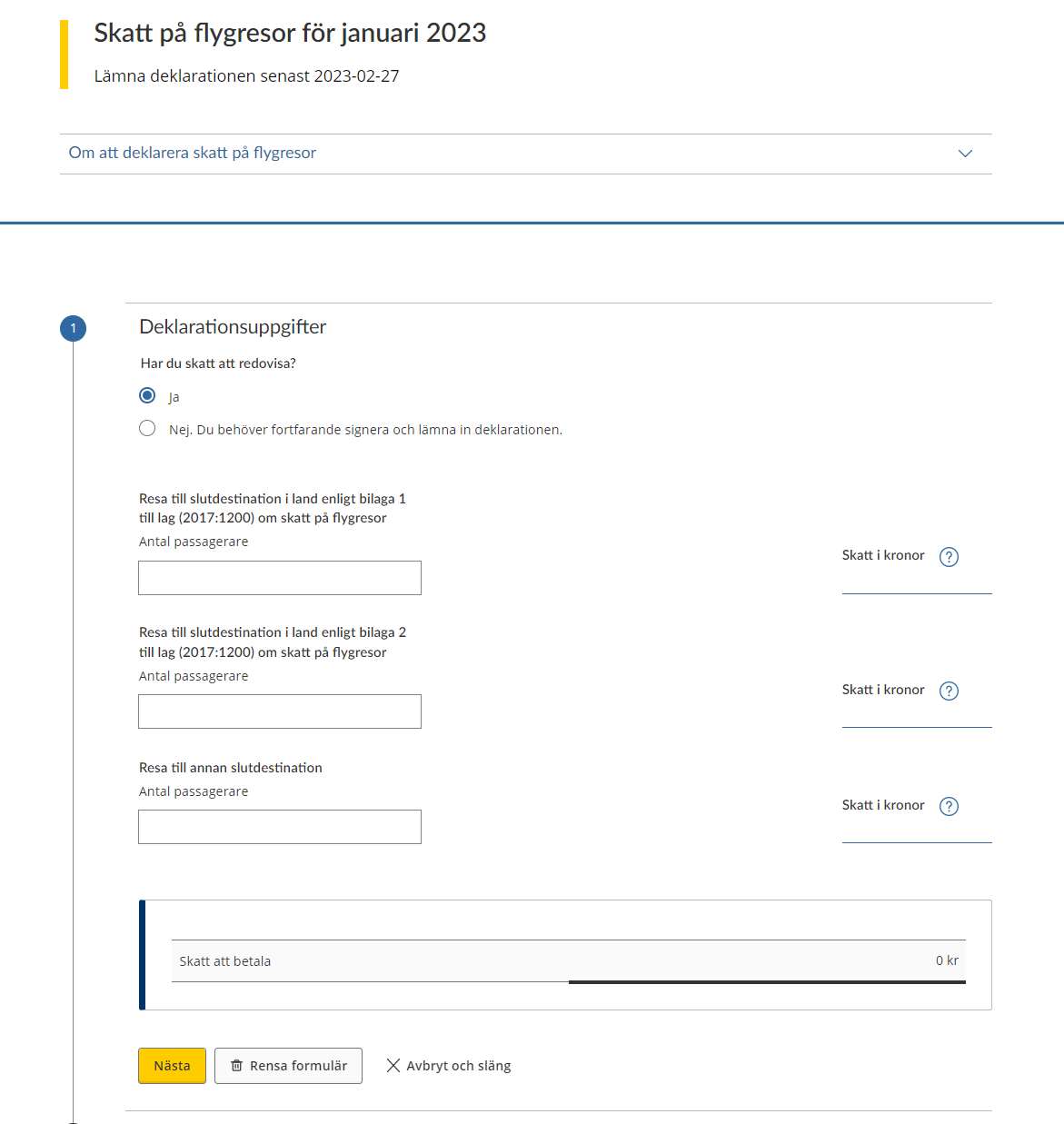
Heading "Flygskatt för {{period}}" (Excise duty on air travel for period)
The deadline for submitting the declaration to the Swedish Tax Agency is specified here.
The accounting period to which the declaration refers is specified here.
Dropdown menu "Om att deklarera flygskatt" (About Excise duty on air travel)
Who is to pay tax on air travel?
You are to pay tax on air travel if you are an air carrier providing flights from Swedish airports on aircraft approved for more than ten passengers. An air carrier is a private individual or legal entity with a valid operating licence or similar permit to offer commercial air service. The organisation that is responsible for the government airlines is also regarded as an air carrier. The tax on air travel is on both domestic and international flights.
You pay the tax per passenger. The tax rate is based on the final destination.
Exemptions from tax on air travel
You do not pay tax on air travel for the following categories of passengers:
- children younger than 2
- those who fail to reach their final destination due to technical difficulties, weather conditions or other unforeseen events such that they must depart a second time
- flight crew who fly the aircraft, perform technical surveillance, maintenance or repair, provide services or take charge of passenger safety
- those who land at a Swedish airport and continue on the same aircraft as stipulated by travel documents
- those who land at a Swedish airport and connect to another aircraft that departs within 24 hours as stipulated by travel documents
File a return even if you don’t owe any tax for the period.
Once you are finished, select “Next” to review and submit the return.
If you want to add an explanation or additional documentation to the information in the return, do so in an email to the Swedish Tax Agency.
Option "Har du skatt att redovisa?" (Do you have excise duty to report?)
Ja (yes) – Select this option to report information for the period
Nej (No) – Select this option when you have no information to report for the period
Text field "Resa till slutdestination i land enligt bilaga 1 till lag (2017:1200) om skatt på flygresor"
Travel to a final destination in a country as specified in Annexe 1 of “Lag (2017:1200) om skatt på flygresor” (“the Air Travel Taxation Act”)
State here the total number of passengers who travelled as specified in Annexe 1 during the period.
Calculation "Skatt i kronor" (Excise duty in SEK)
The service will calculate the excise duty based on the number of passengers you specified for travel in accordance with Anneex 1.
Text field "Resa till slutdestination i land enligt bilaga 2 till lag (2017:1200) om skatt på flygresor" (Travel to a final destination in a country as specified in Annexe 2 of “Lag (2017:1200) om skatt på flygresor” - “the Air Travel Taxation Act”)
State here the total number of passengers who travelled as specified in Annexe 2 during the period.
Calculation "Skatt i kronor" (Excise duty in SEK)
The service will calculate the excise duty based on the number of passengers you specified for travel in accordance with Annexe 2.
Text field "Resa till annan slutdestination" (Travel to another final destination)
State here the total number of passengers who travelled to another final destination during the period.
Calculation "Skatt i kronor" (Excise duty in SEK)
The service will calculate the excise duty based on the number of passengers you specified as having another final destination.
Calculation”Skatt att betala” (Excise duty to pay)
The service will calculate the total excise duty you have to pay based on the amounts in the fields “Skatt i kronor”. The total sum is rounded to the nearest whole Swedish krona.
Button "Nästa" (Next)
Once you have filled in all the information, you click this button in order to proceed to the next step, where you review the information you want to submit.
Button "Rensa formulär" (Clear form)
If you want to delete all the information you have filled in, click this button. You will then be asked whether you really want to delete all the information.
Button "Avbryt och släng" (Cancel and discard)
Use this button if you want to cancel the submission. If you have filled in any information, you will then be asked whether you really want to start again.
Granska (Review)
In this step you have to review the information provided in earlier steps to ensure it is correct. The information you provided is in the section “Excise duty categories and operators”.
You will be shown the information you will be submitting to the Swedish Tax Agency. You can still alter it by clicking the pencil icon at the top of the page, or the button “Ändra uppgifter” (change information) at the bottom of the page.
Heading "Deklarationsuppgifter" (Information in the return)
Information "Inlämnad av" (Submitted by)
Your name is shown here.
Information "Företagsnamn" (Company name)
Your company name or the name of the company you are representing, i.e. the business that the return concerns.
Information "Redovisningsperiod" (Reporting period)
The period that the return covers.
Information "Person-/Organisationsnummer" (Personal/corporate identity number)
The personal or corporate identity number of the operator that the return concerns.
Checkbox "Jag har granskat att uppgifterna stämmer och intygar att lämnade uppgifter är korrekta" (I have reviewed the information and certify that it is correct)
Once you have checked that the information you want to submit is included in the summary, click the box to tick it.
Button "Skriv under och lämna in" (Sign and submit)
You must have reviewed the information and ticked the box above, otherwise this button will not let you proceed to the next step.
Button "Ändra uppgifter" (Edit information)
Click here if you need to make any changes to the information before you submit it.
Signera (Sign)
Follow the instructions for your eID app to sign the information. You are signing for the information that was shown in the “Review” step.
Kvittens (Receipt)
Once you have signed, a receipt will be shown. The information shown on it is that which you provided in the earlier steps and reviewed in the “Review” step. The receipt shows the information that has been submitted to the Swedish Tax Agency.
Button "Spara pdf" (Save the receipt)
Use this button to save the receipt.
Button "Skriv ut" (Print)
Click this button if you want to print out your receipt.
Button "Tillbaka till startsidan" (Back to the start page)
This button takes you back to the e-service’s start page.
Skapa en särskild skattedeklaration (Create a special excise duty return)
On this page you can create a special excise duty return. You have to fill in all the fields in order to be able to create a special excise duty return.
Once all the fields have been filled in, you can click the button “Till deklarationen” to be taken to the excise duty return form. The return will contain the information described in the section “Excise duty categories and operators”.
Drop-down menu "Om att lämna en särskild skattedeklaration" (About submitting a special excise duty return)
Here you can create and submit a special excise duty return.
If you are reporting excise duty for an event or situation, you first have to create a return.
- Select the excise duty for the return you want to create.
- Select the situation that requires a return.
- Select a date for the situation.
- Select “Create”.
The special excise duty return will be created, after which you submit it in three steps:
- Fill in the return.
- Review and submit the return. If you see something that is incorrect, you can go back and change it. When you are finished you sign and submit the return. Use your eID to sign the return.
- A receipt for the information submitted will be shown. You can print out this receipt or save it to your computer.
If you file your return late, or if you pay late, you may be liable for a penalty charge and interest.
If you want to add an explanation or additional documentation to the information in the return, do so in an email to the Swedish Tax Agency.
Selection "För vilken skatt vill du lämna en särskild skattedeklaration" (For which excise duty do you want to submit a special excise duty return?)
Here you select which excise duty you are going to submit a special excise duty return for. All categories of excise duty will not be included in the list.
Contents of the list:
- Skatt på kemikalier i viss elektronik – Excise duty on chemicals in certain electronic goods
Selection "Vilken situation gör att du ska lämna deklarationen" (Which is the situation requiring you to submit the return?)
Here you select why you have to submit a special excise duty return.
Contents of the list for the selection Skatt på kemikalier i viss elektronik – Excise duty on chemicals in certain electronic goods:
- Jag har fört in elektronikvaror från ett annat EU-land (I have imported electronic goods from another EU country)
- Jag har tillverkat elektronikvaror (I have manufactured electronic goods)
Input field "Datum för deklarationen du deklarerar för" (Date of the return you are filing)
State the date of the return. The date can be selected from the dropdown calendar or be typed YYYY-MM-DD.
Se och ändra tidigare perioder (View and change earlier periods)
If you have previously submitted returns using this e-service, you can view those returns here.
Click the return you want to see more information about. You will be able to see receipts sent and excise duty determined for the period.
If you need to change information previously submitted, you can submit new information in its place.
There are two lists. One is a list of excise duty returns and the other a list of special excise duty returns.
Skattedeklarationer (Excise duty returns)
Column "Skatteslag" (Excise duty category)
The excise duty category that the return is for. To see what duties and operators there are, see the section “Excise duty categories and operators”.
Column "Period" (Period)
This column shows the period that the return is for. This can be a month, a quarter or a year.
Särskilda skattedeklarationer (Special excise duty returns)
Column "Skatteslag" (Excise duty category)
The excise duty category that the return is for.
Column "Period" (Period)
This column shows the date that the return is for.
Column "Löpnummer" (Serial number)
A unique serial number, as there may be several special excise duty returns for the same date.
An earlier period
Once you have selected which period you want to see more information about, a page is shown which has three sections.
If an orange information box with the heading Ni har blivit skönsbeskattade is shown, the return for that period has not been received by the Swedish Tax Agency – click the button “Lämna in deklarationen” to be taken to the return form. See directions for how to submit the return in the section “Excise duty categories and operators”.
If the Swedish Tax Agency has not yet made a decision regarding the period, you will see the text Det finns inget beslut att visa för den här perioden ännu.
Beslutad skatt (Excise duty determined)
This section shows information about the excise duty determined by the Swedish Tax Agency for the period.
The information on the left is as follows:
Information "Företagsnamn" (Company name)
Your company name or the name of the company you are representing is shown here.
Information "Person-/Organisationsnummer" (Personal/corporate identity number)
The personal or corporate identity number of operator that the decision concerns is shown here.
Information"Datum" (Date)
The date shown is that of the Swedish Tax Agency’s most recent decision. The information shown is from that decision.
Information"Status" (Status)
There are several different possibilities for status:
- Beslutad (Decision reached)
- Skönsbeskattad (Discretionary taxation applied)
The information presented on the right will depend on the excise duty category that the return is for.
See more information in the section “Excise duty categories and operators”.
Not all decisions will include the information below.
Information"Skattetillägg" (Surcharge)
If the Swedish Tax Agency has determined that a surcharge is to be levied, a sum will be shown here.
Information"Förseningsavgift" (Penalty charge)
If the Swedish Tax Agency has determined that a penalty charge is to be levied, a sum will be shown here.
Information"Totalt beslutat" (Total determined)
The total amount for the period, which has been or will be deducted from your tax account, is shown here.
Kvittens (Receipt)
Receipts for the information submitted via the e-service are shown here. From the dropdown menu you can select the receipt you want to see, if you have submitted information on several occasions for this period.
An explanation of the contents of the receipt is available in the section “Excise duty categories and operators”.
Button "Ändra" (Change)
This button allows you to submit new information on the return form. You can see which information can be submitted in the section “Excise duty categories and operators”.
The information you submit may lead to a review. When you have signed and submitted the information, it will be sent to the Swedish Tax Agency and you will see a receipt.
The information shown on the form is the most recent information submitted via this e-service.