How to use our e-service Property tax return, rental apartment blocks
This is a guide on how to use the e-service Property tax return, rental apartment blocks.
Log in to the e-service
1. How to log in to the e-service
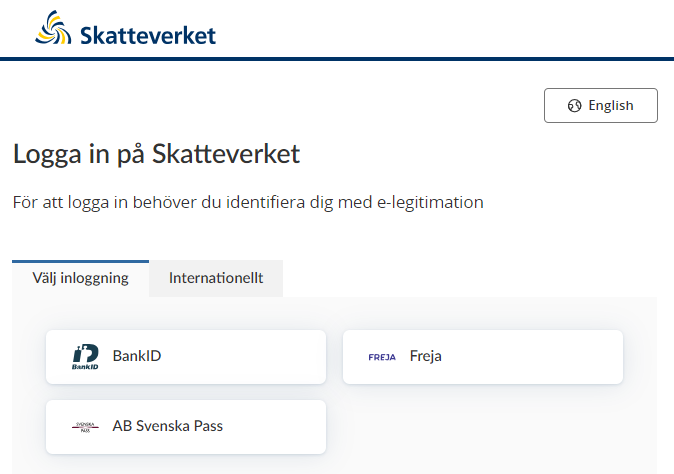
When you have selected the e-service you want to log in to, a login page will open. In the upper part of the view you can change the language to English by clicking the button ”English”. By choosing ”International” you get more alternatives for eIDs you can use to log in to the e-service. Select the login mode that suits you best by clicking it, and then proceed to identify yourself.
2. Ownership and tax assessment units
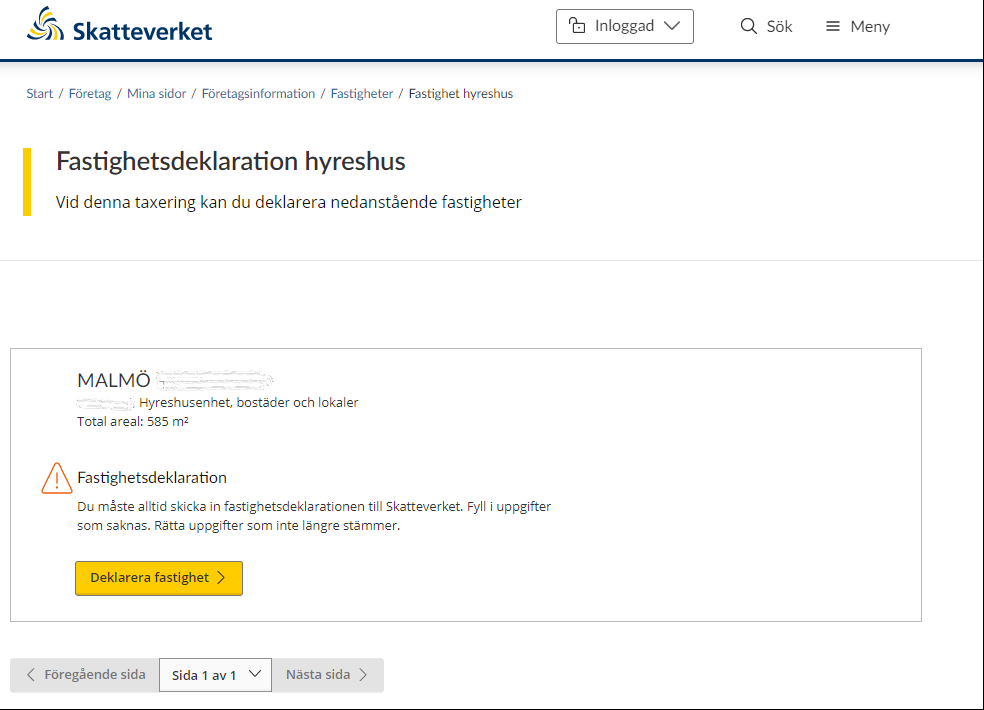
When you have logged in to the e-service, the first page opens and shows you the properties you have to declare for your current property tax assessment.
Each tax assessment unit that must be declared is individually marked in its own box. Details of the tax assessment unit’s property designation, assessment unit number, property type and total area are stated at the top of the box.
If you as the property owner have received a draft of the property’s new assessed value, you have to check that the details are correct. If all the details in the draft are correct, you don’t need to submit anything to the Swedish Tax Agency; your silent approval of the draft is sufficient.
However, if you need to change any of the prefilled details, you must provide the Swedish Tax Agency with the relevant details.
If you as the property owner have received a property tax return, you need to provide the Swedish Tax Agency with information about your property, and submit the tax return to us.
“File property tax return” button – This is the button you click in order to change the details in the draft of the property’s new assessed value you have been sent, or to file a tax return for your property. To proceed with providing information about your property, click the button marked “Deklarera fastighet” (“File property tax return”).
You will be directed to various pages within the e-service, depending on which information you need to provide.
If you wish to move between different pages in the e-service, click the button marked “Nästa sida” (“Next page”) to move forward, or the button marked “Föregående sida” (“Previous page”) to go back.
Pagination is used so that a certain number of properties are shown on each page. You can therefore use the drop-down menu on the button marked “Sida x av x” (“Page x of x”) if you want to go straight to a specific page.
3. File property tax return
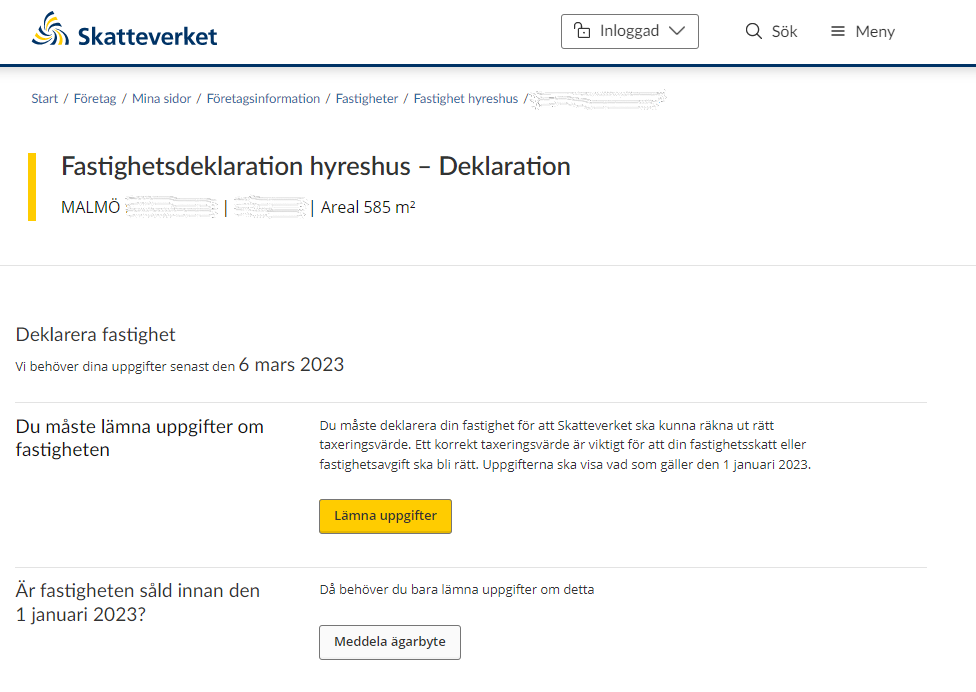
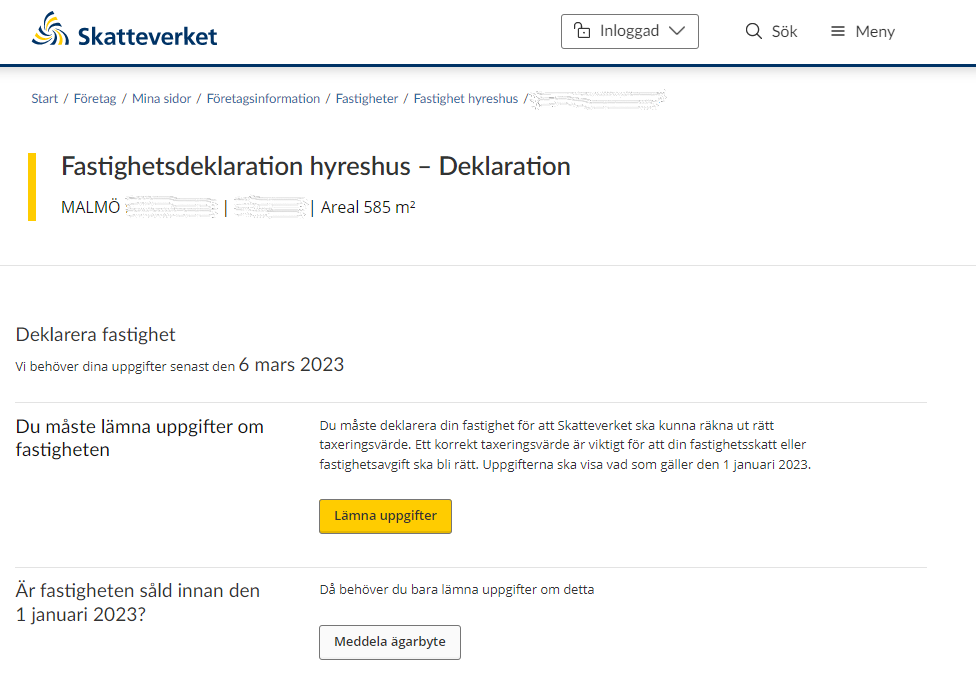
If you have chosen to file a property tax return for a tax assessment unit, you will be directed to the next page in the e-service. Here, you will be informed that you need to submit information to us before the submission deadline.
You need to submit information about the property in order for the Swedish Tax Agency to be able to calculate its correct assessed value. You do this by clicking on the button “Lämna uppgifter” (“Submit information”).
If the property was sold before 1 January the year of assessment, you just need to notify the Swedish Tax Agency of the change of ownership. You do this by clicking on the button “Meddela ägarbyte” (“Submit change of ownership notification”). (See section 3.7)
3.1. Overview of valuation units
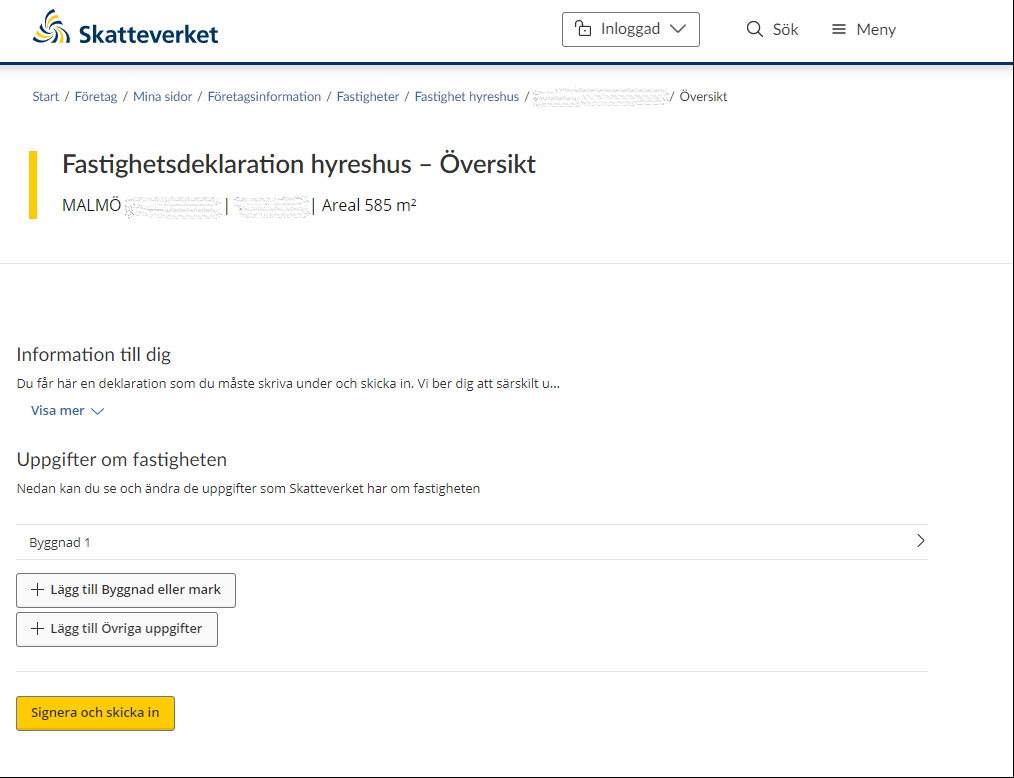
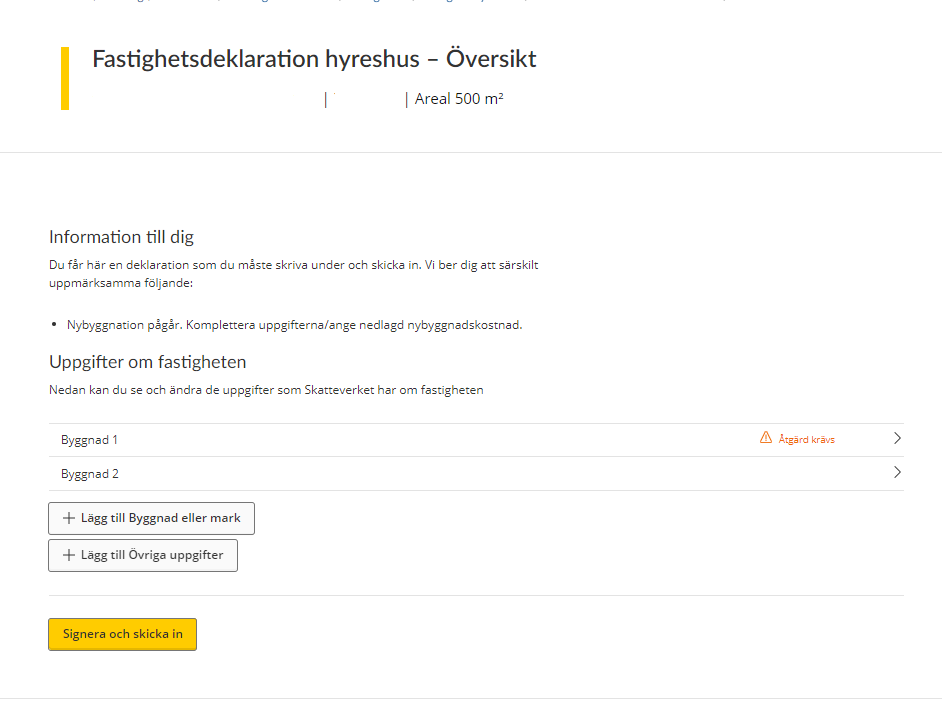
If you have chosen to provide us with information about a tax assessment unit, you will be directed to page that provides an overview of all your land and buildings. If you click on a plot of land or a building, a page will open up, showing you all the information that the Swedish Tax Agency has about that value unit for taxation.
If the list does not include all value units for taxation, you can add a value unit yourself by clicking on the button “Lägg till Byggnad eller mark” (“Add building or plot of land”). (See section 3.3).
If you want to submit a piece of information to the Swedish Tax Agency, you can click on the button marked “Lägg till Övriga uppgifter” (“Add further details”). You will then be directed to a free text field where you can enter the relevant details. (See section 3.6)
3.2 Submit information
3.2.1. Building unit under construction
If you are going to submit information, you will be shown a form. This form specifies all the information the Swedish Tax Agency needs to know about your building unit.
The building in question appears at the top of the form (according to the numbering system), and there is also the option of removing this building by clicking on the wastebasket icon that says “Remove building”. (See section 3.4)
On the rest of the form you must/can provide information about the following:
Building unit
Note that information marked * is required.
- On 1 January 2023 (the year is just for example, each Property tax return states your correct year) the entire building was*
- Under construction
- Completed
If you select the “Under construction” option, you will be asked to fill in the following information:
Expenditure on residences
- Total expenditure for construction, exclusive of VAT* – state the total costs of conversion or new construction, exclusive of VAT. (In SEK thousand, e.g. SEK 123,000 is written “123”)
- Planned area, m2 – state the estimated floor area of the completed building, in square metres.
Expenditure on premises
- Total expenditure for construction, exclusive of VAT* - state the total costs of conversion or new construction, exclusive of VAT. (In SEK thousand, e.g. SEK 123,000 is written “123”)
- Planned area, m2 – state the estimated floor area of the completed premises, in square metres.
At the bottom of the form you can opt to add land plots for residences, in which case you click “+Add Land – construction rights, housing”. (See section 3.3)
If you want to save the information provided, click “Spara”. You will then be taken back to the overview page where all valuation units are listed. (See section 2)
If you click “Save” when an item of information is missing you will see an error message describing what needs to be done before the information can be saved.
If you want to go back to the overview page without saving any information, click the “Tillbaka” button. (See section 2)
3.2.2 Building unit, completed
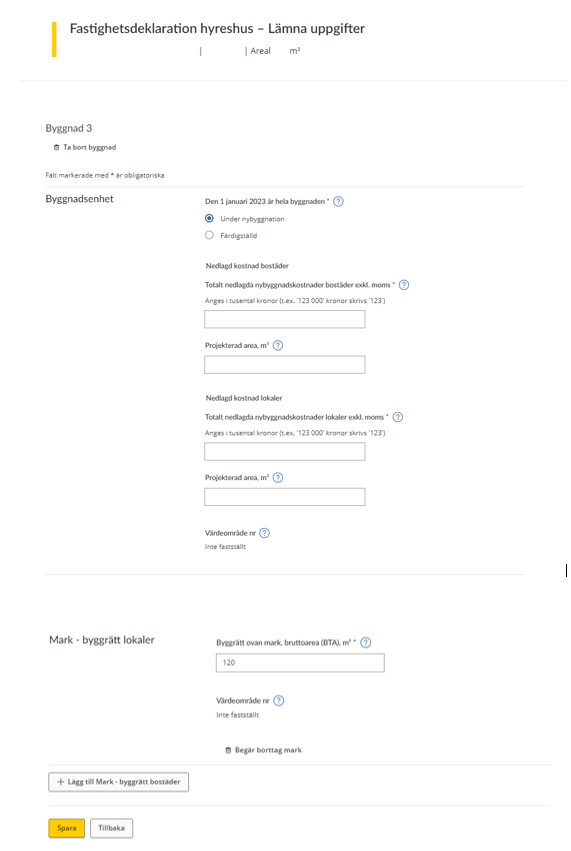
If you are going to provide information, you will be shown a form. This form specifies all the information that the Swedish Tax Agency needs to know about your building unit.
The building in question appears at the top of the form (according to the numbering system), and there is also the option of removing this building by clicking on the wastebasket icon that says “Request removal of building”. (See section 3.4)
On the rest of the form you have to/can provide information about the following:
Note that information marked * is required.
Building unit
Note that information marked * is required.
- On 1 January 2023 (the year is just for example, each Property tax return states your correct year) the entire building was*
- Under construction
- Completed
If you select the “Completed” option, you will be asked to fill in the following information:
- State the year in which the building was completed (year of original construction)
Conversion or extension
- Ready for use in – state the year in which the conversion or extension was ready to be use. Note that you can only register information that applies for the year before the year of assesment.
- Expenditure, excl. VAT – state the total costs of the conversion or extension, exclusive of VAT. (In SEK thousand, e.g. SEK 123,000 is written “123”).
- Value area no. – the value area number will be shown if it has been determined
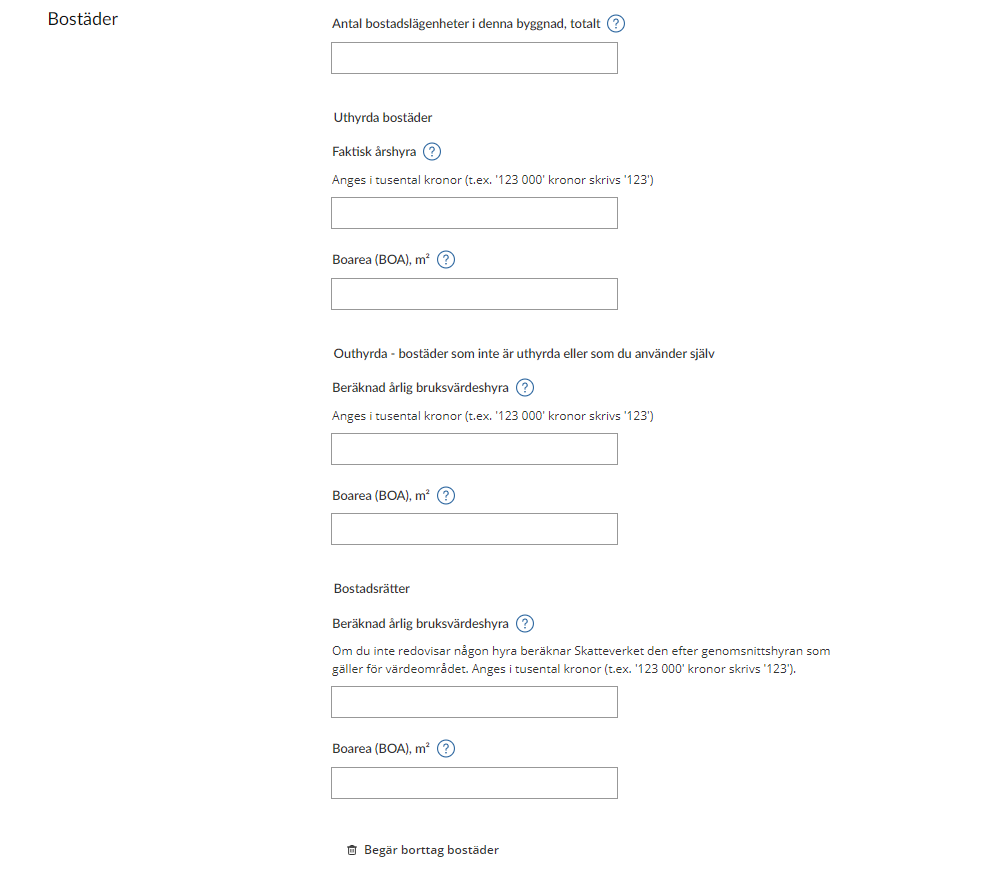
Residences
- State the number of residential apartments in the building in question.
Residences let
- Actual annual rent – state here the total annual rent for the units you let. (In SEK thousand, e.g. SEK 123,000 is written “123”).
- Floor area (“Boarea”, or BOA in Swedish), m2 – state here the total floor area, in square metres, of the residences let at utility value.
Residences not let
- Estimated annual utility value rent – state here the annual rent you would have received if the residences had been let. (In SEK thousand, e.g. SEK 123,000 is written “123”).
- Floor area (“Boarea”, or BOA in Swedish), m2 – state here the total floor area, in square metres, that you are not letting at utility value, but instead using in some other way.
Tenant-owner residences
- Estimated annual utility value rent – state here the estimated annual rent for tenant-owner residences.
- Floor area (Boarea, or BOA in Swedish), m2 – state here the total floor area, in square metres, of the tenant-owner residences.
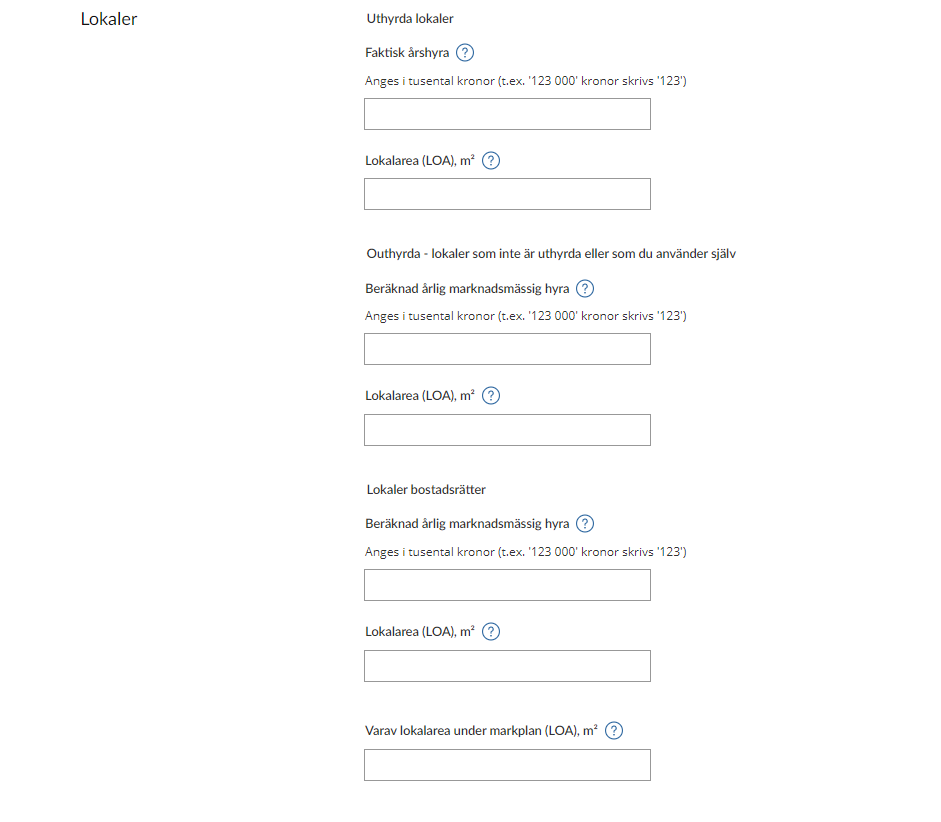
Commercial premises
Premises let
- Actual annual rent – state here the total annual rent for the premises you let. (In SEK thousand, e.g. SEK 123,000 is written “123”).
- Area of premises (“Lokalarea”, or LOA, in Swedish), m2 – state here the area, in square metres, of the premises let.
Not let – premises which are not let or which you use yourself
- Estimated annual market rent – state here the annual rent you would have received if the premises were let. (In SEK thousand, e.g. SEK 123,000 is written “123”)
- Area of premises (“Lokalarea”, or LOA, in Swedish), m2 – state here the area, in square metres, of the premises not let.
Tenant-owner premises
- Estimated annual market rent – state here the estimated market rent for premises the association leases under a tenant-owner scheme. Area of premises (In SEK thousand, e.g. SEK 123,000 is written “123”)
- Area of premises (“Lokalarea”, or LOA, in Swedish), m2 – state here the area, in square metres, of the premises being leased under a tenant-owner scheme.
- Of which area of premises below ground level (LOA), m2 – if you have premises whose area is below ground level, state here how many square metres that area is.
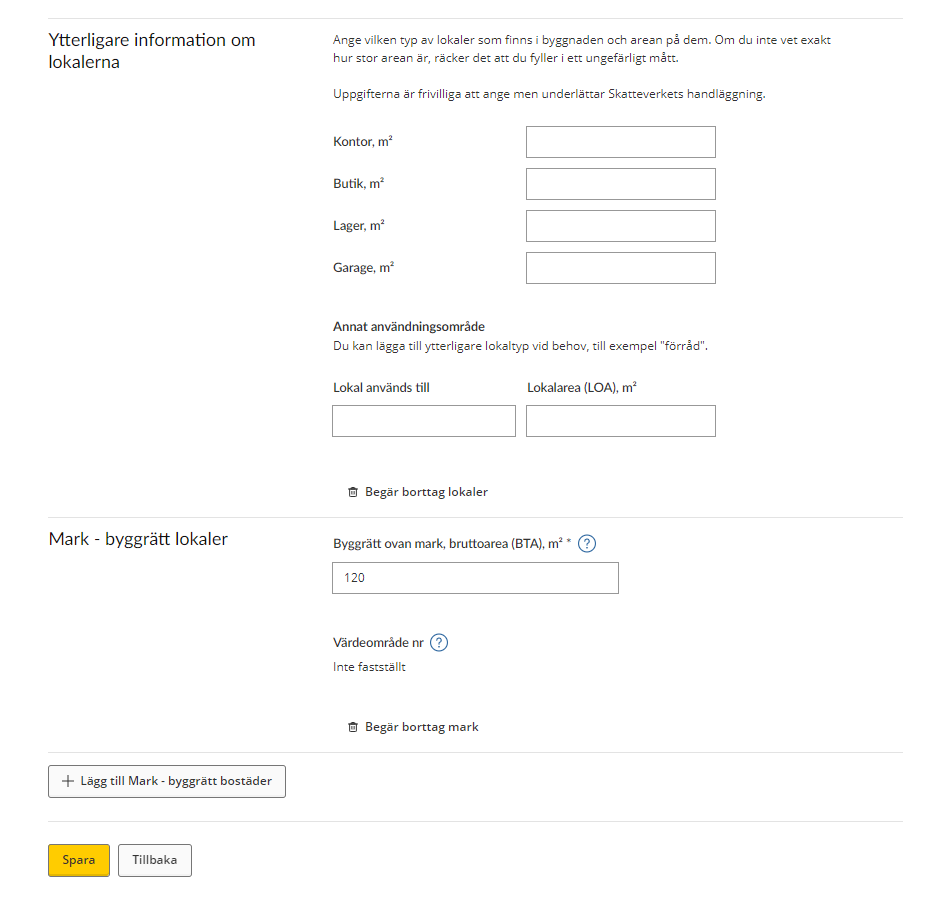
Further information about the premises
In the following section you will be asked to state what type of premises there are in the building and what their areas are, respectively. Approximate figures are sufficient if you don’t have exact information regarding their area.
This information is voluntary, but if you specify it you will facilitate the Swedish Tax Agency’s processing.
- Offices, m2 – state the area in square metres if the premises are offices
- Shops, m2 – state the area in square metres if the premises are shops
- Storage, m2 – state the area in square metres if the premises are storage space
- Garages, m2 – state the area in square metres if the premises are garages
Other use – you can add other types of premises if necessary. - Premises used for – state what the premises are used for
- Area of premises (LOA,) m2 – state the area of the premises in square metres
You also have the option of removing premises, which you do by clicking the wastebasket icon.
Land – construction rights, premises
- Construction rights above ground, gross area (“bruttoarea”, or BTA, in Swedish), m2 – state here the gross area, in square metres, of the construction rights
- Value area no. – the value area number will be shown if it has been determined
Note that information marked * is required.
At the bottom of the form you can opt to add land with construction rights for residences, in which case you click “+Add Land – construction rights, residences”. (See section 3.3)
If you want to save the information provided, click “Spara”. You will then be taken back to the overview page where all valuation units are listed. (See section 2)
If you save when an item of information is missing, you will see an error message describing what needs to be done before the information can be saved.
If you want to go back to the overview page without saving any information, click the “Tillbaka” button. (See section 2)
3.2.3 Land – construction rights, residences
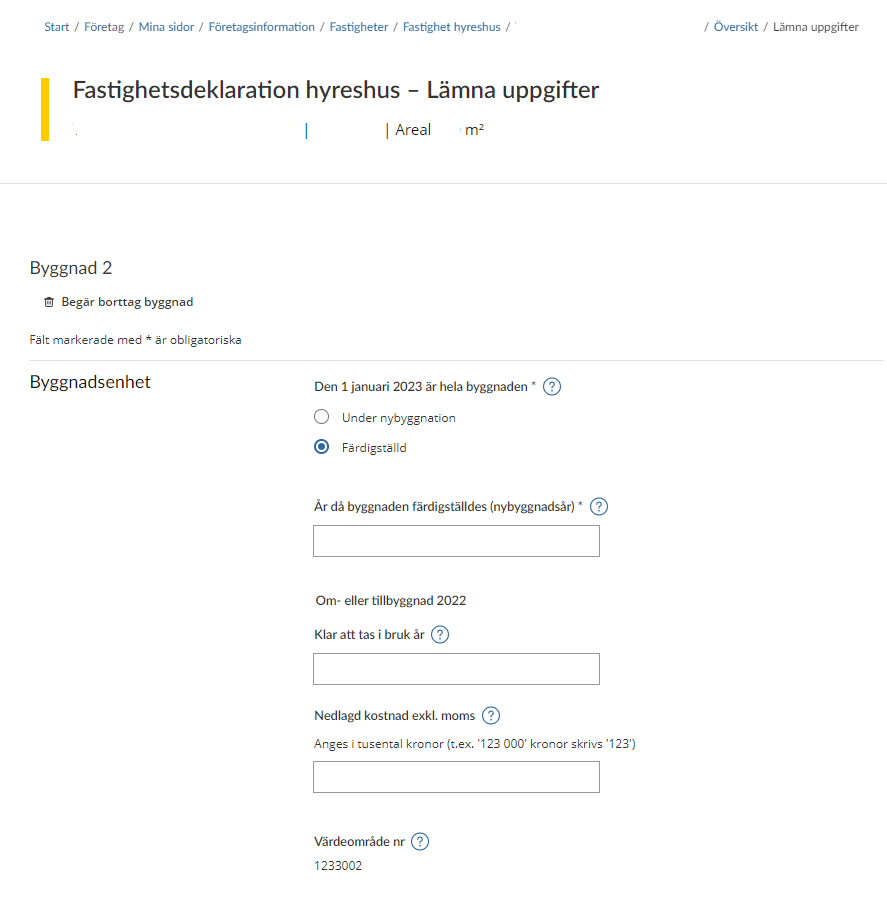
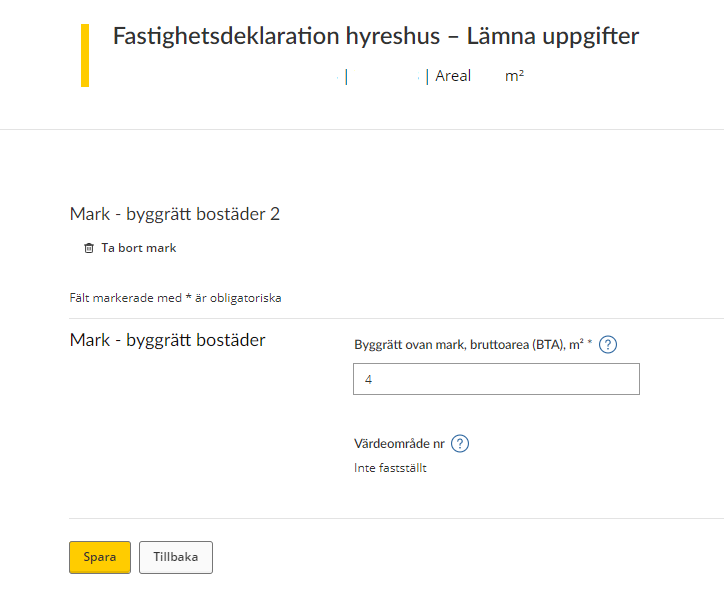
If you are going to provide information about a plot of land with construction rights for residences, you will be shown a form. This form specifies all the information that the Swedish Tax Agency needs to know about your land.
The land in question appears at the top of the form (according to the numbering system), and there is also the option of removing this land by clicking on the wastebasket icon that says “Remove plot of land”. (See section 3.4)
On the rest of the form you have to/can provide information about the following:
Land – construction rights, residences
- Construction rights above ground, gross area (“bruttoarea”, or BTA, in Swedish), m2 – state here the gross area, in square metres, of the construction rights
- Value area no. – the value area number will be shown if it has been determined
If you want to save the information provided, click “Spara”. You will then be taken back to the overview page where all valuation units are listed. (See section 2)
If you save when an item of information is missing you will see an error message describing what needs to be done before the information can be saved.
If you want to go back to the overview page without saving any information, click the “Tillbaka” button. (See section 2)
3.2.4 Land – construction rights, commercial premises
If you are going to provide information about land with construction rights for commercial premises, you will be shown a form. This form specifies all the information that the Swedish Tax Agency needs to know about your land.
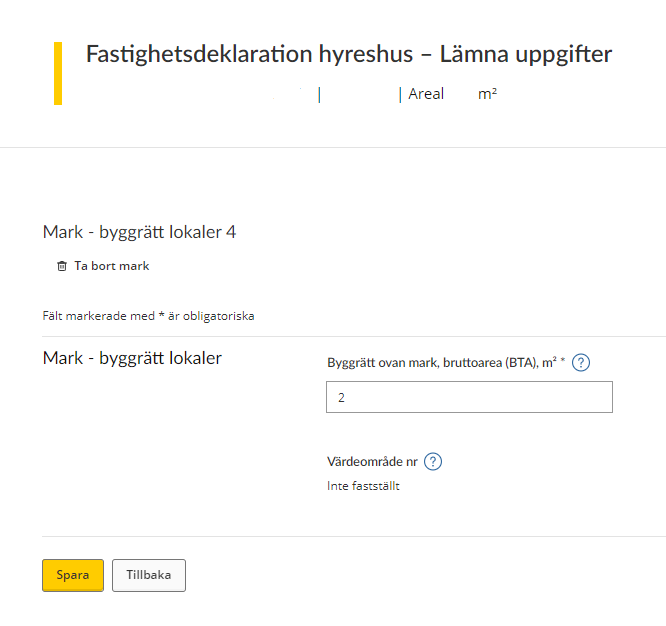
The land in question appears at the top of the form (according to the numbering system), and there is also the option of removing this land by clicking on the wastebasket icon that says “Ta bort mark” (“Remove plot of land”). (See section 3.4)
On the rest of the form you have to/can provide information about the following:
Land – construction rights, premises
- Construction rights above ground, gross area (“bruttoarea”, or BTA, in Swedish), m2 – state here the gross area, in square metres, of the construction rights
- Value area no. – the value area number will be shown if it has been determined
If you want to save the information provided, click “Spara”. You will then be taken back to the overview page where all valuation units are listed. (See section 2)
If you save when an item of information is missing you will see an error message describing what needs to be done before the information can be saved.
If you want to go back to the overview page without saving any information, click the “Tillbaka” button. (See section 2)
3.3 Add a building or land
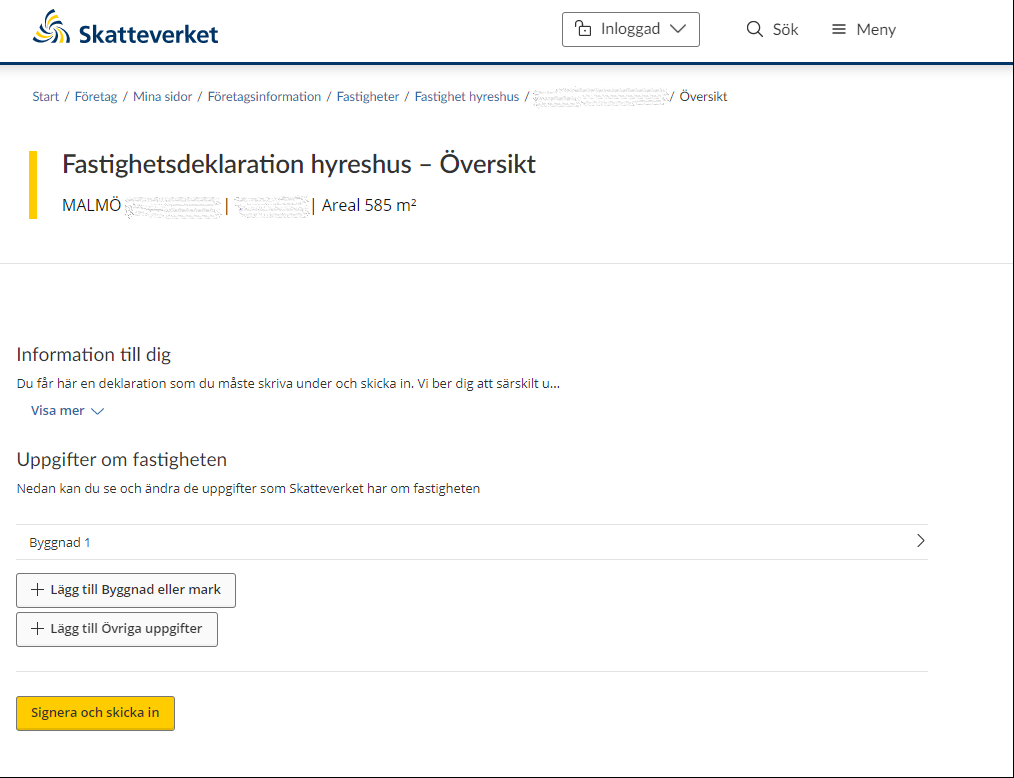
If the list does not include all valuation units you can add a valuation unit yourself by clicking the button “Lägg till Byggnad eller mark” (“Add building or land”).
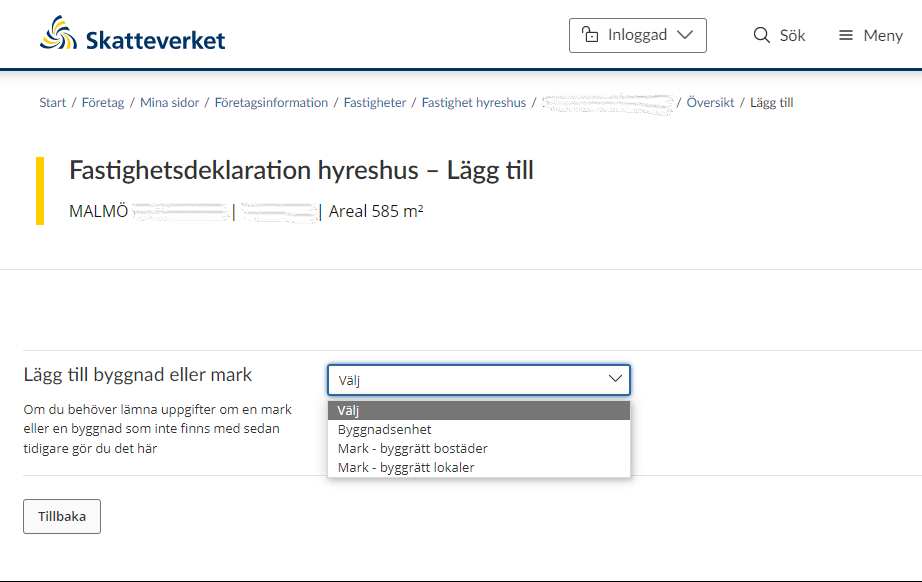
You will then be shown a drop-down menu where you select either “Byggnadsenhet” (“Building unit”), “Mark – byggrätt bostäder” (“Land – construction rights, residences”) or “Mark – byggrätt lokaler” (“Land – construction rights, premises”).
If you opt to add a building unit, you will be shown the form for information about the building unit (See section 3.2.2)
If you instead opt to add “Land – construction rights, residences”, you will be shown the form for information about the land with construction rights for residences (See section 3.2.3)
If you instead opt to add “Land – construction rights, premises”, you will be shown the form for information about the land with construction rights for premises (See section 3.2.4)
If you change your mind and decide not to add another valuation unit, click the “Tillbaka” button to be taken back to the overview page where all valuation units are listed. (See section 2)
3.4 Remove a building or plot of land
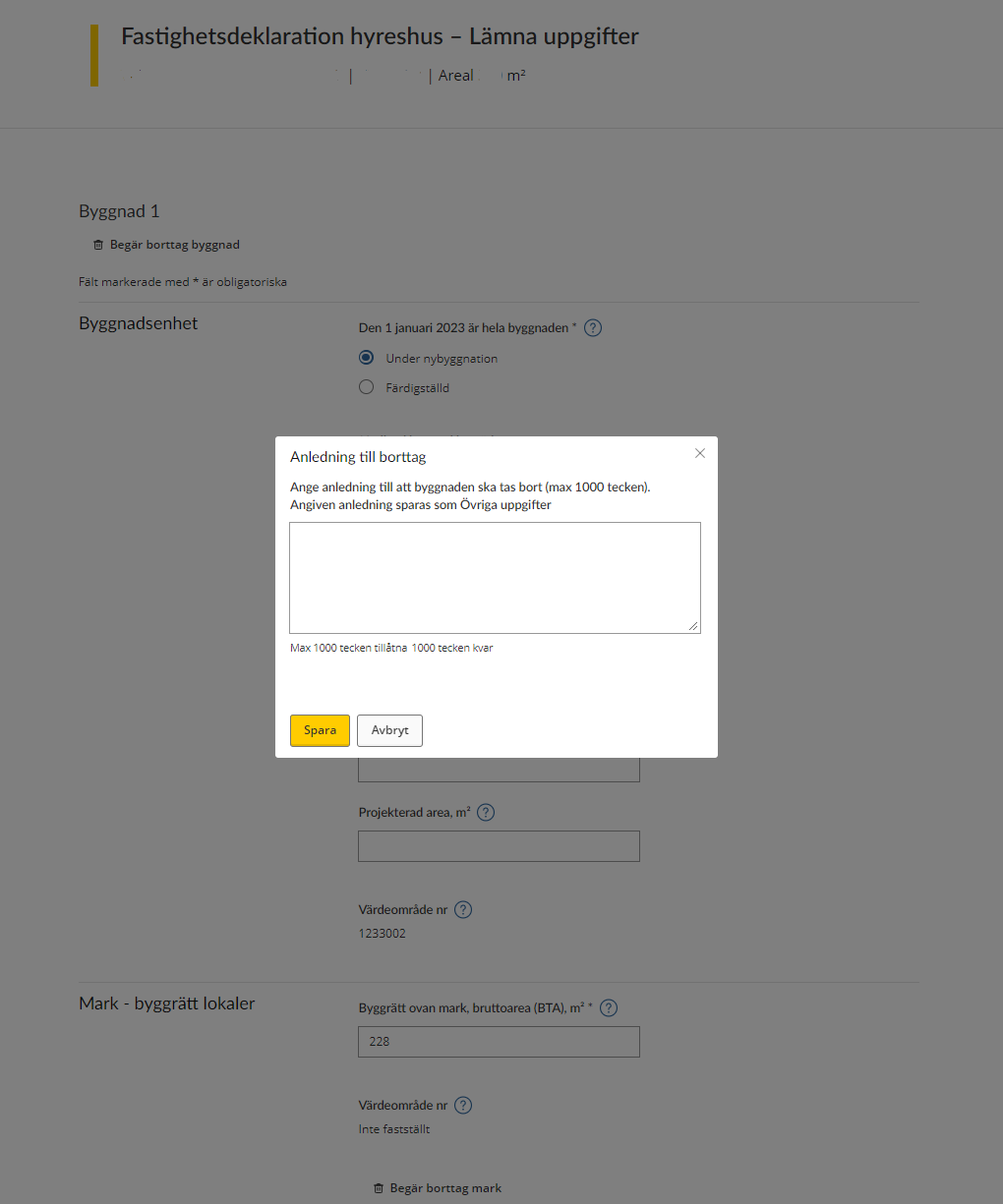
When you have the form for either a building or land open, you can opt to remove the value unit for taxation by clicking on the wastebasket icon saying either “Begär borttag av byggnad” (“Request removal of building”) or “Begär borttag av mark” (“Request removal of land”).
If you opt to remove a value unit for taxation, you will be asked to provide a reason for this. Your reason can be a maximum of 1,000 characters in length.
3.5 Information missing on value unit for taxation
If you need to add some information on a particular value unit for taxation, this will be shown in the overview. You will see a message in red saying “Åtgärd krävs” (“Action required”) by the value unit in question.
You then have to click on the value unit in question in order to add the missing details before you can sign and submit the information. (See the forms in sections 3.2.1 – 3.2.4 to understand which information needs to be added.)
3.6 Other information
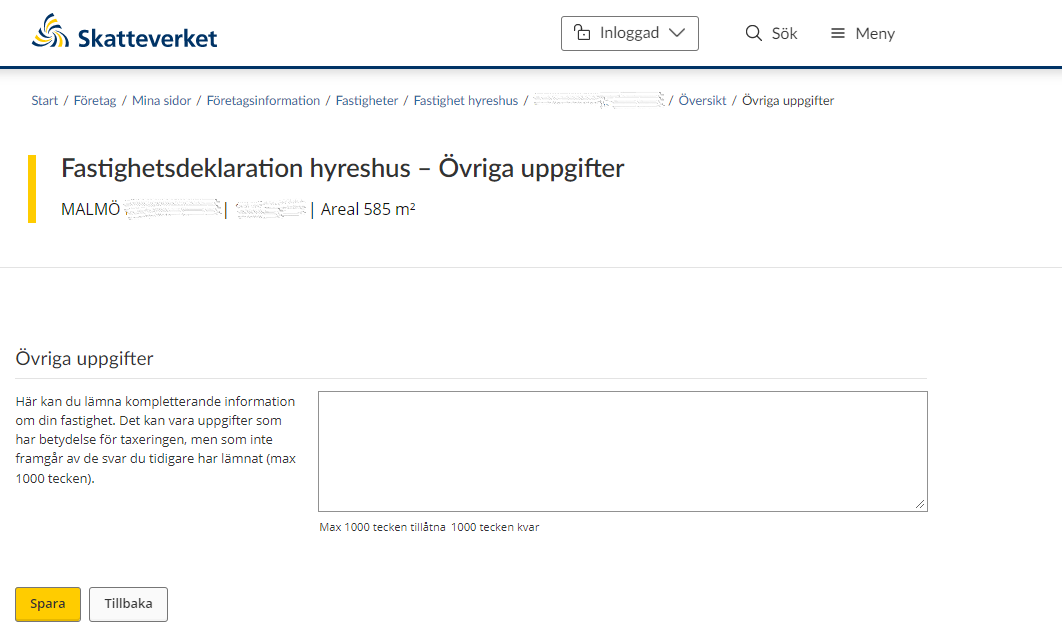
If you have opted to provide other information you will be taken to a text box where you can provide additional information about your property. The information you provide can be a maximum of 1,000 characters in length.
Click “Spara” to save the text you typed, and then you will be taken back to the overview page where all valuation units are listed. (See section 2)
If you change your mind about providing other information, click the “Tillbaka” button and you will be taken back to the overview page where all valuation units are listed. (See section 2)
3.7 Notification of ownership change
If the property was sold before 1 January the year of assesment, you do not have to provide any information about it. You need to notify the Swedish Tax Agency of the change of ownership instead. You do this by clicking on the button marked “Meddela ägarbyte” (“Submit change of ownership notification”).
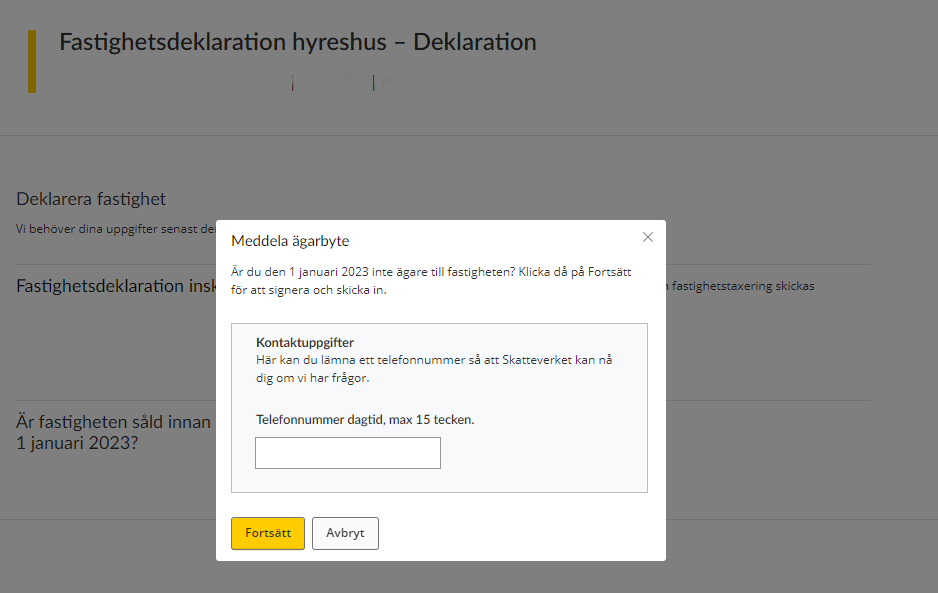
When you have on the button marked “Meddela ägarbyte” (“Submit change of ownership notification”), you will be asked to provide your phone number so that the Swedish Tax Agency can contact you if necessary. The phone number you provide can comprise a maximum of 15 characters.
Once you have provided your phone number and want to proceed, click on the button marked “Spara” (“Save”). You will then move on to a signing procedure during which you have to approve the information you have provided using your eID.
If you change your mind about submitting a change of ownership notification, click on the button marked “Avbryt” (“Cancel”).
4 Sign and submit your tax return
Once you have provided all the information about your property and want to submit it to the Swedish Tax Agency, click on the button marked “Signera och skicka in” (“Sign and submit”).
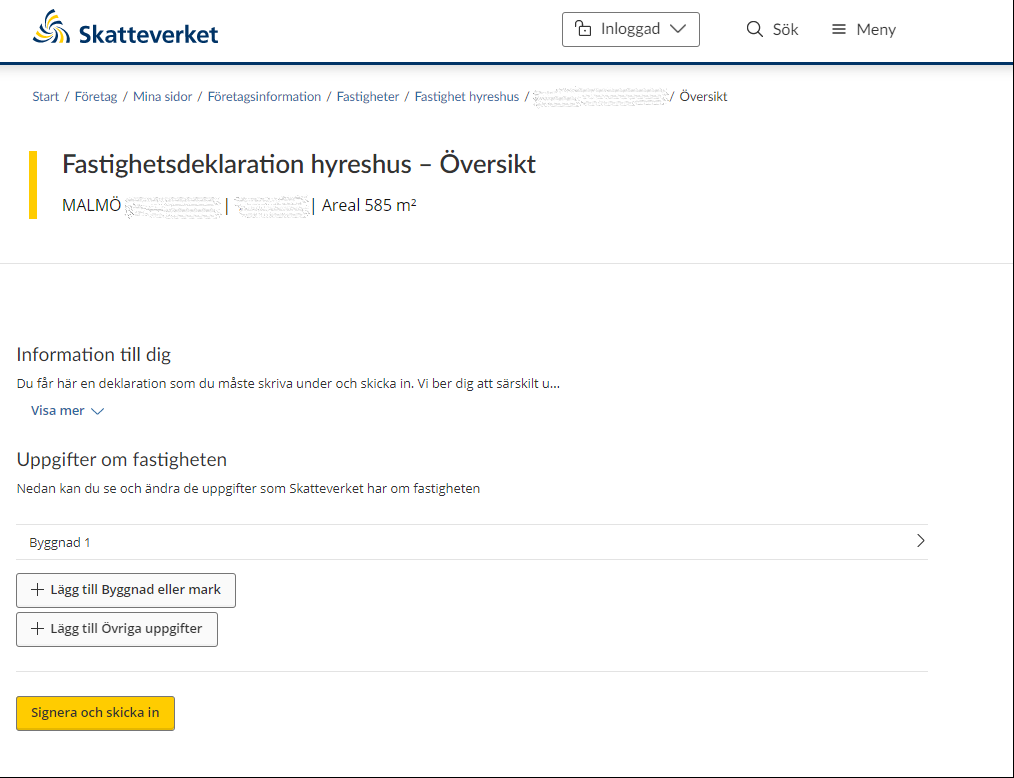
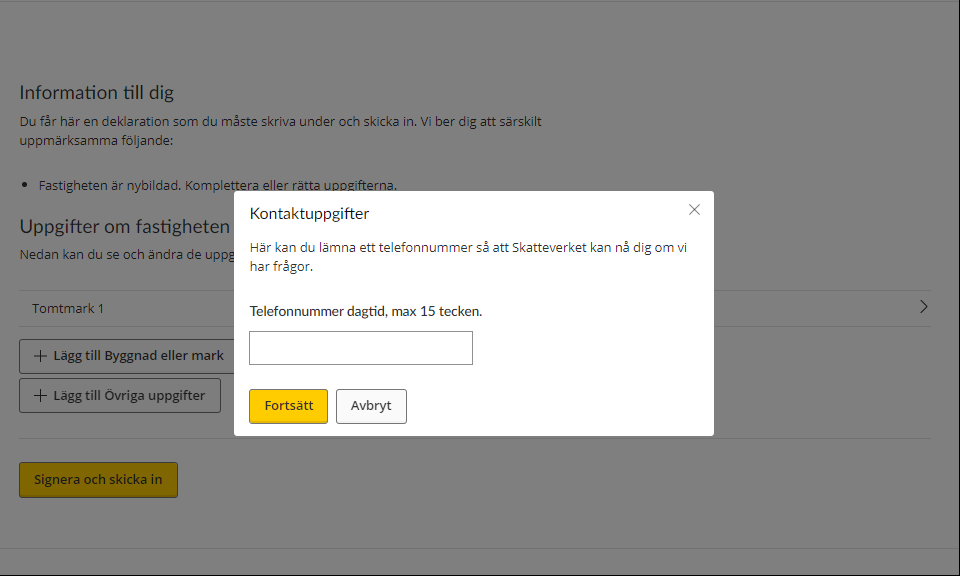
Once you have clicked “Signera och skicka in” (“Sign and submit”), you will asked to provide your phone number so that the Swedish Tax Agency can contact you if needed. The phone number you provide can have a maximum of 15 characters
Click “Fortsätt” (“Continue”) to proceed with the signing procedure, in which you have to approve the information you provided using your electronic ID.
Click “Avbryt” (“Cancel”) to return to the overview page where you can review the information you have provided.
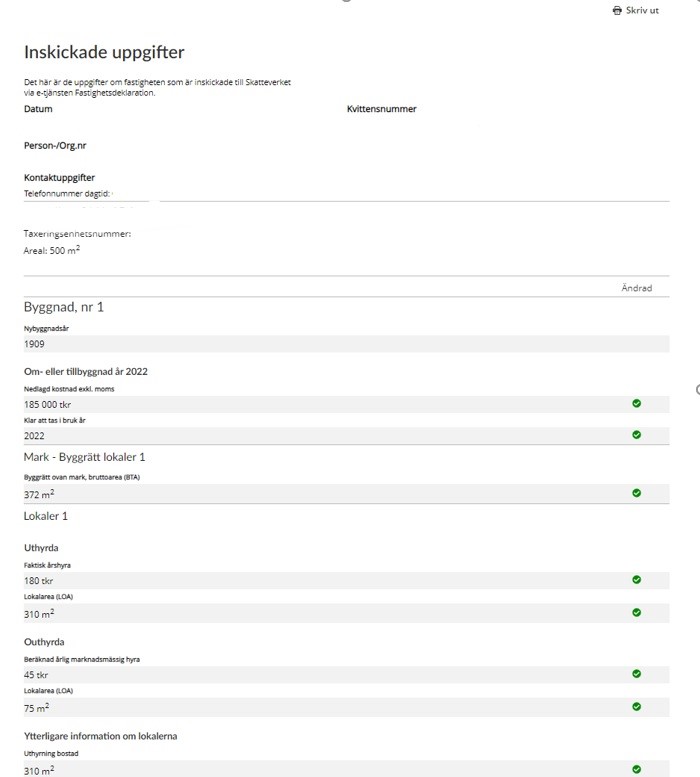
Once you have approved the information and submitted your tax return, you will be sent a receipt that includes the information you submitted via the e-service.
The receipt will include the following information:
General information
- Date – when the information was submitted.
- Receipt number – a unique number ensuring that your information can be traced at the Swedish Tax Agency.
- Personal/Corporate Identity Number – the personal or corporate identity number of the information provider.
- Contact details – the phone number you have stated that the Swedish Tax Agency can use to reach you if needed.
- VELLINGE NORRA HÅSLÖV 30:35 – the property designation of the property that the tax return concerns.
- Assessment unit number – of the property that the tax return concerns.
- Area – the area in square metres of the property for which you have just filed a tax return.
Building no 1
- Year of original construction – the year in which the building was completed.
Conversion or extension
- Expenditure excl. VAT – your costs for the conversion or extension.
- Ready for use in – the year in which the building was ready for use.
Land – Construction rights, premises 1 – specification of which land the information concerns
- Construction rights above ground, gross area (BTA) – the total area of all floor levels above ground, including external walls.
Premises 1 – specification of which premises the information concerns
Let
- Real annual rent – the total annual rent of the premises you let.
- Area of premises (LOA) – the area of the premises you let at market rents.
Not let
- Estimated annual market rent – the annual rent you would have received if the premises were let.
- Area of premises (LOA) – the total area, in square metres, of the premises you are not letting.
Further information about the premises
- Letting of residences – in this case, a specification of what proportion of the premises are being to let residences.
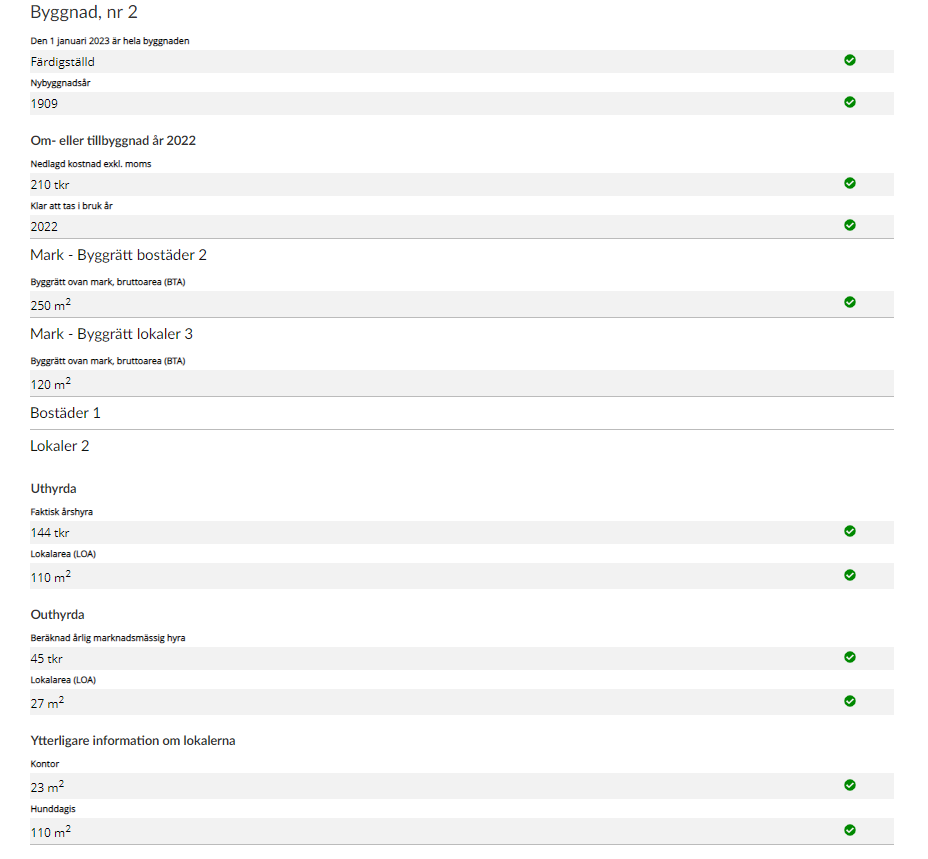
Building no 2
- On 1 January 2023 (the year is just for example, each Property tax return states your correct year) the entire building was – the status of the building at the specified time.
- Year of original construction – specifies which building the information concerns.
Conversion or extension
- Expenditure excl. VAT – your costs for the conversion or extension.
- Ready for use in – the year in which the building was ready for use.
Land – Construction rights, premises 2
- Construction rights above ground, gross area (BTA) – the total area of all floor levels above ground, including external walls.
Land – Construction rights, premises 3
- Construction rights above ground, gross area (BTA) – the total area of all floor levels above ground, including external walls.
Residences 1 – no information provided.
Premises 2 - specification of which premises the information concerns.
Let
- Real annual rent – the total annual rent of the premises you let.
- Area of premises (LOA) – the area of the premises you let at market rents.
Not let
- Estimated annual market rent – the annual rent you would have received if the premises were let.
- Area of premises (LOA) – the total area, in square metres, of the premises you are not letting.
Further information about the premises
- Specification of what proportion is being used as offices.
- Specification of what proportion is being used for daycare of dogs.