How to use our e-service Cash registers – Register, change, report a fault in, and deregister cash registers
This is a guide on how to use our e-service Cash registers – Register, change, report a fault in, and deregister cash registers.
Log in to the e-service
Use our e-service for Cash registers – Register, change, report a fault in and deregister cash registers (in Swedish: Anmäl, ändra, felanmäl och avanmäl kassaregister).
Your obligation to use a certified cash register
The obligation to use a certified cash register applies where the company’s sales take place in return for cash payment or in return for payment with a debit or credit card.
How to log in to the e-service
When you have selected the e-service you want to log in to, a login page will open. In the upper part of the view you can change the language to English by clicking the button ”English”. By choosing ”International” you get more alternatives for eIDs you can use to log in to the e-service. Select the login mode that suits you best by clicking it, and then proceed to identify yourself.
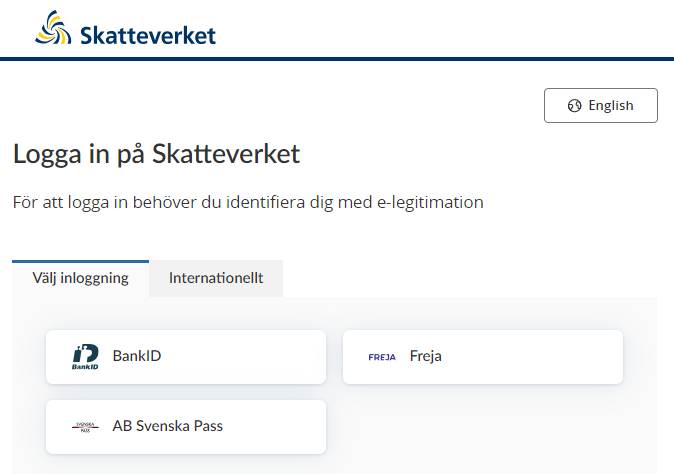
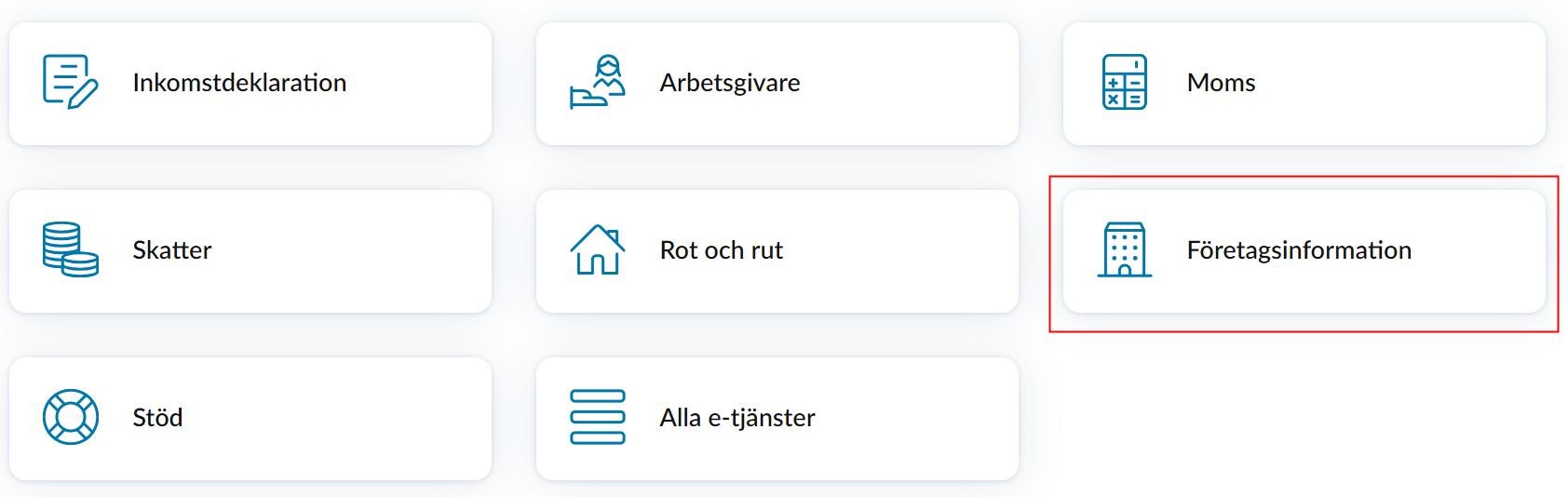
Once you have logged in, click “Företagsinformation” (“Company information”) at the bottom of the page.
Click ”Kassaregister” (Cash registers).

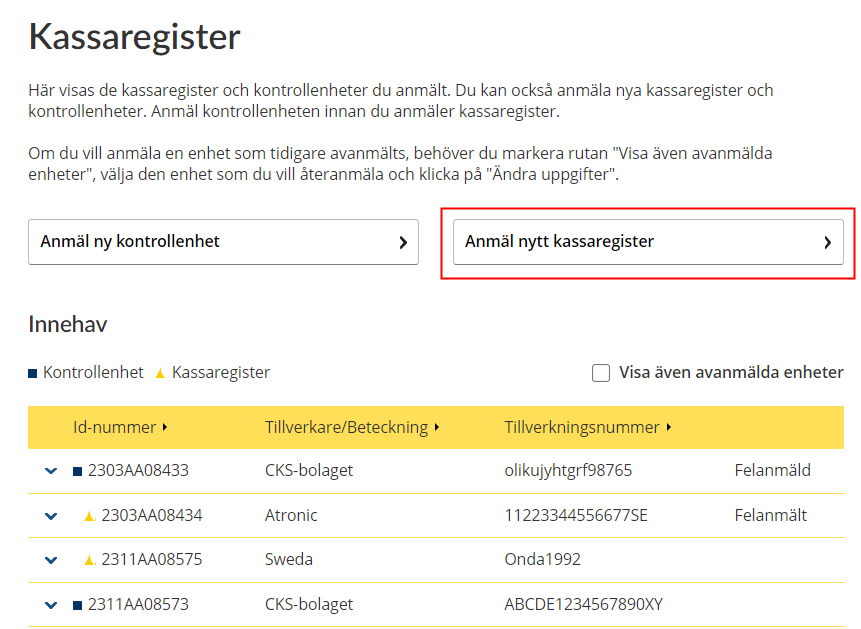
Overview cash registers and control units
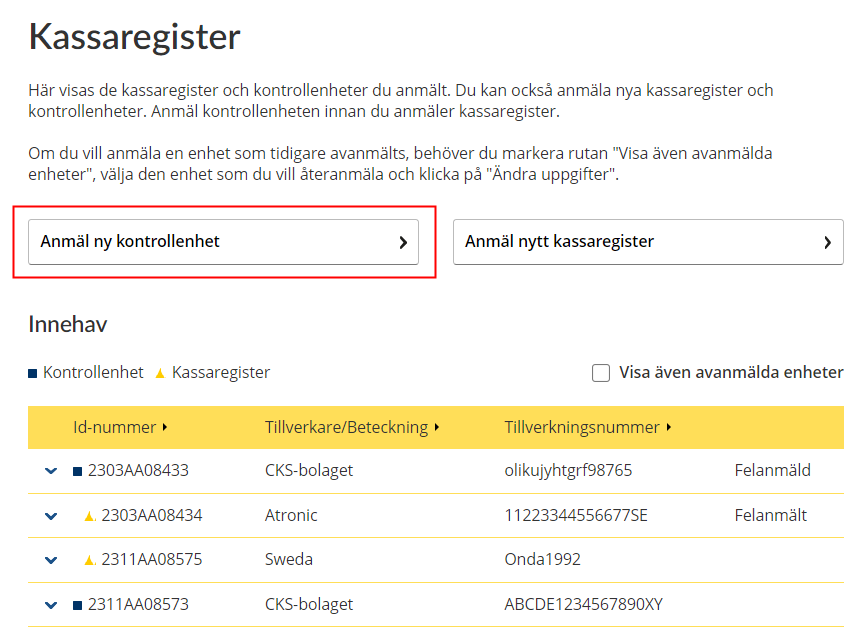
This is where you register new control units and cash registers. If you have already registered control units and cash registers, you will be able to see these in the list. You can also change, deregister or report faults for them.
A black square means “Control unit” and a yellow triangle means “Cash register”.
If you also want to see deregistered units, tick the small box next to the text “Visa även avanmälda enheter” (“Also show deregistered units”).
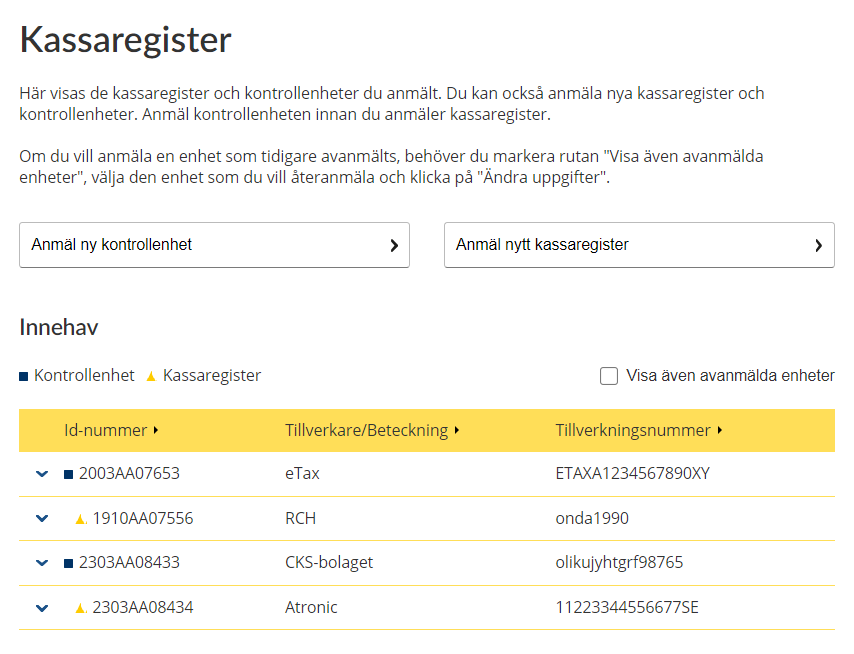

Click the arrow on the far left of each row to view more detailed information.
- Tillverkningsnummer (Serial number),
- Kontrollenhetens adress (Control unit’s address),
- Modell/program (Model/software),
- Anmälningsdatum (Registration date).
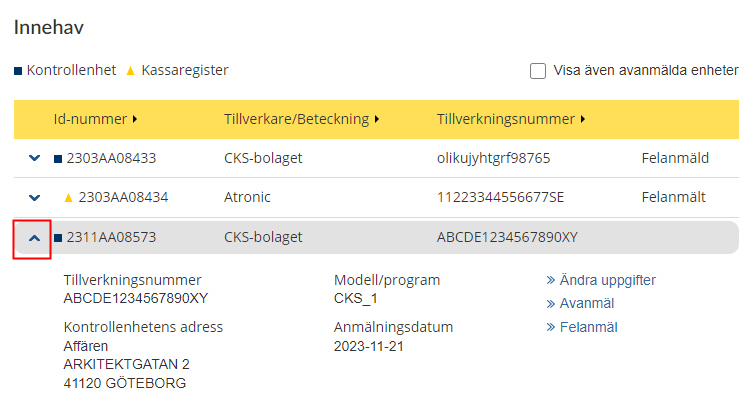
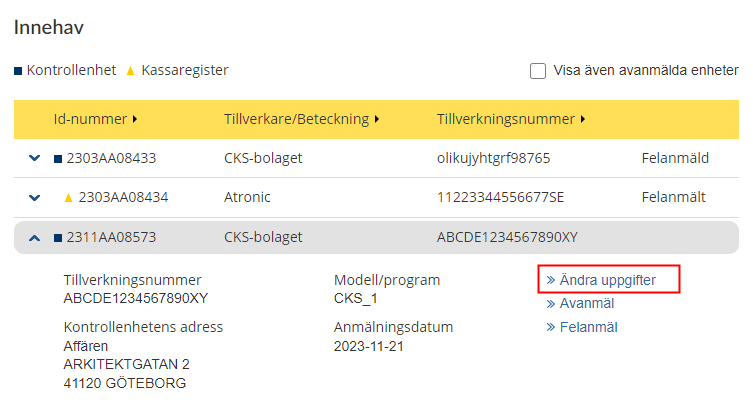
A form containing the information registered for the control unit will open.
To change the address, begin by filling in the “Postnummer” (“Postcode”) field. Then click the link “Hitta adresser” (“Find address”) in the field next to it. This will open the “Gata” (“Street”) field and you can select the street from the list that is shown when you place the cursor in the field. Once you have selected the street, the “Nummer” (“Number”) field will open and you can select a number from the list shown.
Once you have filled in the form, click the “Spara” (“Save”) button. If you want to cancel, click the “Avbryt” (“Cancel”) button instead.
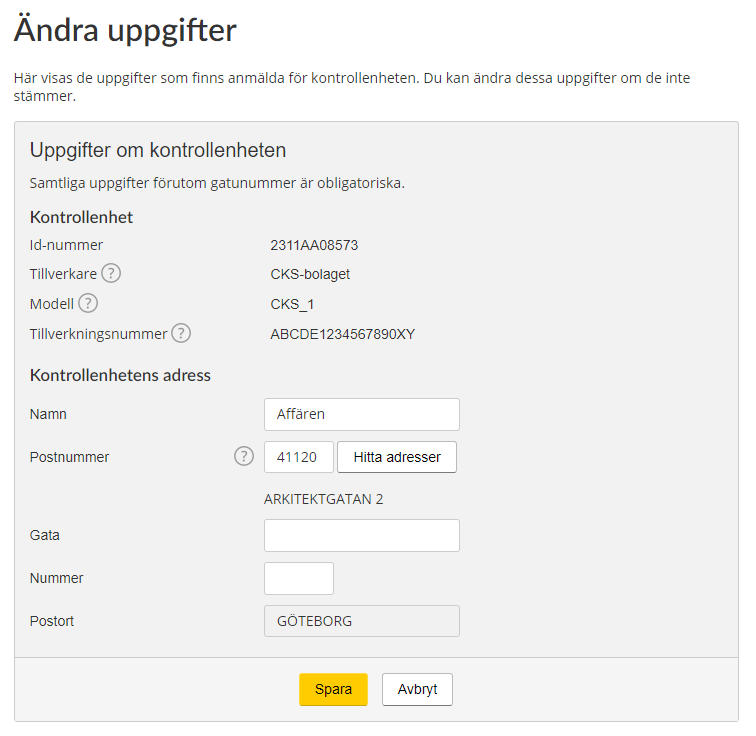
Explanations of the words in the form:
- Uppgifter om kontrollenheten (Information about the control unit)
- Id-nummer (ID number)
- Tillverkare (Manufacturer)
- Modell (Model)
- Tillverkningsnummer (Serial number)
- Kontrollenhetens adress (Control unit’s address)
- Namn (Name)
- Postnummer (Postcode)
- Gata (Street)
- Nummer (Number)
- Postort (City/town)
Help texts:
- Each encircled question mark on the form is a help text button. Click it and the relevant help text will be shown.
- Tillverkade (Manufacturer) – This information can be found in the documentation for the control unit/control system.
- Modell (Model) – Which models are available to select depends on which manufacturer was selected. Only certified units can be selected. If your model is not shown, it is not certified.
- Tillverkningsnummer (Serial number) – Each control unit has a unique serial number. This number must include 17 alphanumeric characters and have the format ABCDE1234567890XY.
- Postnummer (Postcode) – Begin by filling in the postcode. You can then select the street and house number.
Once you have clicked the “Spara” (“Save”) button, you will be shown a confirmation that the information has been changed.

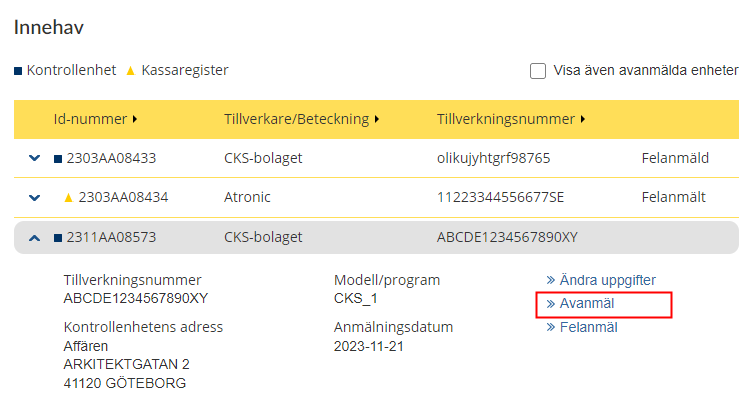
You will be shown a dialog box with the option of deregistering cash registers linked to the control unit. You do this by ticking the small box “Avanmäl även alla kassaregister kopplade till kontrollenheten” (“Also deregister all cash registers linked to the control unit”).
Then click the button “Avanmäl” (“Deregister”).
If you want to cancel, click the “Avbryt” (“Cancel”) button.
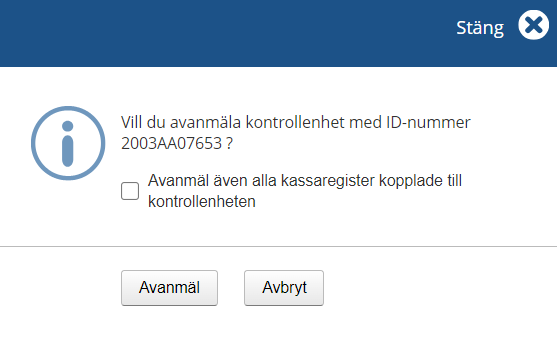
Once you have clicked the “Avanmäl” (“Deregister”) button you will be shown a confirmation that the control unit has been deregistered.

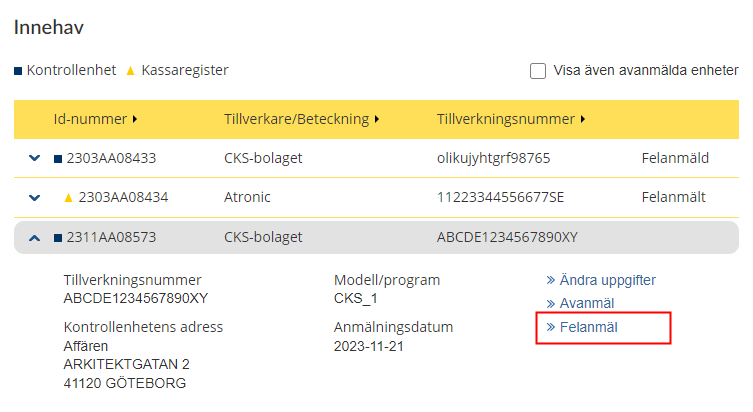
A dialog box will be shown.
Click the button “Felanmäl” (“Report fault”) if you want to report a fault in the control unit.
If you want to cancel, click the “Avbryt” (“Cancel”) button.
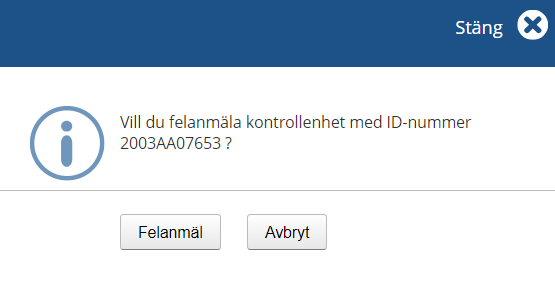
Once you have clicked the “Felanmäl” (“Report fault”) button you will be shown a confirmation that the information has been registered with the text:
- Ett mottagningsbevis kommer att skickas till företages adress. En trasig kontrollenhet får inte reprareras utan den måste bytas ut, i de fall ska du också avanmäla kontrollenheten. (Proof of receipt will be sent to the company’s address. A malfunctioning control unit may not be repaired; instead it has to be replaced – in which case you also have to deregister it.)

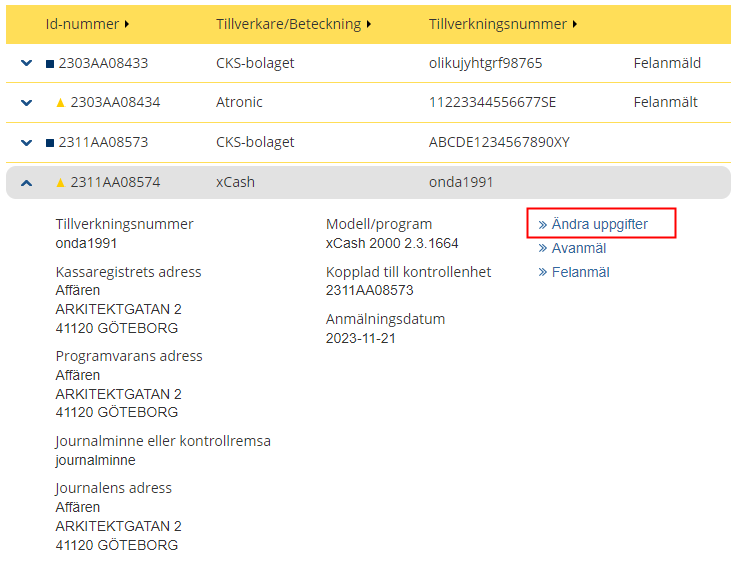
The form will show the information registered for the cash register. You can change any part of this information if it is incorrect.
Click the “Ändra” (“Change”) links on the form.
To change the address, begin by filling in the “Postnummer” (“Postcode”) field. Then click the link “Hitta adresser” (“Find address”) in the field next to it. This will open the “Gata” (“Street”) field and you can select the street from the list that is shown when you place the cursor in the field. Once you have selected the street, the “Nummer” (“Number”) field will open and you can select a number from the list shown.
Fill in the new information and click the “Spara” (“Save”) button.
If you want to cancel, click the “Avbryt” (“Cancel”) button.
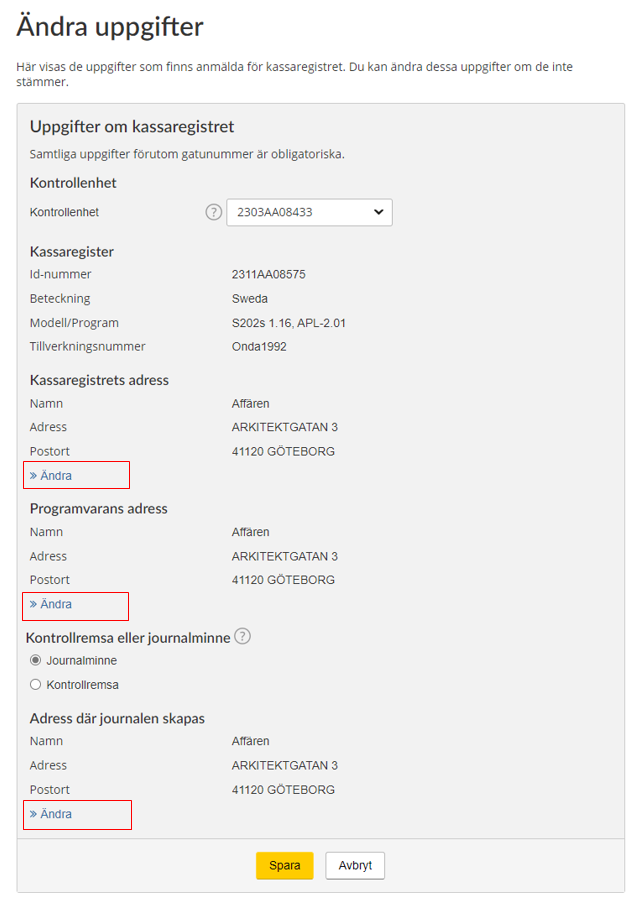
Explanations of the words in the form:
- Uppgifter om kassaregistret (Information about the cash register)
- Samtliga uppgifter förutom gatunummer är obligatoriska (All the information except for the house number is required)
- Kontrollenhet (Control unit)
- Kassaregister (Cash register)
- Id-nummer (ID number)
- Beteckning (Designation)
- Modell/program (Model/software)
- Tillverkningsnummer (Serial number)
- Kassaregistrets adress (Cash register’s address)
- Namn (Name)
- Adress (Address)
- Postort (City/town)
- Programvarans adress (Software’s address)
- Kontrollremsa eller journalminne (Audit strip or journal memory)
- Adress där journalen skapas (Address where the journal is created)
Help texts:
Each encircled question mark on the form is a help text button. Click it and the relevant help text will be shown.
- Kontrollenhet (Control unit) – Select an existing control unit at the company, which the cash register is to be linked to.
- Kontrollremsa eller journalminne (Audit strip and journal memory) – An audit strip is a a form of continuous documentation on paper of registrations in the cash register. If the cash register has an audit strip, select audit strip. No further selection will need to be made. Journal memory, often called an e-journal, is an electronic form of continuous documentation of registrations in the cash register. If the cash register uses an e-journal, select this option and specify the address where the journal memory is generated.
Once you have clicked the “Spara” (“Save”) button you will be shown a confirmation that the information has been registered.

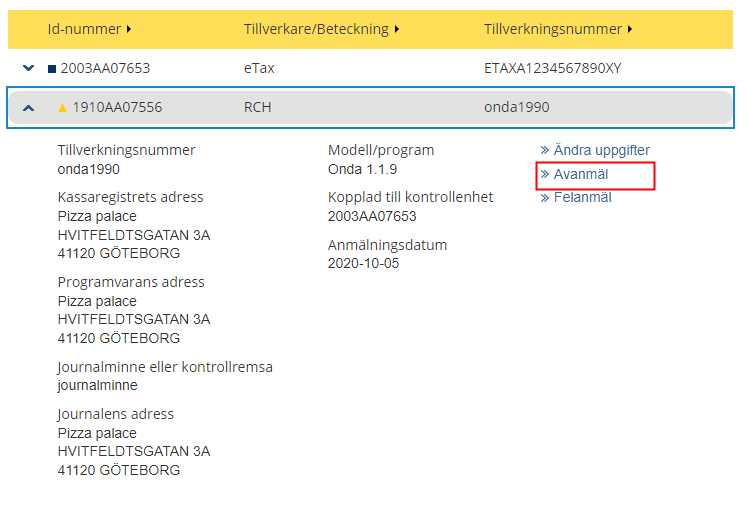
A dialog box will be shown. Click the “Avanmäl” (“Deregister”) button to deregister the cash register. If you want to cancel, click the “Avbryt” (“Cancel”) button.
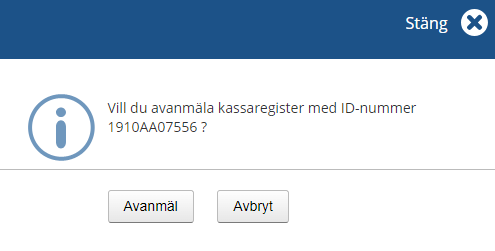
Once you have clicked the “Avanmäl” (“Deregister”) button, you will be shown a confirmation that the cash register has been deregistered.

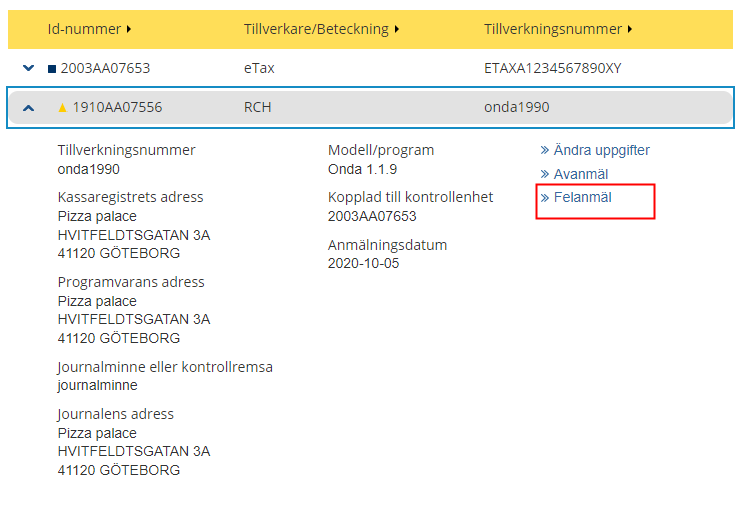
A dialog box will be shown. Click the “Felanmäl” (“Report fault”) button to report a fault in the cash register. If you want to cancel, click the “Avbryt” (“Cancel”) button.
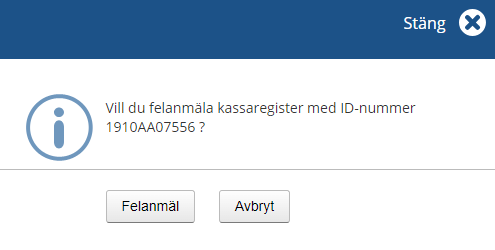
Once you have clicked the “Felanmäl” (“Report fault”) button, you will be shown a confirmation that a fault in the cash register has been reported and the text:
- Ett mottagningsbevis kommer skickas till företagets adress. Du ska så snart som möjligt se till att åtgärda felet. Går kassaregistret inte att reparera ska du avanmäla kassaregistret. (Proof of receipt will be sent to the company’s address. You must repair the fault as soon as possible. If the cash register cannot be repaired, you must deregister it.)

Fill in information
The first step is to fill in information about the control unit. All the information except for the house number is required.
To state the address, begin by filling in the “Postnummer” (“Postcode”) field. Then click the link “Hitta adresser” (“Find address”) in the field next to it. This will open the “Gata” (“Street”) field and you can select the street from the list that is shown when you place the cursor in the field. Once you have selected the street, the “Nummer” (“Number”) field will open and you can select a number from the list shown.
Fill in the form and click the “Nästa” (“Next”) button.
If you want to cancel, click the “Avbryt” (“Cancel”) button.
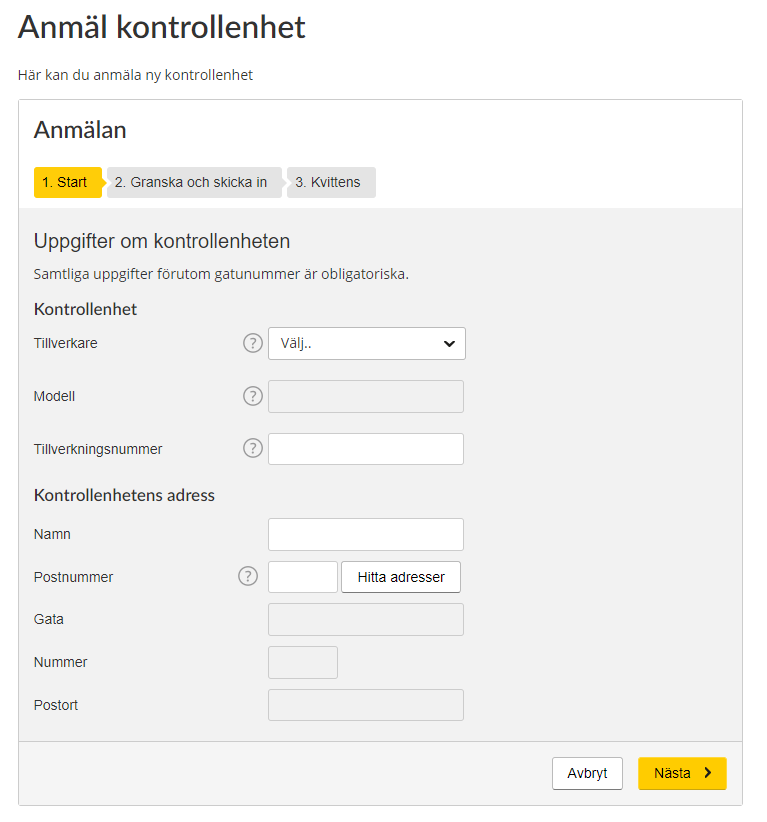
Explanations of the words in the form:
- Uppgifter om kontrollenheten (Information about the control unit)
- Kontrollenhet (Control unit)
- Tillverkare (Manufacturer)
- Modell (Model)
- Tillverkningsnummer (Serial number)
- Kontrollenhetens adress (Control unit’s address)
- Namn (Name)
- Postnummer (Postcode)
- Hitta adresser (Find address)
- Gata (Street)
- Nummer (Number)
- Postort (City/town)
If you click Hitta adresser “Find address” (in the field), a list of addresses you can select will be shown.
Help texts:
Each encircled question mark on the form is a help text button. Click it and the relevant help text will be shown.
- Tillverkare (Manufacturer) – This information can be found in the documentation for the control unit/control system.
- Modell (Model) – What models are available to select depends on which manufacturer was selected. Only certified units can be selected. If your model is not shown, it is not certified.
- Tillverkningsnummer (Serial number) – Each control unit has a unique serial number. This number must include 17 alphanumeric characters and have the format ABCDE1234567890XY.
- Postnummer (Postcode) – Begin by filling in the post code. You can then select the street and house number.
Review and Submit
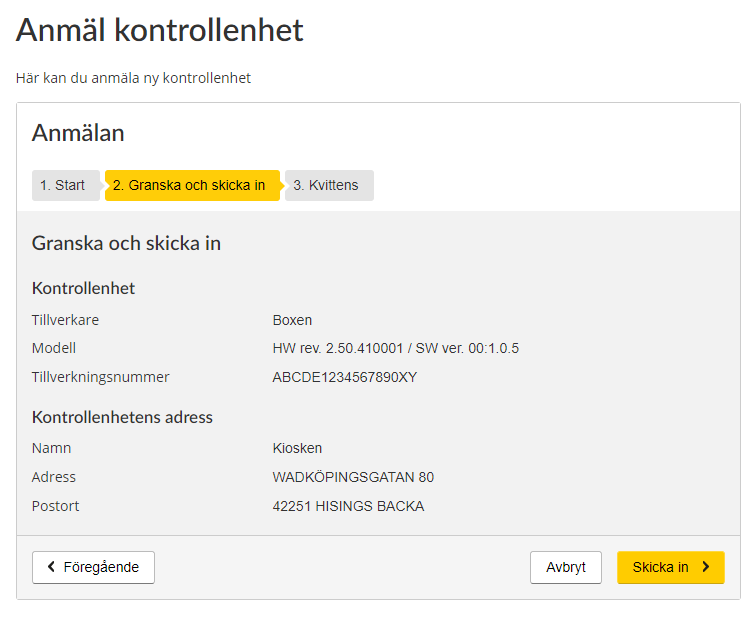
When you click the “Nästa” (“Next”) button you will be taken to the next step, in which you review and submit the information.
Review the information. If everything is correct, click the “Skicka in” (“Submit”) button.
If you need to change any item of information, click the “Föregående” (“Previous”) button. If you want to cancel, click the “Avbryt” (“Cancel”) button.
Receipt
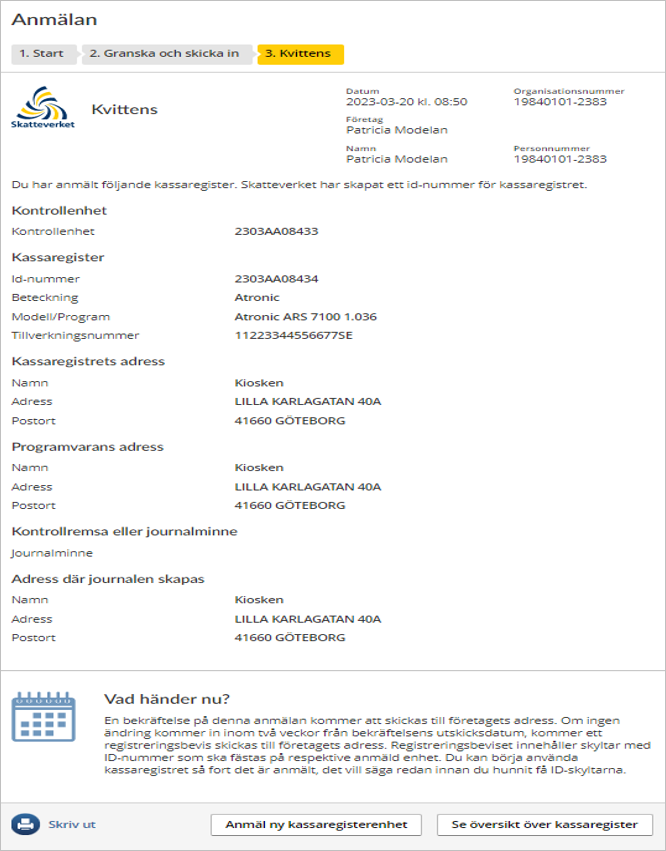
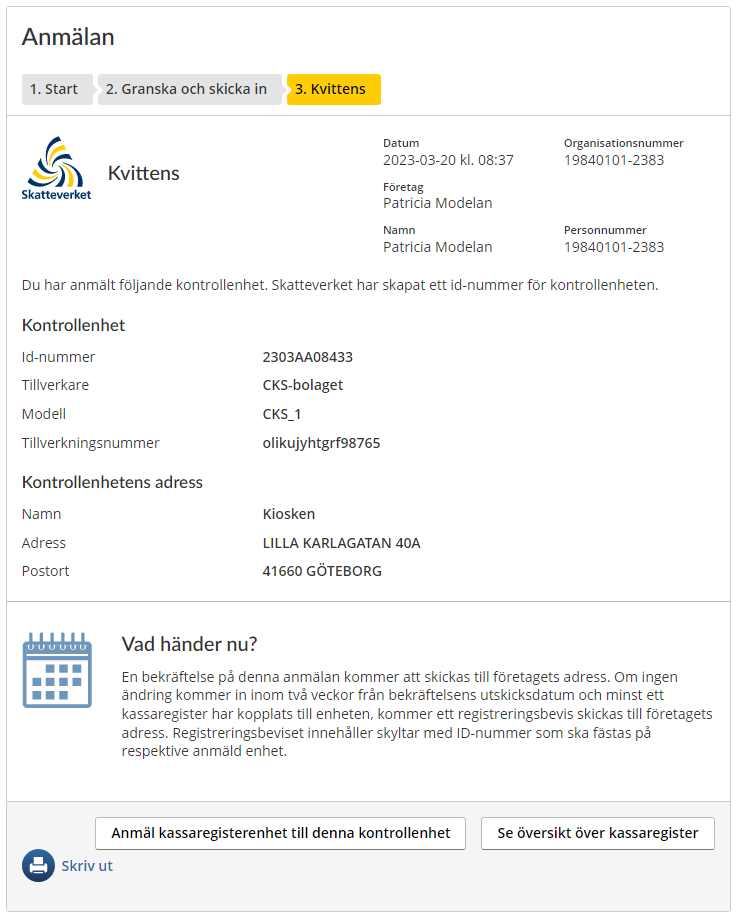
In the final step you are shown the receipt, which is a summary of all the information you have submitted and a confirmation that the Swedish Tax Agency has received your registration.
What happens next?
Confirmation of your registration will sent to the company’s address. If we receive no request for changes within two weeks of the date on which the confirmation was sent, and at least one cash register was linked to the control unit, a registration certificate will be sent to the company’s address. The registration certificate includes labels with ID numbers that have to be affixed to the respective registered unit.
Click “Skriv ut” (“Print”) if you want to print out the receipt.
Click the button “Anmäl kassaregisterenhet till denna kontrollenhet” (“Register a cash register unit for this control unit”)
Click the button “Se översikt över kassaregister” (“See overview of cash registers”) to open the overview that shows registered units.
Fill in information
The first step is to fill in information about the cash register. All the information except for the house number is required.
To state the address, begin by filling in the “Postnummer” (“Postcode”) field. Then click the link “Hitta adresser” (“Find address”) in the field next to it. This will open the “Gata” (“Street”) field and you can select the street from the list that is shown when you place the cursor in the field. Once you have selected the street, the “Nummer” (“Number”) field will open and you can select a number from the list shown.
Fill in the form and click the “Nästa” (“Next”) button. If you want to cancel, click the “Avbryt” (“Cancel”) button.
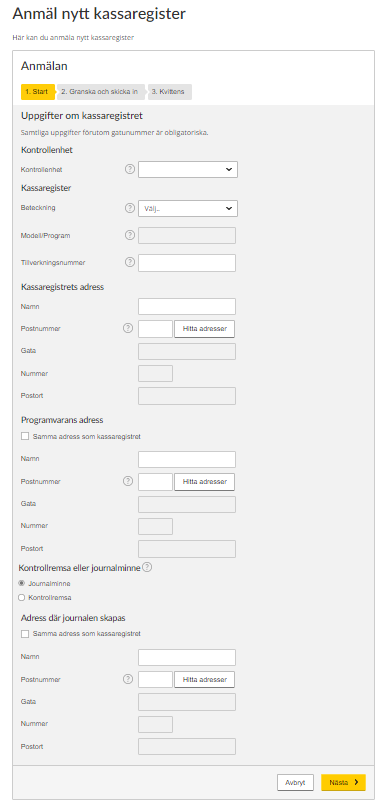
Explanations of the words in the form:
- Uppgifter om kassaregistret (Information about the cash register)
- Kassaregister (Cash register)
- Modell/program (Model/software)
- Tillverkningsnummer (Serial number)
- Kassaregistrets adress (Cash register’s address)
- Namn (Name)
- Postnummer (Postcode)
- Hitta adresser (Find address)
- Gata (Street)
- Nummer (Number)
- Postort (City/town)
- Programvarans adress (Software’s address)
- Samma adress som kassaregistret (Same address as the cash register)
- Kontrollremsa eller journalminne (Audit strip or journal memory)
- Adress där journalen skapas (Address where journal memory is generated)
Help texts:
Each encircled question mark on the form is a help text button. Click it and the relevant help text will be shown.
- Kontrollenhet (Control unit) – Select an existing control unit at the company, which the cash register is to be linked to.
- Beteckning (Designation) – This information can be found in the documentation for the cash register. What models and software are available to select depends on what designation was selected.
- Modell/program (Model/software) – Only manufacturer-declared cash registers can be selected. If your model is not included, it is not a manufacturer-declared cash register.
- Tillverkningsnummer (Serial number) – Every cash register has a unique serial number. This means that two or more cash registers with the same designation and model/software cannot have the same serial number.
- Postnummer (Postcode) – Begin by filling in the postcode. Then you can select the street and house number.
- Kontrollremsa eller journalminne (Audit strip or journal memory) – An audit strip is a a form of continuous documentation on paper of registrations in the cash register. If the cash register has an audit strip, select audit strip. No further selection will need to be made. Journal memory, often called an e-journal, is an electronic form of continuous documentation of registrations in the cash register. If the cash register uses an e-journal, select this option and specify the address where the journal memory is generated.
Fill in the form and click the “Nästa” (“Next”) button. If you want to cancel, click the “Avbryt” (“Cancel”) button.
Review and Submit
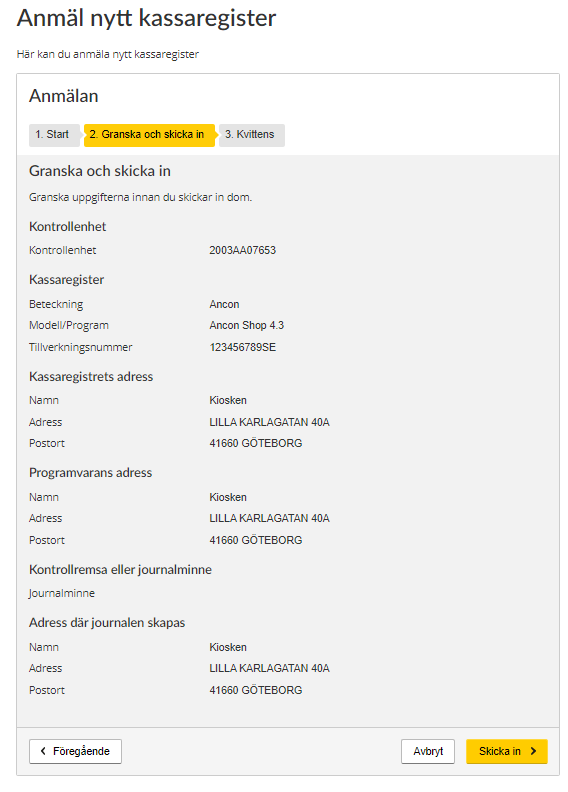
When you click the “Nästa” (“Next”) button, you will be taken to the next step, in which you review and submit the information.
Review the information. If everything is correct, click the “Skicka in” (“Submit”) button.
If you need to change any item of information, click the “Föregående” (“Previous”) button. If you want to cancel, click the “Avbryt” (“Cancel”) button.
Receipt
In the final step you are shown the receipt, which is a summary of all the information you have submitted and a confirmation that the Swedish Tax Agency has received your registration.
What happens next?
Confirmation of your registration will sent to the company’s address. If we receive no request for changes within two weeks of the date on which the confirmation was sent, a registration certificate will be sent to the company’s address.
Click “Skriv ut” (“Print”) if you want to print out the receipt.
Click the button “Anmäl kassaregisterenhet till denna kontrollenhet” (“Register a cash register unit for this control unit”) if you want to register a cash register unit.
Click the button “Se översikt över kassaregister” (“See overview of cash registers”) to return to the overview that shows registered cash registers.