How to use our e-service Property tax return, residential house
This is a guide on how to use the e-service Property tax return, residential house
Log in to the e-service
1. How to log in to the e-service
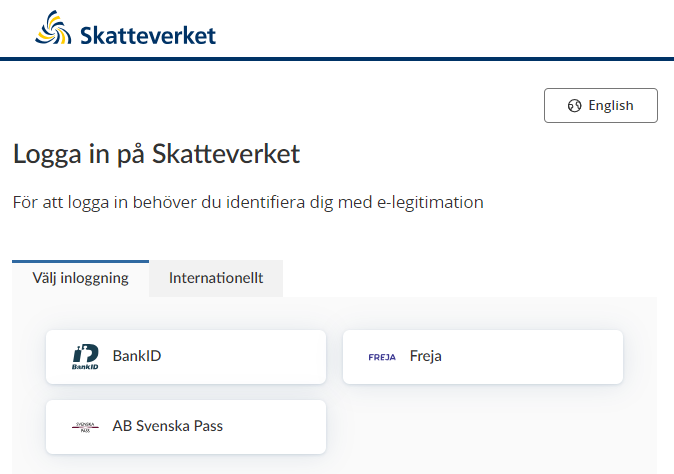
When you have selected the e-service you want to log in to, a login page will open. In the upper part of the view you can change the language to English by clicking the button ”English”. By choosing ”International” you get more alternatives for eIDs you can use to log in to the e-service. Select the login mode that suits you best by clicking it, and then proceed to identify yourself.
2. Ownership and assessment units
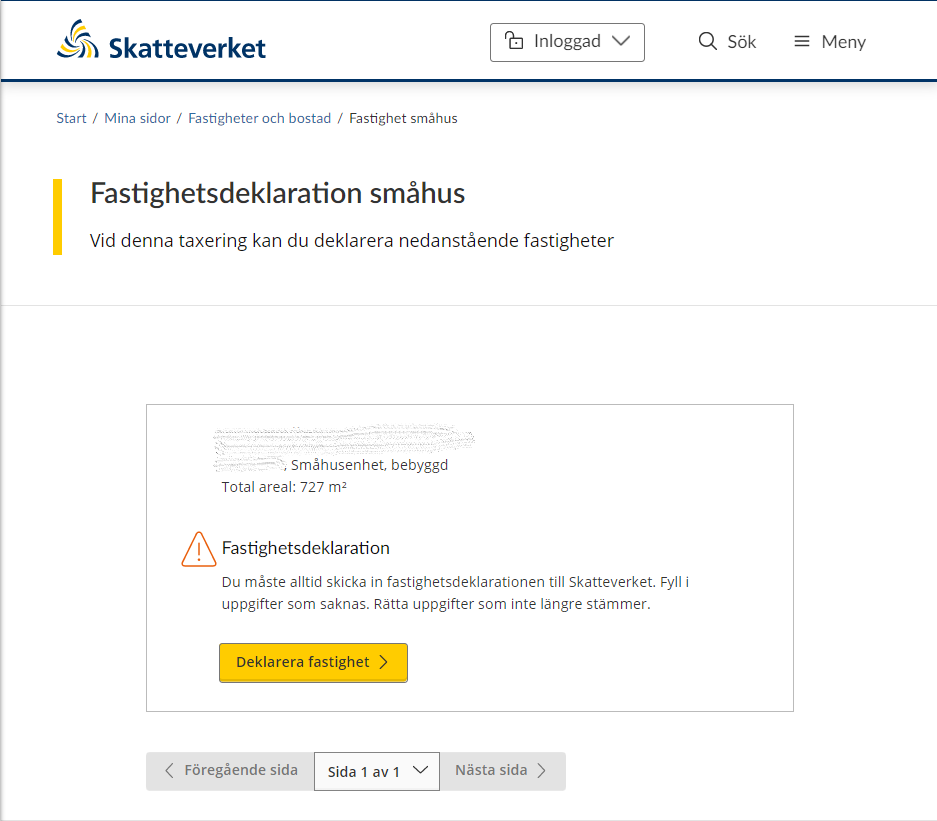
When you have logged in to the e-service, the first page opens and shows you the properties you have to file tax returns for in the current property tax assessment.
Each assessment unit to file a tax return for is shown in its own box. At the top of the box is that property designation, assessment unit number, property type and total area.
If you as the property owner have received a proposal for a new assessment value, you have to check that the information is correct. If all the information in the proposal is correct, you don’t need to send anything to the Swedish Tax Agency; we will assume you approve the proposal if you do not respond.
However, if you need to change any of the prefilled information that the Swedish Tax Agency has included in the proposal for a new assessment value, you have to click the button “Deklarera fastighet” to file a property tax return.
If you, as a property owner, have received a property tax return, you need to provide information about your property and submit the tax return to the Swedish Tax Agency. To proceed with providing information about your property, click the button “Deklarera fastighet”.
You will be taken to the relevant page in the e-service depending on what information you need to provide.
Click the button “Nästa sida” to move to the next page in the e-service, or the button “Föregående sida” to go to the previous page.
Pagination is used so that a certain number of properties are shown on each page. You can therefore use the dropdown menu on the button “Page x of x” if you want to go straight to a specific page.
3. File property tax return
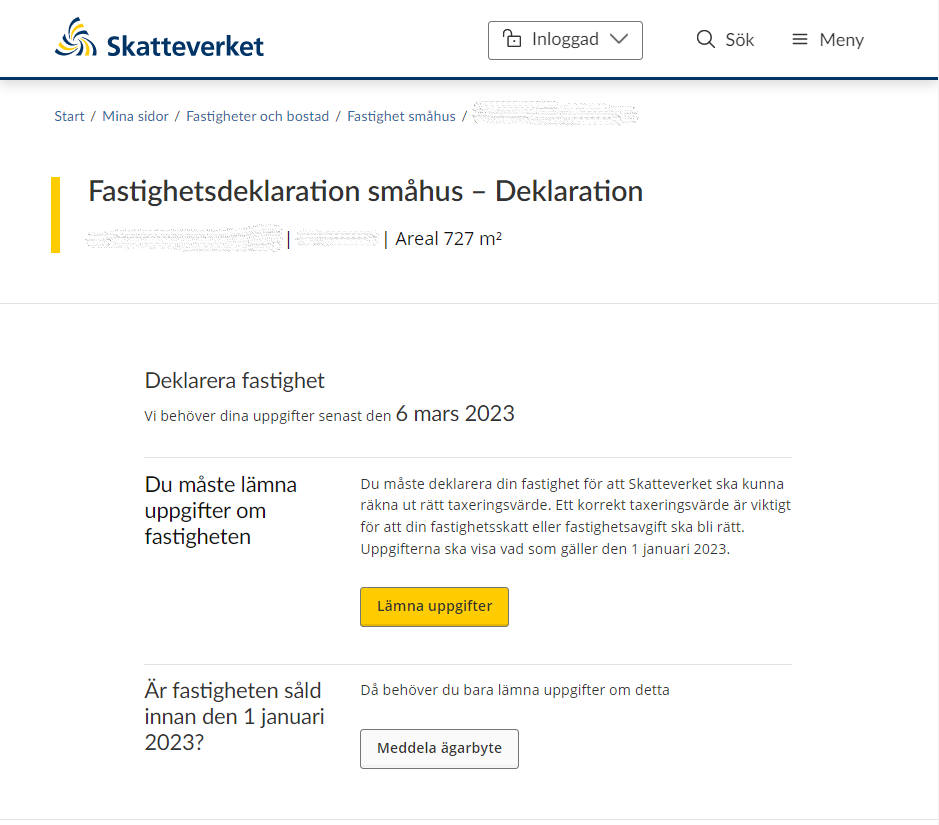
If you opted to file a property tax return for an assessment unit, you will be taken to the next page in the e-service. This tells you that you need to submit your information before the submission deadline..
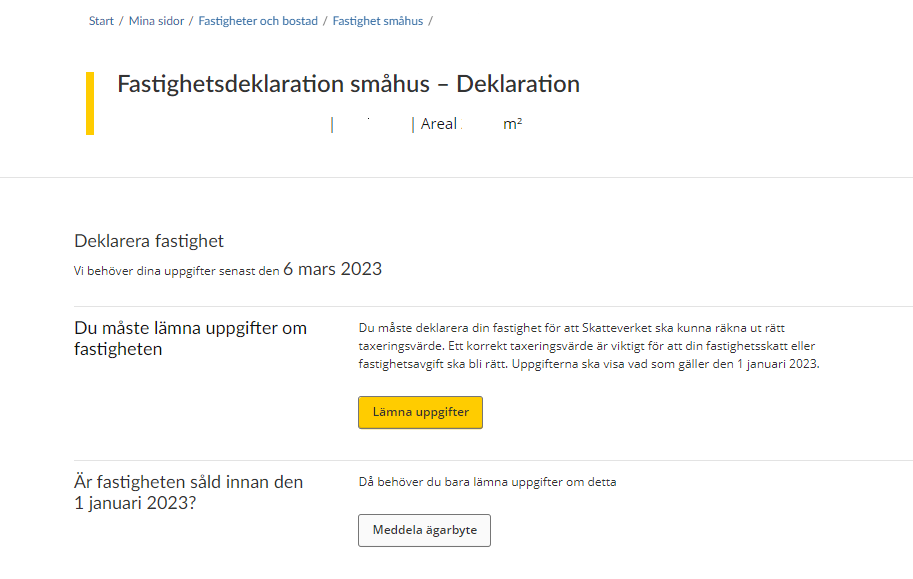
You need to submit information about the property in order for the Swedish Tax Agency to be able to calculate the correct assessment value. You do this by clicking the button “Lämna uppgifter”.
If the property was sold before 1 January the year of assesment, you just need to notify the Swedish Tax Agency of the sale. You do this by clicking the button “Ownership change notification”. (See section 3.9).
3.1 Overview of valuation units
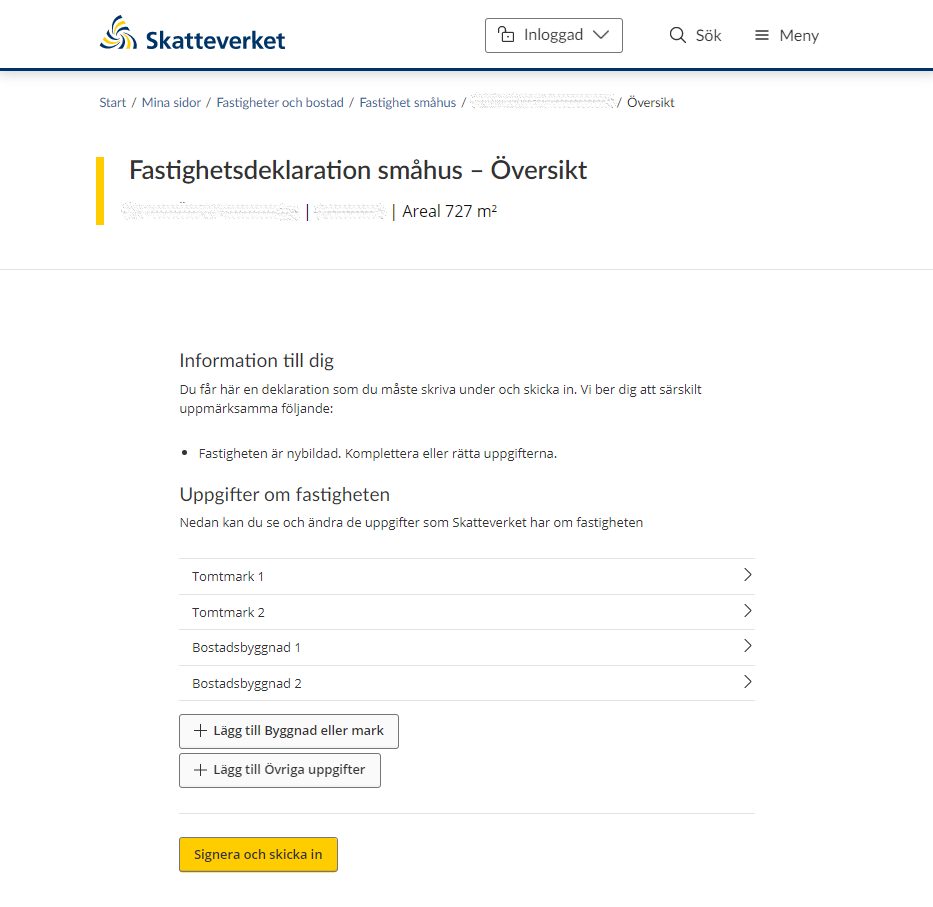
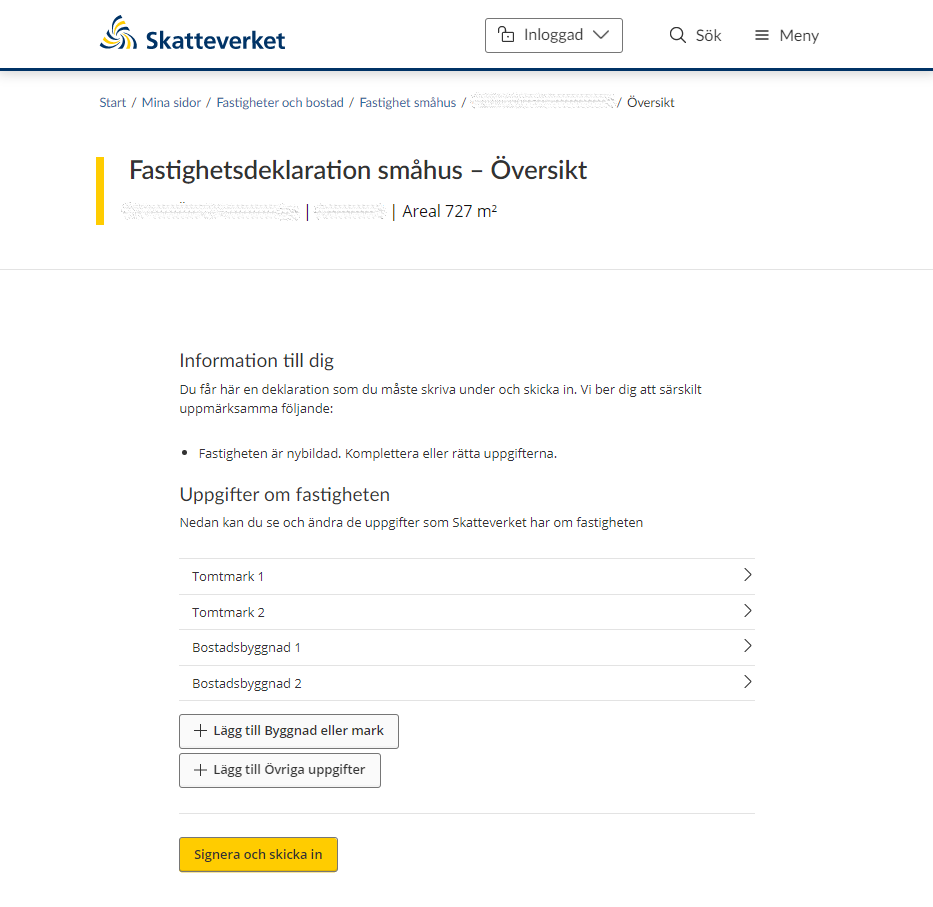
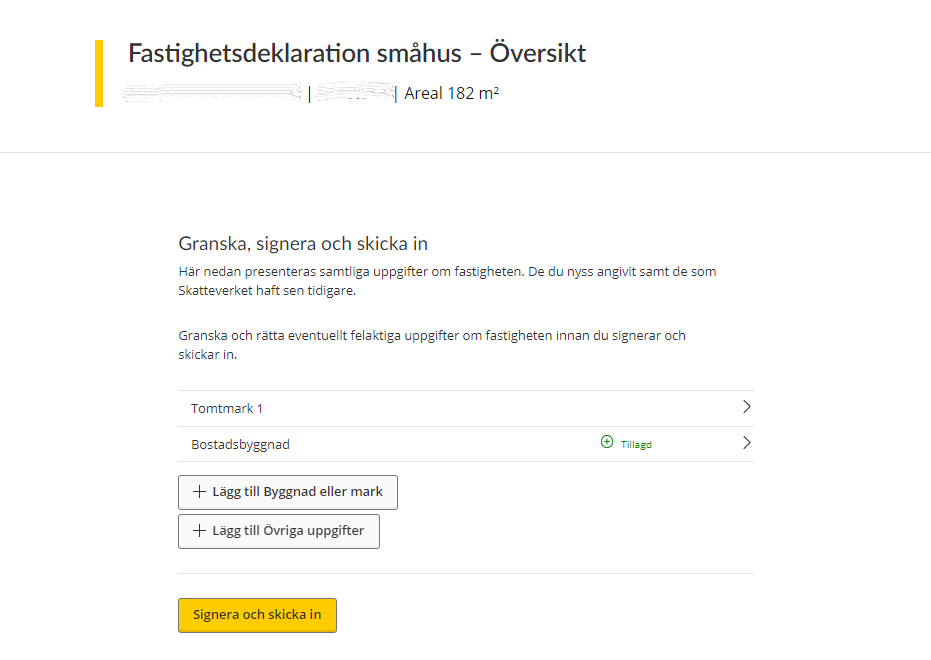
If you opt to submit information for an assessment unit, you will be taken to an overview page. This shows you all land plots and residential buildings that exist on the property.
If you click on one of the land plots or residential buildings, you will be taken to page where you can see all the information that the Swedish Tax Agency has about that particular valuation unit.
If the list does not include all valuation units, you can add a valuation unit yourself by clicking the button “Lägg till Byggnad eller mark”. (See section 3.4)
If you want to submit information to the Swedish Tax Agency, you can click the button “Lägg till Övriga uppgifter”. A free text field will open where you can type in your information. (See section 3.8)
3.2 Information about land plots
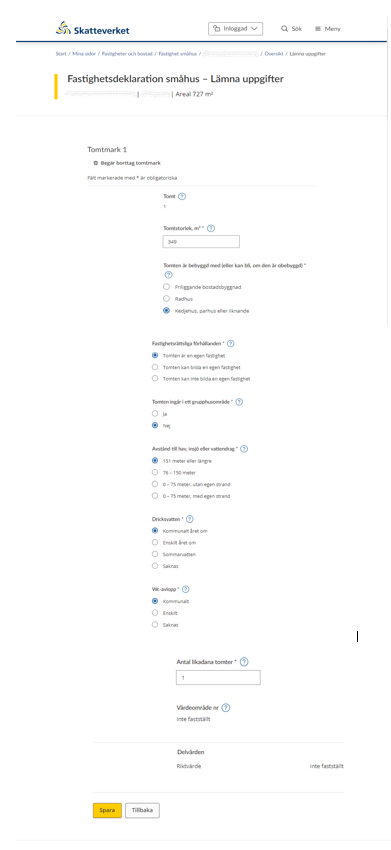
If you opt to click on a land plot belonging to the property, or if you opt to add a land plot, you will be shown a form. This form specifies all the information that the Swedish Tax Agency needs to know about your land plot.
At the top of the form is the option of removing a land plot. You do so by clicking on the wastebasket icon that says “Begär borttag tomtmark”. (See section 3.7)
The rest of the form is for required/voluntary information about the following:
Note that information marked * is required.
- Number of plots
- Size of plots in square metres*
- Buildings currently on the plot (or that could be built if no current buildings)*
- Detached residential building
- Terraced house
- Linked house, semidetached house or similar
- Property-law circumstances*
- The plot is a separate property
- The plot can form a separate property
- The plot cannot form a separate property •
- The plot is part of a property development area*
- Yes
- No
- Distance to the sea, a lake or watercourse*
- 151 metres or more
- 76 – 150 metres
- 0 – 75 metres, without private short
- 0 – 75 metres, with private shore
- Drinking water*
- Municipal all year round
- Private source all year round
- Summer water
- None
- WC sewage disposal*
- Municipal
- Private
- None
- State the number of plots of the same kind*
- The value area number will be shown if it has been determined
- Part values will be shown if they have been determined
Click the “Spara” button to save the information. You will then be taken back to the overview page where all valuation units are listed. (See section 3.1)
If you click “Spara” when an item of information is missing, you will see an error message describing what needs to be done before the information can be saved.
If you want to go back to the overview page without saving any information, click the “Tillbaka” button. (See section 3.1)
3.3 Information about residential buildings
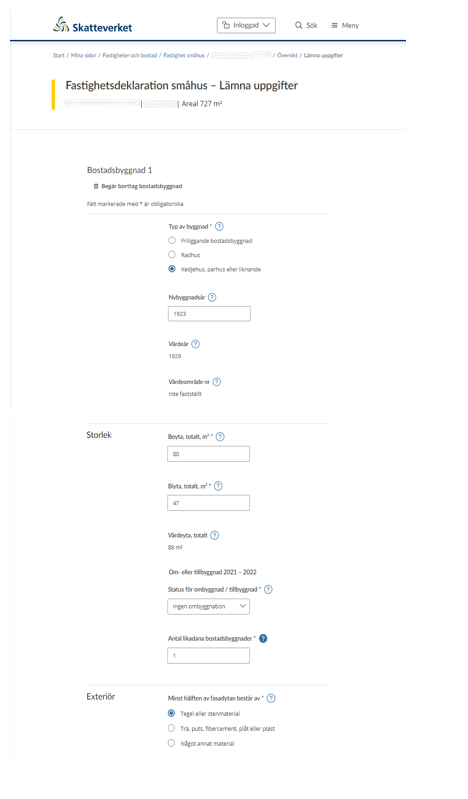
If you opt to click on a residential building belonging to the property, or if you opt to add a residential building, you will be shown a form. This form specifies all the information that the Swedish Tax Agency needs to know about your residential building.
At the top of the form is the option of removing a residential building. You do so by clicking on the wastebasket icon that says “Begär borttag bostadsbyggnad”. (See section 3.7)
The rest of the form is for required/voluntary information about the following:
Note that information marked * is required.
General information:
- Type of building*
- Detached residential building
- Terraced house
- Linked house, semidetached house or similar
- Year of original construction
- Valuation year
- Valuation area number
Size:
- Floor area, total in square metres*
- Additional area, total in square meters*
- Valuation area, total in square metres
- Conversion or extension, specify status of conversion/extension*
- Number of residential buildings of the same kind*
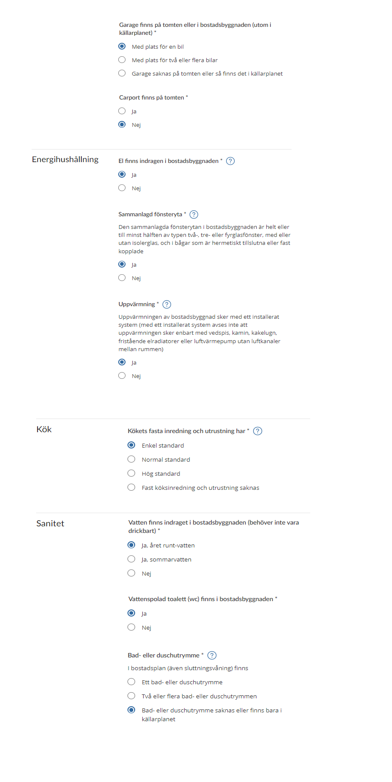
Exterior:
- At least half of the building’s frontage is*
- Brick or other masonry
- Timber, exterior plaster, fibre cement, sheet metal, or plastic
- Some other material
- There is a garage on the plot or in the residential house (except in the basement)*
- With space for one car
- With space for two or more carso There is no garage on the plot, or it is in the basement
- There is a carport on the plot*
- Yes
- No
Energy management:
- The residential building is wired for electricity*
- Yes
- No
- Total glazed area*
The total glazed area in the residential building consists wholly or to at least 50 per cent of double, triple or quadruple glazing, with or without thermopane, and in casements that are hermetically sealed or hinged- Yes
- No
- Heating*
Heating of the residential building is with an installed system (an installed system is one in which heating is not done only with wood-fired range, wood stove, tiled stove, freestanding electric radiators, or air heat pump without ducts between rooms)- Yes
- No
Kitchen:
- The equipment and fittings in the kitchen are of*
- Basic standard
- Normal standard
- High standard
- Building lacks kitchen equipment and fittings
Sanitation:
- The residential building has plumbing for water (does not need to be potable)*
- Yes, year-round water
- Yes, summer water
- No
- The residential building has flush toilets (WC)*
- Yes
- No
- Bath or shower*
The building’s residential level/levels (including split-level) has/have- One bath or shower room
- Two or more bath or shower rooms
- There are no bath or shower rooms, or only in the basement
- Laundry and clothes-care room*
The residential building has a separate space of more than 4 square metres dedicated to laundry and clothes care, e.g. a laundry room or back kitchen
- Yes
- No
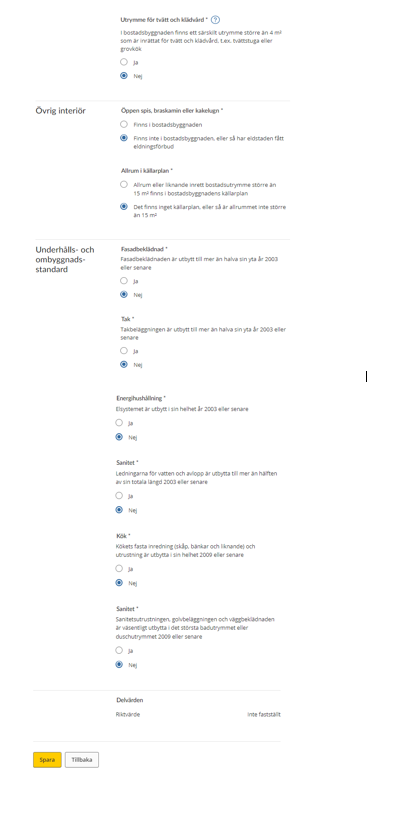
Other interior features:
- Fireplace, wood stove or tiled stove*
- Exist in the residential building
- Do not exist in the residential building, or the existing fireplace has a lighting ban
- Basement recreation room*
- The residential building’s basement has a recreation room or similar furnished living space with an area of more than 15 square metres
- There is no basement, or the recreation room has an area of less than 15 square metres
Maintenance and conversion standard:
- Cladding*
More than half of the original surface area the cladding was replaced in 2003 or later- Yes
- No
- Roof*
More than half the original surface area of roofing was replaced in 2003 or later- Yes
- No
- Energy management*
The electrical system was replaced in its entirety in 2003 or later- Yes
- No
- Sanitation*
More than half of the total original length of plumbing for water and wastewater was replaced in 2003 or later- Yes
- No
- Kitchen*
The kitchen fittings (cabinets, countertops and similar) were replaced in their entirety in 2009 or later- Yes
- No
- Sanitation*
The sanitation equipment and floor and wall coverings in the biggest bath or shower room were replaced to a significant extent in 2009 or later- Yes
- No
- Part values will be shown if they have been determined.
Click the “Spara” button to save the information. You will then be taken back to the overview page where all valuation units are listed. (See section 3.1)
If you click “Spara” when an item of information is missing, you will see an error message describing what needs to be done before the information can be saved.
If you want to go back to the overview page without saving any information, click the “Tillbaka” button. (See section 3.1)
3.4 Add a land plot or residential building
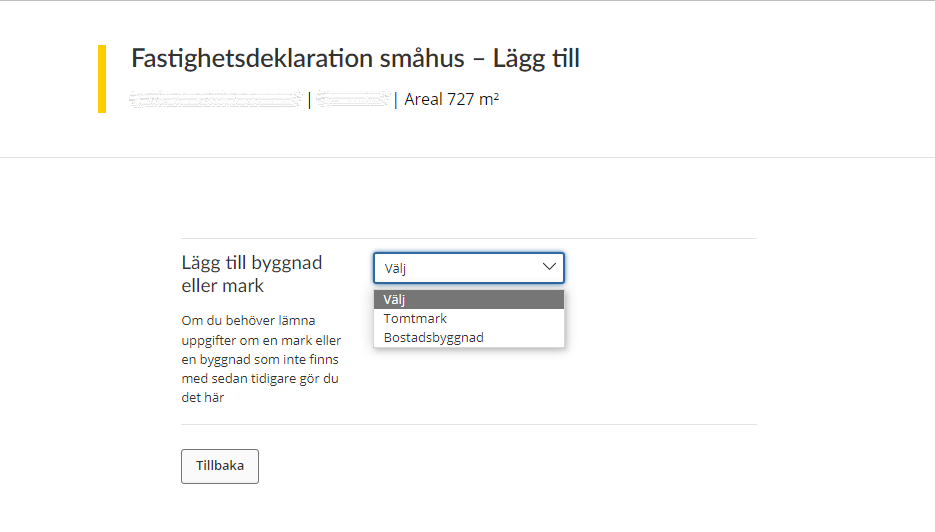
If the list does not include all valuation units you can add a valuation unit yourself by clicking the button “Lägg till Byggnad eller mark”.
You will then be shown a drop-down menu where you select either a land plot or a residential building.
If you opt to add a land plot, the form with information about the land plot will be shown (see section 3.2). If you instead opt to add a residential building, the form with information about residential buildings will be shown (see section 2.3).
If you change your mind and decide not to add another valuation unit, click the “Tillbaka” button to go back to the overview page where all valuation units are listed. (See section 3.1)
3.5 Complete information provided for added valuation unit
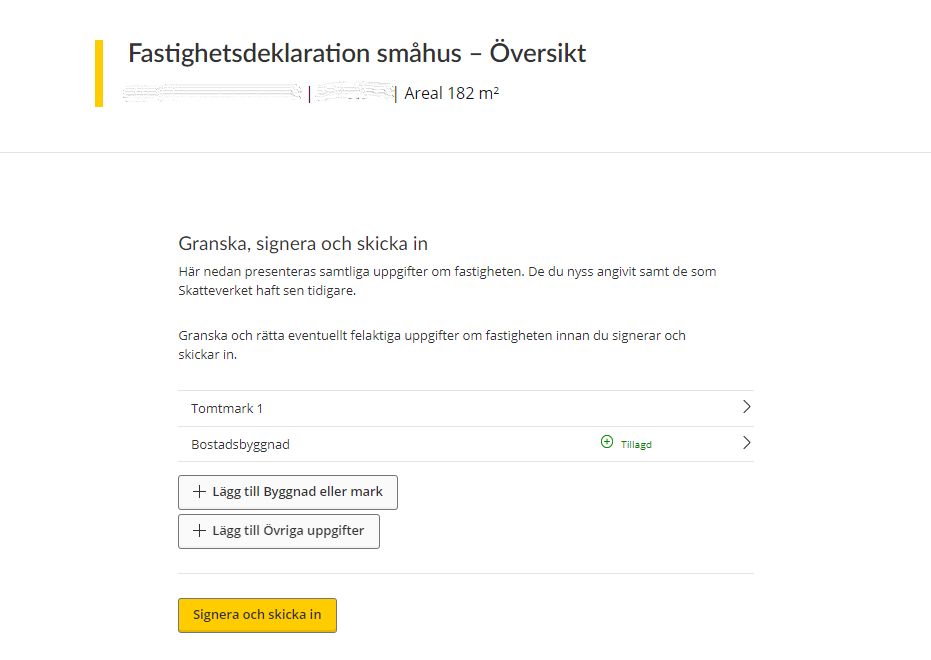
If you added a land plot or a residential building and have filled in all the necessary information, you will see a confirmation of this in the overview. The word “Tillagd” in green will appear next to the plot or building you have added. You can now opt to sign and submit the information. (See section 5).
3.6 Information missing for an added valuation unit
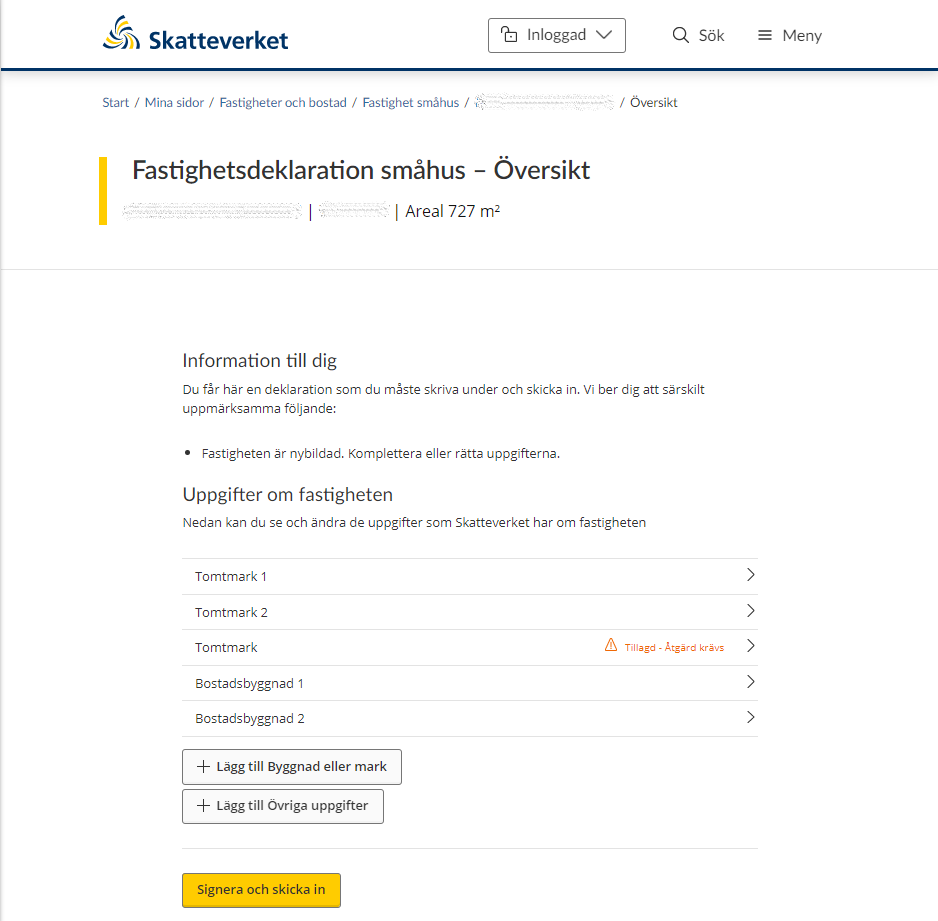
If you added a land plot or a residential building and you have not filled in all the required fields, you will be notified of this in the overview.
You will see an “action required” message in red saying “Tillagd – Åtgärd krävs” next to the plot or building in question. You then have to click on that valuation unit and add the missing details before you can sign and submit the information.
3.7 Remove a land plot or residential building
When you have the form for either a land plot or a residential building open, you can opt to remove the valuation unit by clicking on the wastebasket icon saying either “Begär borttag av bostadsbyggnad” (“Request removal of land plot”) or “Begär borttag av bostadsbyggnad” (“Request removal of residential building”). (See sections 3.2 and 3.3)
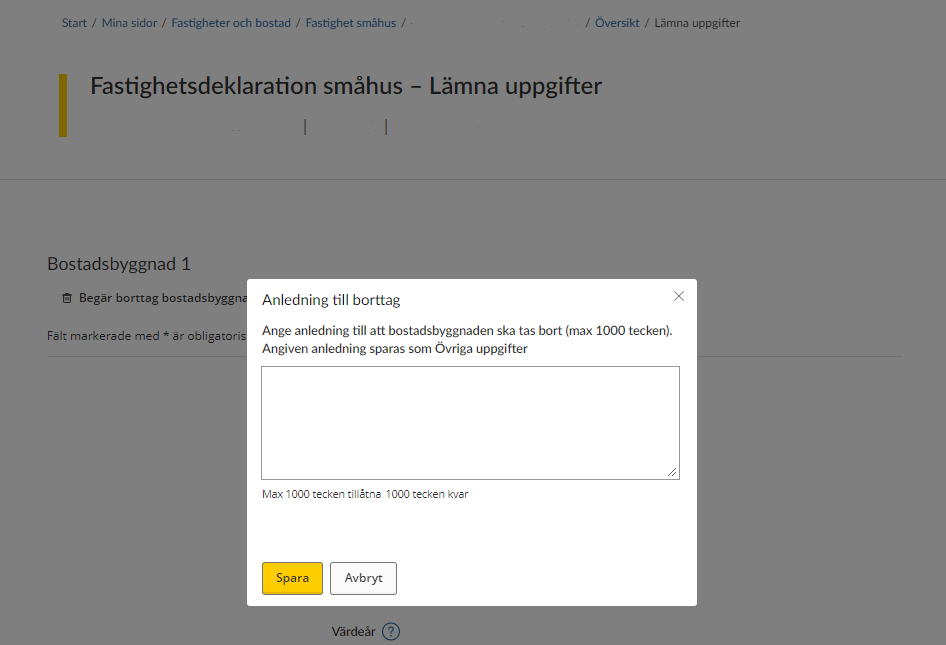
If you opt to remove a valuation unit, you will be asked to provide a reason for this. Your explanation can be a maximum of 1,000 characters in length.
3.8 Other information
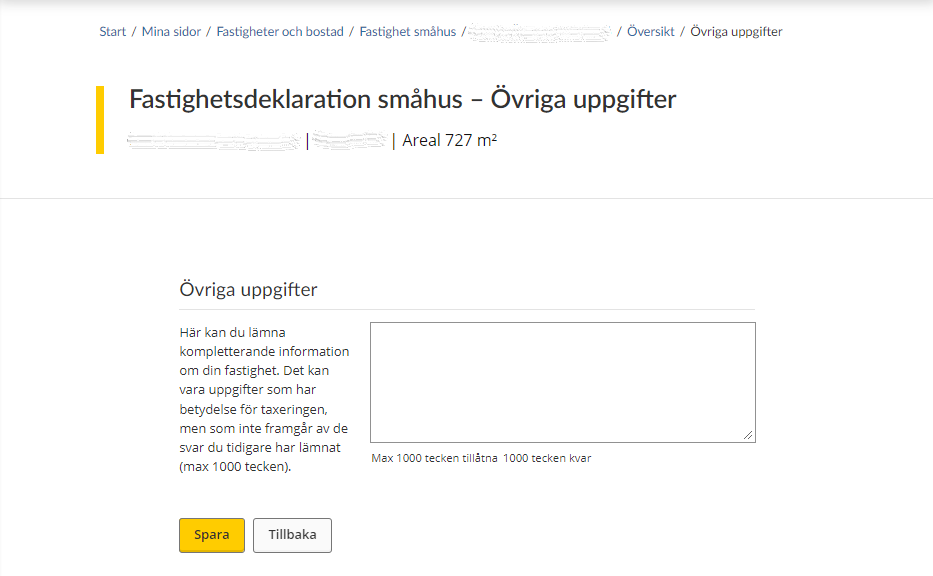
If you have opted to provide other information, you will be taken to a text box where you can provide additional information about your property. The information you provide can be a maximum of 1,000 characters in length.
Click “Spara” to save the text you typed, and then you will be taken back to the overview page where all valuation units are listed. (See section 3.1)
If you change your mind about providing other information, click the “Tillbaka” button and you will be taken back to the overview page where all valuation units are listed. (See section 3.1)
3.9 Notification of ownership change
If the property was sold before 1 January the year of assesment, you do not have to provide any information about it.
Instead, you have to inform the Swedish Tax Agency that a change of ownership has occurred. You do this by clicking on the button “Meddela ägarbyte”.
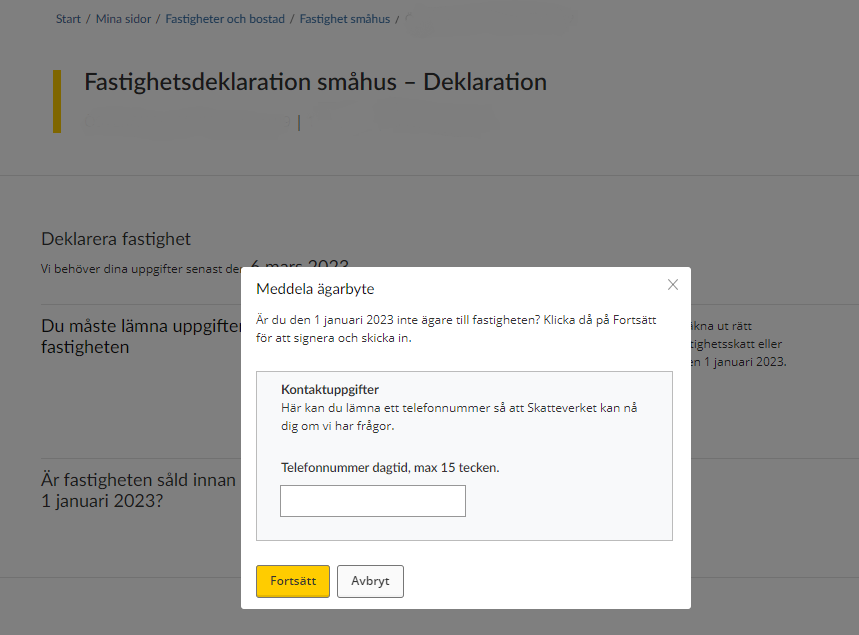
When you have opted to click “Meddela ägarbyte”, you will be asked to provide your phone number so that the Swedish Tax Agency can contact you if needed. The phone number you provide can have a maximum of 15 characters.
Once you have provided your phone number and want to proceed, click the “Spara” button to save. You will then be taken to a signing procedure in which you have to approve the information provided with your eID.
If you change your mind about making an ownership change notification, click the “Avbryt” button to cancel.
4. A simplified process for filing tax returns
In some cases, the Swedish Tax Agency will already have received information that affects the assessed value of your property. This means that you don’t have to fill in all the information on a property tax return, and you will therefore be offered a simplified process for filing your tax return, in which you are only referred to certain sections of the e-service.
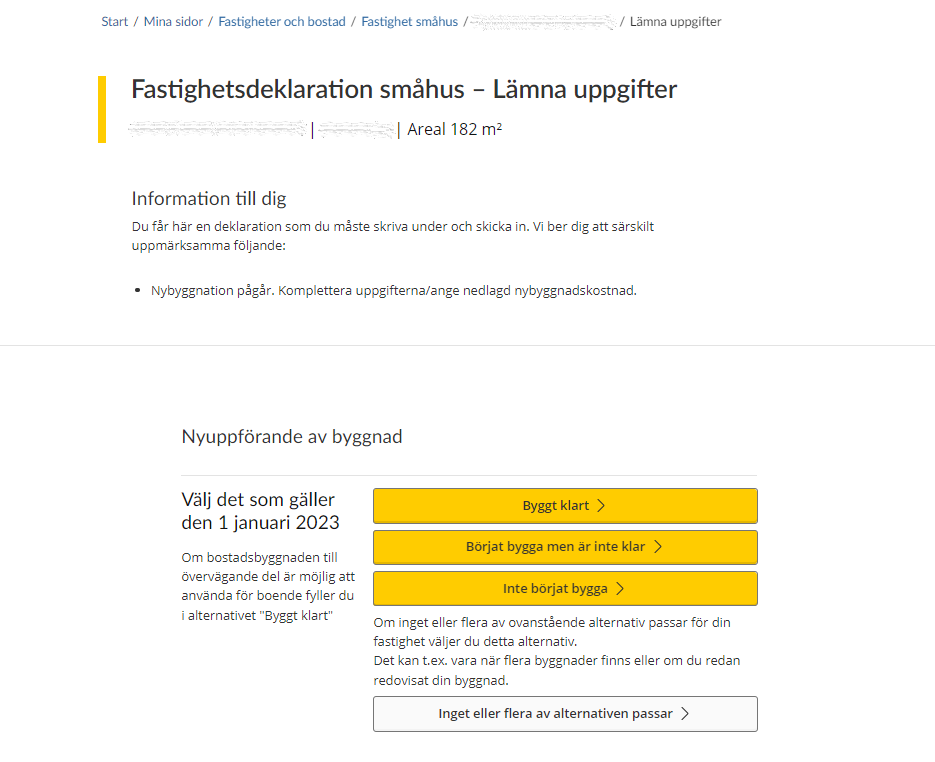
If so, you will be informed of this when you log in to the e-service. In those cases where the Swedish Tax Agency has received information that new construction is ongoing on your property, you will be asked to state what costs you have had for new construction.
Since the Swedish Tax Agency has only received information that new construction is ongoing, you need to specify the construction status as at 1 January the year of assesment.
If construction is complete, click the button “Byggt klart”. (See section 4.1)
If construction has begun, but is not complete, click the button Börjat bygga men är inte klar”. (See section 4.2)
If construction has not begun, click the button “Inte börjat bygga”. (See section 4.3)
If none, or several, of the options above apply, click the button “Inget eller flera av alternativen passar”.
4.1 Construction completed
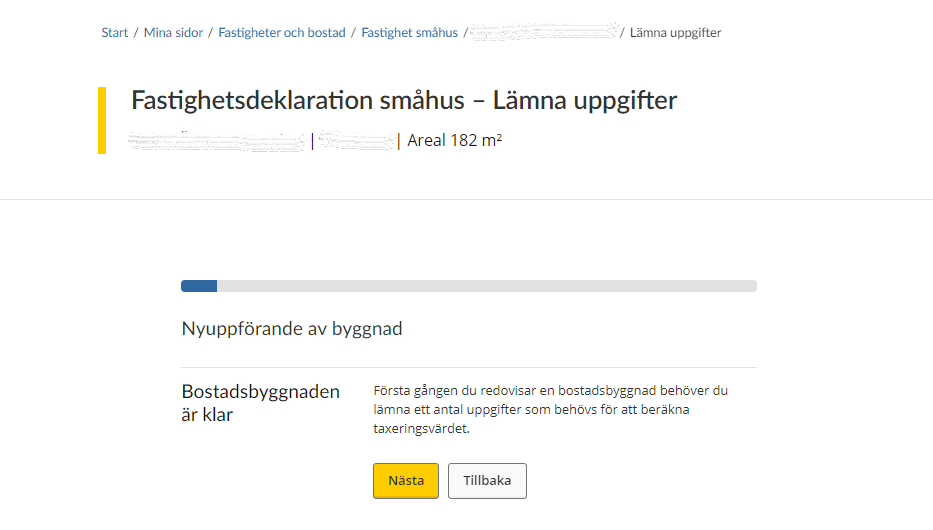
The first time you report the new residential building, you need to provide several items of information which are needed to calculate the assessed value.
Note that all the information requested is marked * and is thus required.
If you want to proceed to the next item of information you have to provide, click “Nästa”. If instead you want to go back to the previous item of information you provided, click “Tillbaka”.
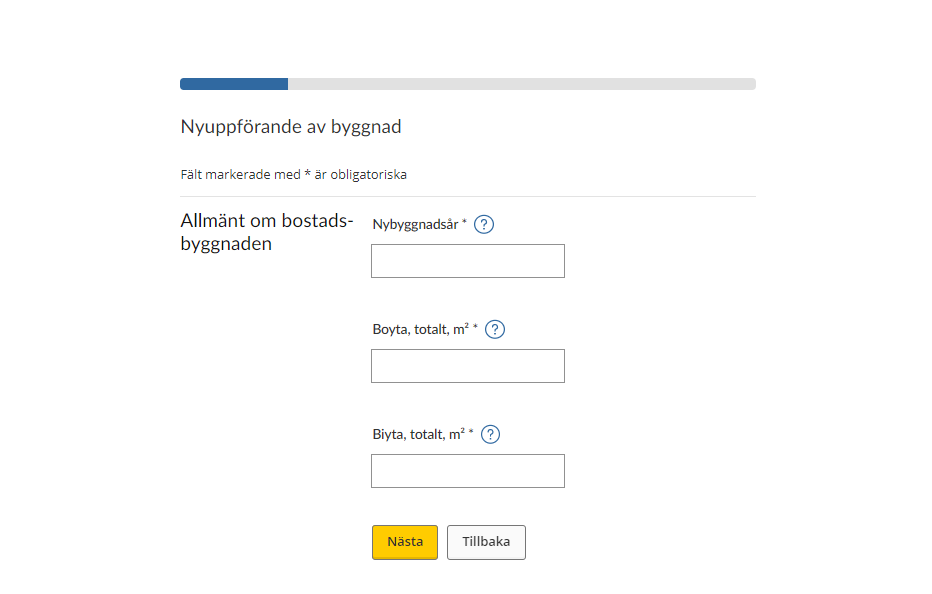
The form shows all the information that the Swedish Tax Agency needs when you have completed construction of your residential building.
Note that all the information requested is marked * and is thus required.
General information about the building:
- Year of original construction*
- Floor area, total in square metres*
- Additional area, total in square metres*
If you want to proceed to the next item of information you have to provide, click “Nästa”. If instead you want to go back to the previous item of information you provided, click “Tillbaka”.
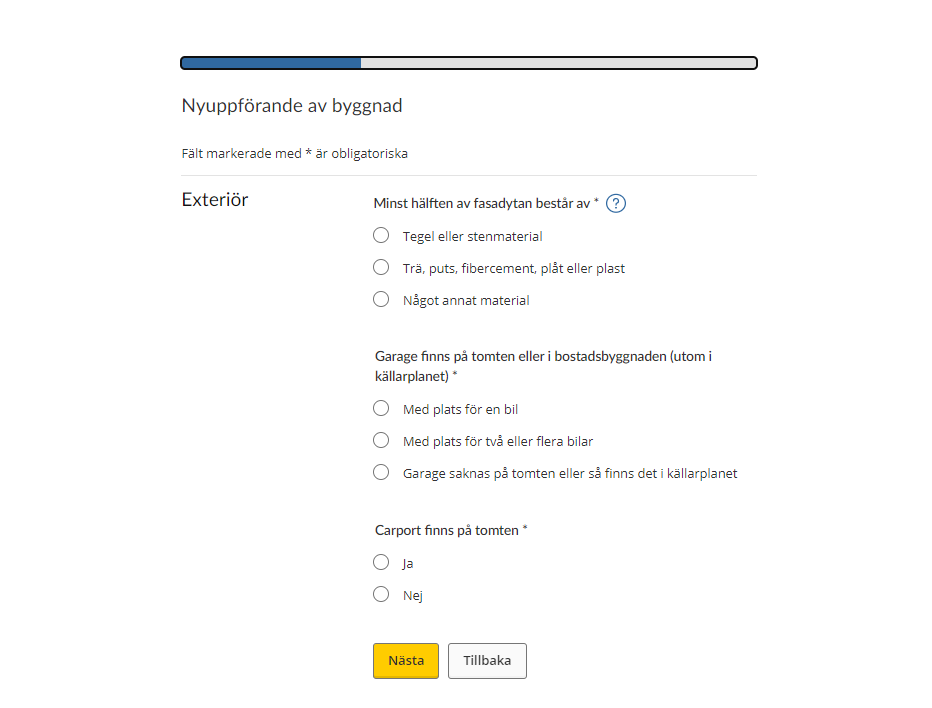
Note that all the information requested is marked * and is thus required.
Exterior
- At least half of the building’s façade area is*
- Brick or other masonry
- Timber, exterior plaster, fibre cement, sheet metal, or plastic
- Other material
- There is a garage on the plot or in the residential house (except in the basement)*
- With space for one car
- With space for two or more cars
- There is no garage on the plot, or it is in the basement
- There is a carport on the plot*
- Yes
- No
If you want to proceed to the next item of information you have to provide, click “Nästa”. If instead you want to go back to the previous item of information you provided, click “Tillbaka”.
Water
- The residential building has plumbing for water (does not need to be potable)*
- Yes, year-round water
- Yes, summer water
- No
- Drinking water*
- Municipal all year round
- Private source all year round
- Summer water
- None
If you want to proceed to the next item of information you have to provide, click “Nästa”. If instead you want to go back to the previous item of information you provided, click “Tillbaka”.
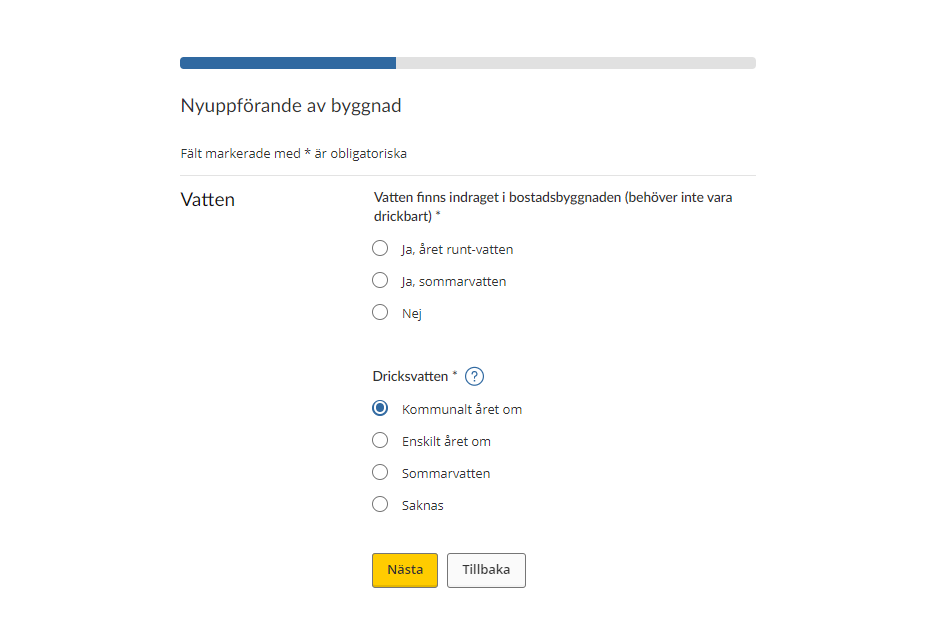
Note that all the information requested is marked * and is thus required.
Sanitation
- Bath or shower*
The building’s residential level/levels (including split-level) include- One bath or shower room
- Two or more bath or shower rooms
- There are no bath or shower rooms, or only in the basement
- Laundry and clothes-care room*
The residential building has a separate space of more than 4 square metres dedicated to laundry and clothes care, e.g. a laundry room or back kitchen- Yes
- No
If you want to proceed to the next item of information you have to provide, click “Nästa”. If instead you want to go back to the previous item of information you provided, click “Tillbaka”.
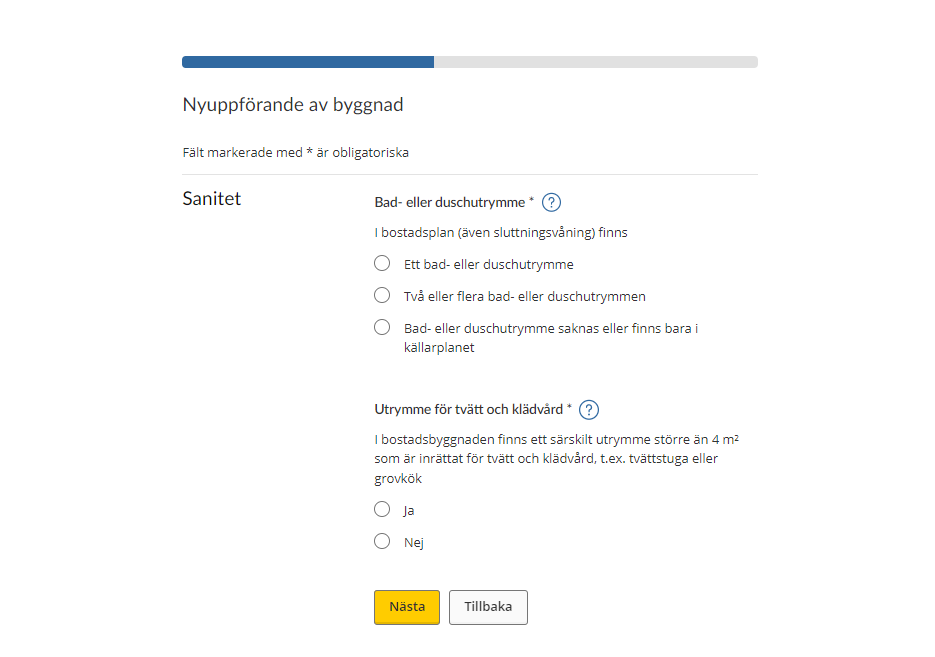
Note that all the information requested is marked * and is thus required.
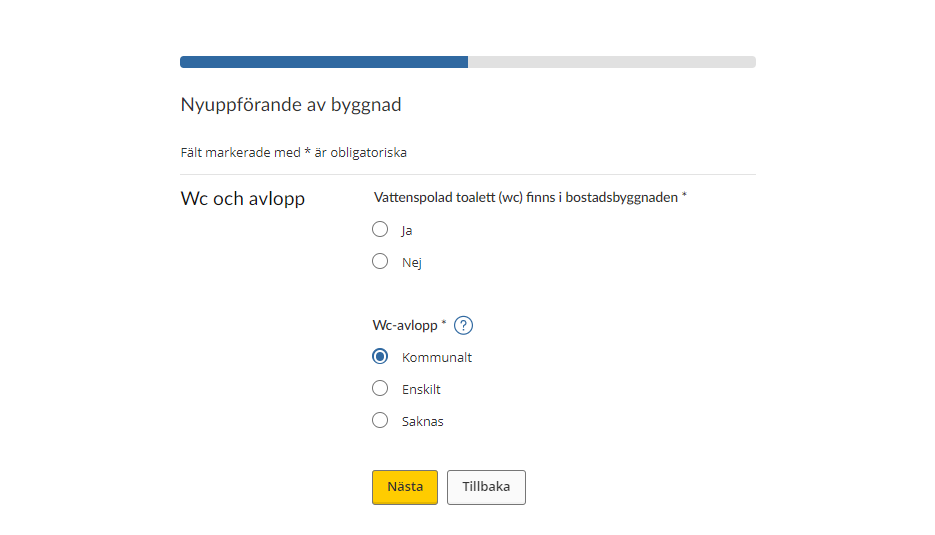
WC and sewage disposal
- The residential building has flush toilets (WC)*
- Yes
- No
- WC sewage disposal
- Municipal
- Private
- None
If you want to proceed to the next item of information you have to provide, click “Nästa”. If instead you want to go back to the previous item of information you provided, click “Tillbaka”.
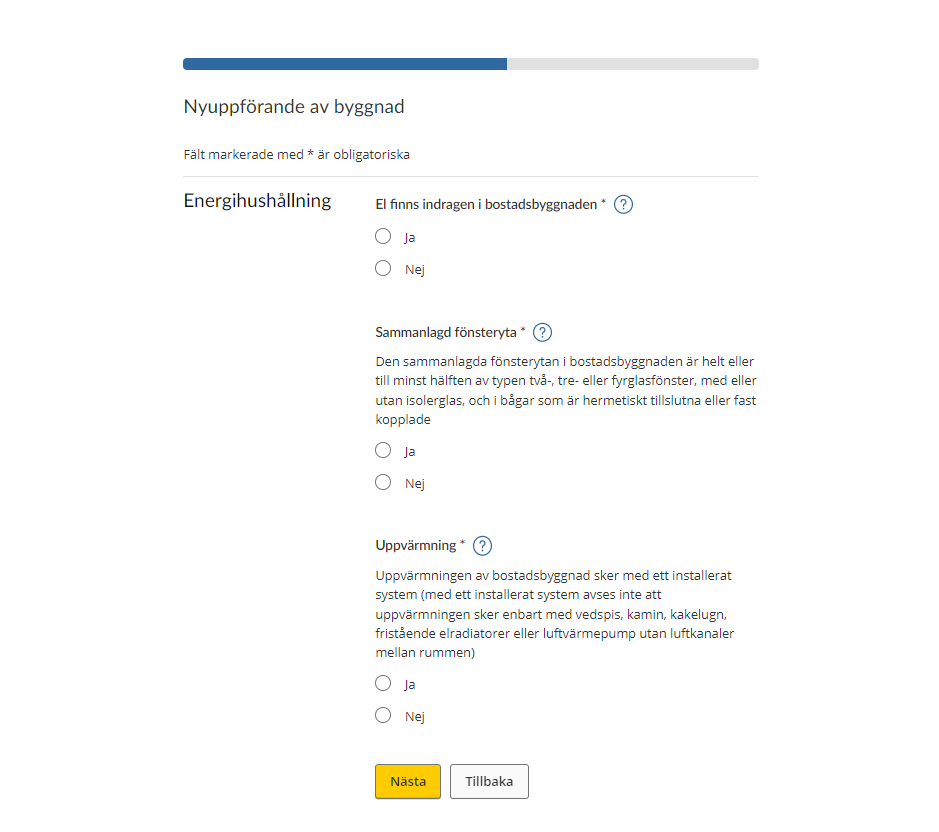
Energy management
- The residential building is wired for electricity*
- Yes
- No
- Total glazed area*
The total glazed area in the residential building consists wholly or to at least 50 per cent of double, triple or quadruple glazing, with or without thermopane, and in casements that are hermetically sealed or hinged.- Yes
- No
If you want to proceed to the next item of information you have to provide, click “Nästa”. If instead you want to go back to the previous item of information you provided, click “Tillbaka”.
Note that all the information requested is marked * and is thus required.
Kitchen
- The equipment and fittings in the kitchen are of*
- Basic standard
- Normal standard
- High standard
- Building lacks kitchen equipment and fittings
If you want to proceed to the next item of information you have to provide, click “Nästa”. If instead you want to go back to the previous item of information you provided, click “Tillbaka”.
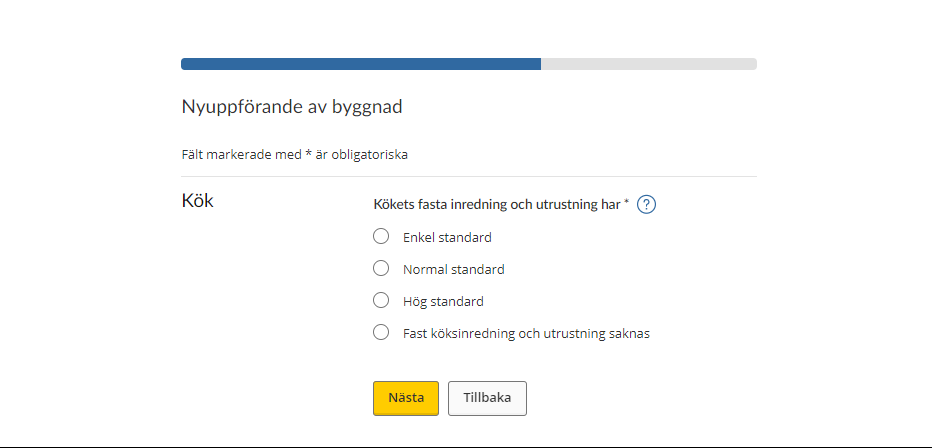
Other interior features
- Fireplace, wood stove or tiled stove*
- Exist in the residential building
- Do not exist in the residential building, or the existing fireplace is subject to a fire ban
- Basement recreation room*
- The residential building’s basement has a recreation room or similar furnished living space with an area of more than 15 square metres
- There is no basement, or the recreation room has an area of less than 15 square metres
If you want to proceed to the next item of information you have to provide, click “Nästa”. If instead you want to go back to the previous item of information you provided, click “Tillbaka”.
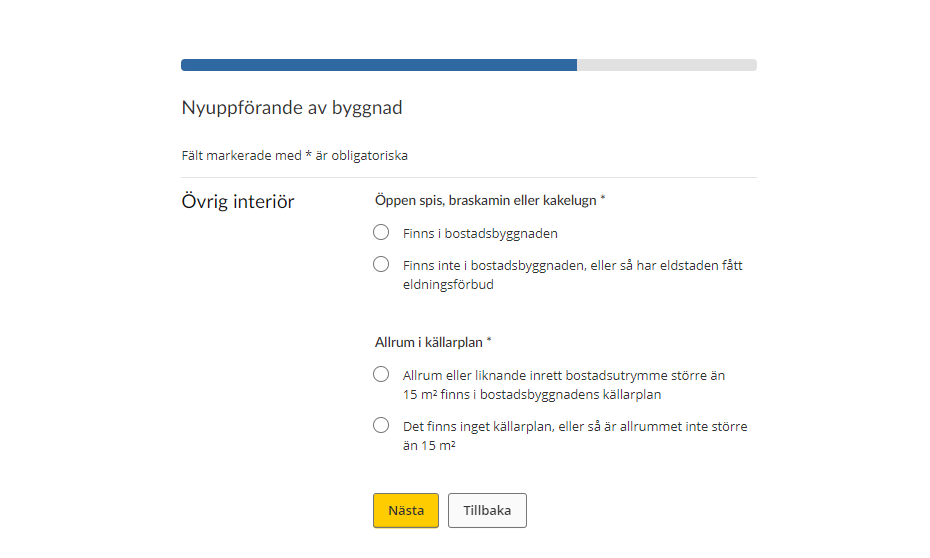
Number of buildings of the same kind
- State the number of residential buildings of the same kind
If you want to proceed to the next item of information you have to provide, click “Nästa”. If instead you want to go back to the previous item of information you provided, click “Tillbaka”.
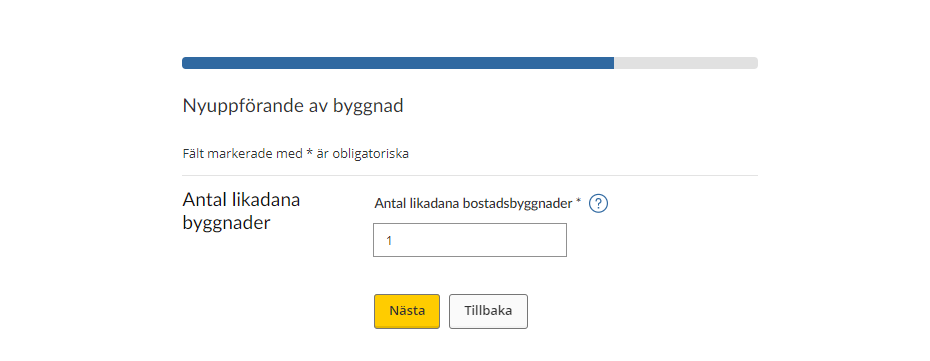
Once you have stated the number of buildings of the same kind, you will be taken to an information page telling you that the next step will give you the opportunity to review and, if necessary, change the information you have provided.
Once you have reviewed the information you have to sign and submit it to the Swedish Tax Agency. A decision on the assessment value will be sent to you during the month of June.
If you want to proceed to the overview page, click “Nästa”. If instead you want to go back to the previous item of information you provided, click “Tillbaka”.
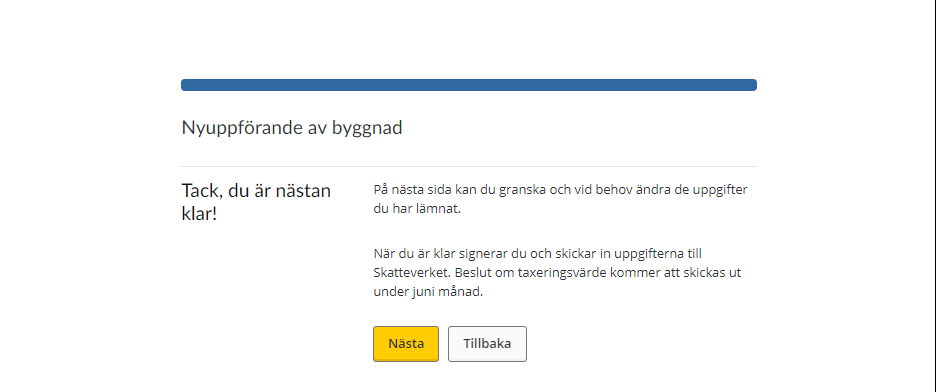
When you have provided information about the property you have to approve the information and submit your tax return to the Swedish Tax Agency. To do so, click the button “Signera och skicka in”. (See section 5)
4.2 Construction begun but not completed
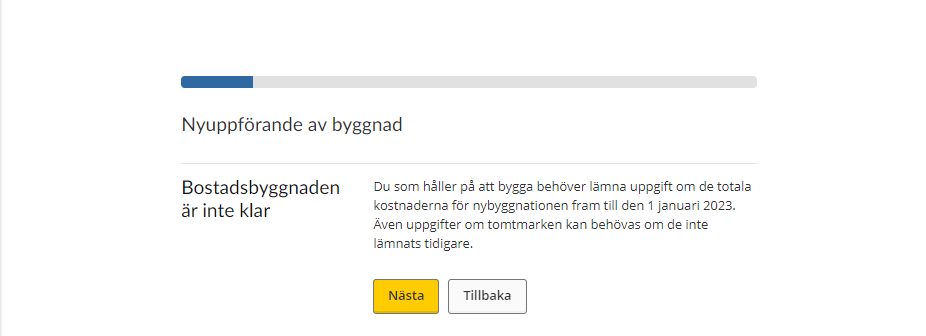
If you stated that you have begun construction but that it is not completed, you need to provide information about costs you have had for the new construction until 1 January the year of assesment. You may also need to provide information about the land plot if that information has not been provided earlier.
Note that all the items of information requested are marked * and are thus required.
If you want to proceed to the next item of information you have to provide, click “Nästa”. If instead you want to go back to the previous item of information you provided, click “Tillbaka”.
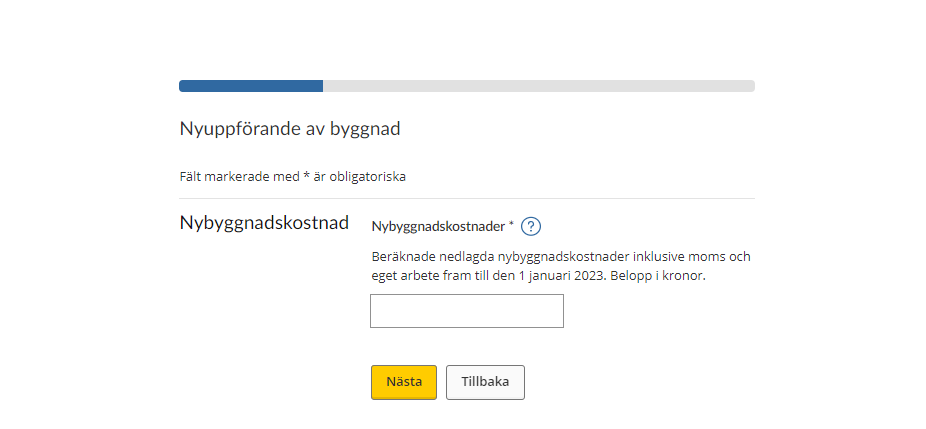
Cost of new construction
- State costs of new construction* Estimated expenditure on new construction, inclusive of VAT and own work, until 1 January the year of assesment. Amount in SEK.
If you want to proceed to the next item of information you have to provide, click “Nästa”. If instead you want to go back to the previous item of information you provided, click “Tillbaka”.
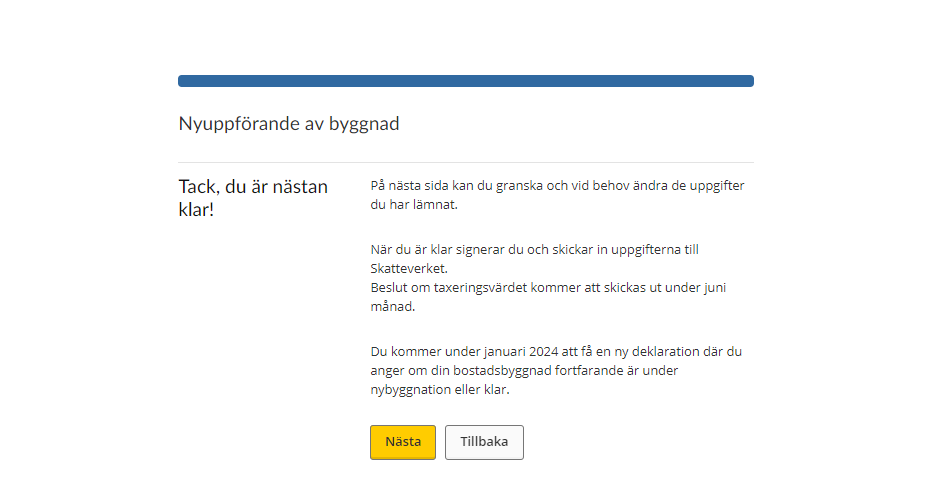
Once you have stated your construction costs you will be taken to an information page telling you that the next step will give you the opportunity to review and, if necessary, change the information you have provided.
Once you have reviewed the information you have to sign and submit it to the Swedish Tax Agency. A decision on the assessment value will be sent to you during the month of June.
You will receive a new tax return in February following year, on which you have to state whether your residential building is still under construction, or if it is completed.
Click “Nästa” to proceed to the next page, where you review and submit your information.
Click “Tillbaka” if you instead want to go back to the previous item of information you provided.
When you have provided information about the property you will be taken to the page above, where you can approve the information and submit your tax return to the Swedish Tax Agency.
“Sign and submit” button – use this button to sign and submit the information you have provided about your property. (See section 5)
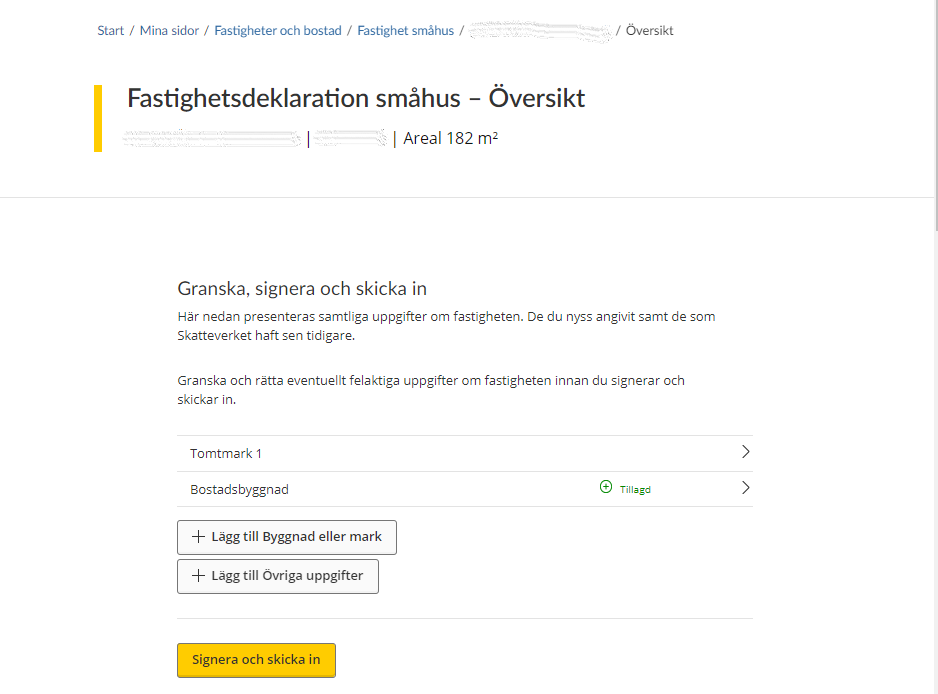
4.3 Construction not begun
If you stated that you have not begun construction you don’t need to provide any further information about your property to the Swedish Tax Agency.
Click “Nästa” to proceed to the next page, where you review and submit your information.
Click “Tillbaka” to go back to the previous item of information you provided.
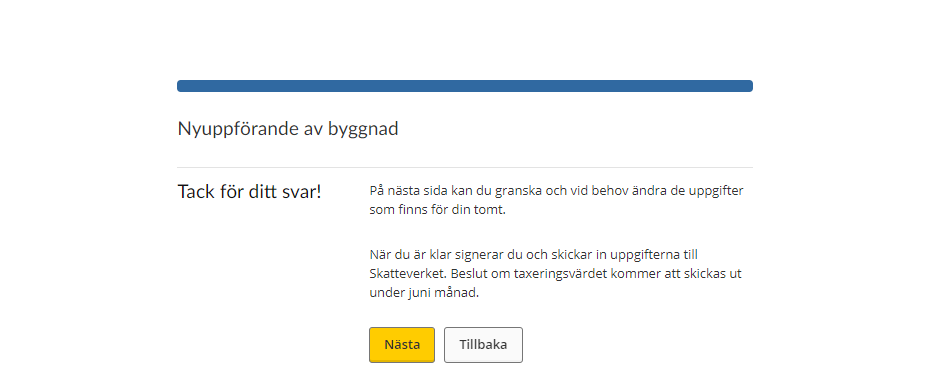
When you have provided information about the property, you will be taken to the page above, where you can approve the information and submit your tax return to the Swedish Tax Agency.
“Signera och skicka in” button – use this button to sign and submit the information you have provided about your property. (See section 5)
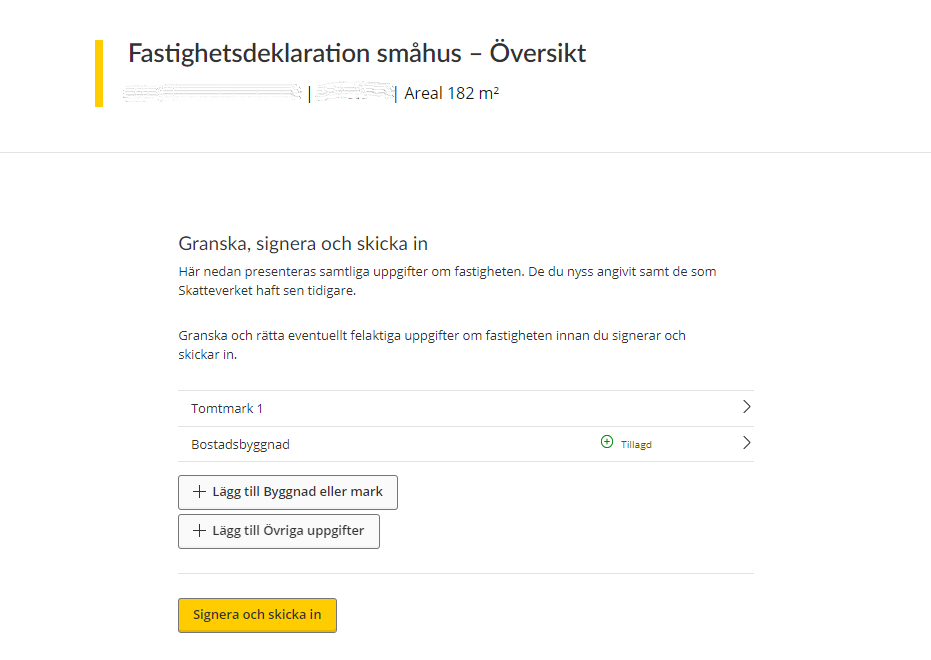
5 Sign and submit the tax return
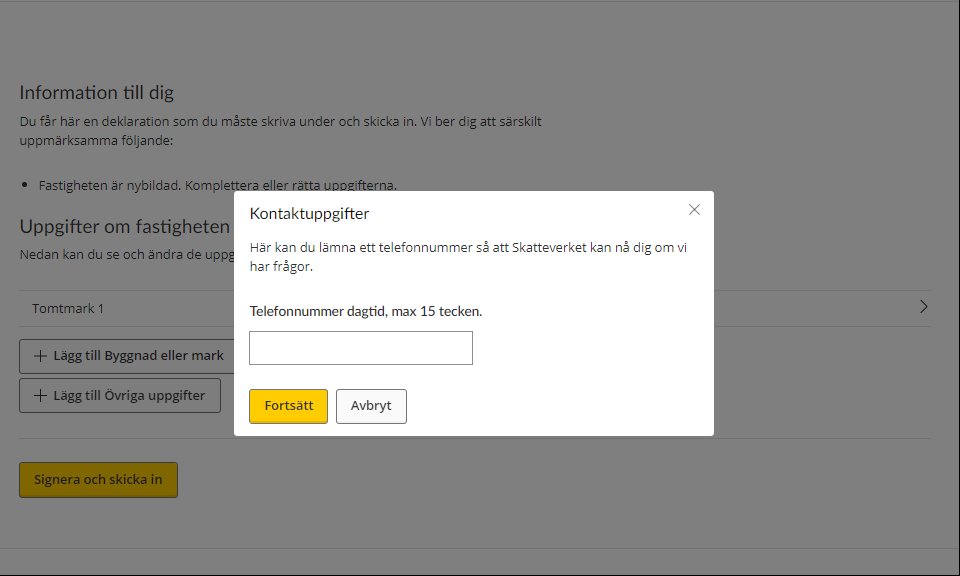
Once you have clicked “Signera och skicka in” you will asked to provide your phone number so that the Swedish Tax Agency can contact you if needed. The phone number you provide can have a maximum of 15 characters
Click “Fortsätt” to proceed with the signing procedure, in which you have to approve the information you provided using your electronic ID.
Click “Avbryt” to return to the overview page where you can review the information you have provided.
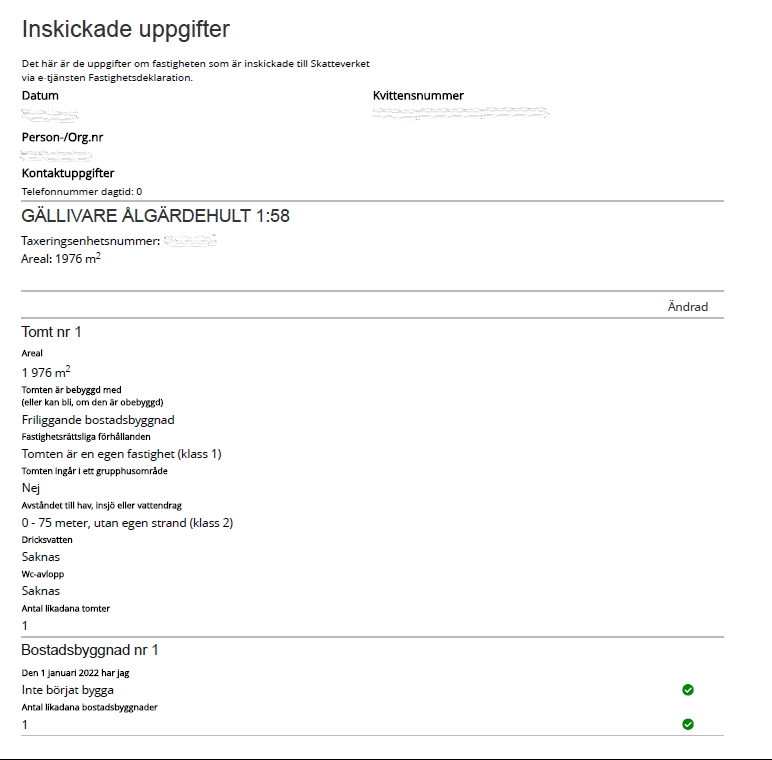
Once you have approved the information and submitted your tax return, you will be sent a receipt that includes the information you submitted via the e-service.
The receipt will include the following information:
General information
- Date – when the information was submitted
- Receipt number – a unique number ensuring that your information can be traced at the Swedish Tax Agency
- Personal/corporate identity number – the personal or corporate identity number of the information provider
- Contact details – the phone number you have stated that the Swedish Tax Agency can use to reach you if needed
- GÄLLIVARE ÅLGÄRDEHULT 1:58 – the property designation of the property that the tax return concerns
- Assessment unit number – of the property that the tax return concerns
Land plot:
- Plot no 1 – which land plot the information concerns (a property can include several plots of land).
- Area – the area of the property.
- The plot has the following buildings on it (or could have, if it lacks buildings) – whether the building(s) on the plot is/are detached houses, terraced houses, linked houses, semidetached houses or similar.
- Property-law circumstances – whether the plot is a separate property or if it can or cannot form a separate property.
- The plot is part of a property development area – whether or not he plot is part of such an area (yes or no).
- Distance to the sea, a lake or watercourse – whether the distance is 151 metres or more, 76–150 metres, 0–75 metres without a private shore or 0–75 metres with a private shore.
- Drinking water – whether the drinking water is municipal all year round, from a private source all year round, summer water, or if there is no drinking water.
- WC sewage disposal – whether the WC sewage disposal is municipal, private, or if there is none.
- Number of plots of the same kind – to clarify whether the property includes several plots of the same kind and if so, how many.
Residential building
- Residential building 1 – which residential building the information concerns (a property can include several residential buildings).
- As of 1 January 2022 (the year is just for example, each Property tax return states your correct year) I have – whether the construction status of the residential building, on 1 January 2022 (the year is just for example, each Property tax return states your correct year), was construction completed, construction begun but not completed, or construction not begun. (Note that the date can change depending on which assessment it concerns).
- Number of residential buildings of the same kind – to clarify whether the property includes several residential buildings of the same kind and if so, how many.
 Leave a review (Your Europe)